
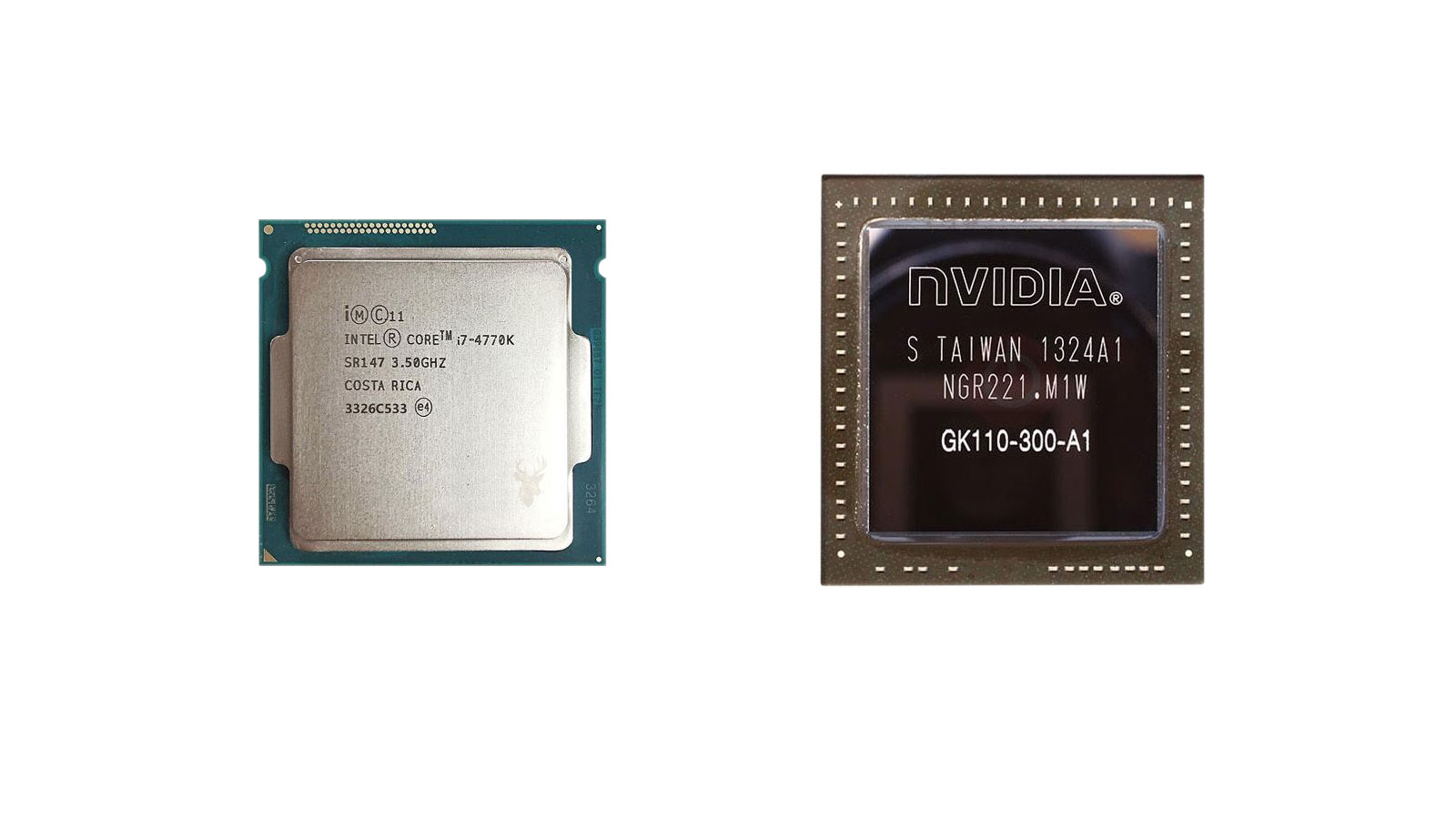
How Two Different Processors Share the Work Inside a Computer
Modern computers often contain more than one processor, even though many users think of the CPU as the only component responsible for performing calculations. In reality, many systems also include a Graphics Processing Unit (GPU), a specialized processor designed to handle large numbers of visual calculations efficiently.
Although both processors perform mathematical operations, they were designed with different objectives. The CPU focuses on flexibility, decision-making, and coordinating the operating system, while the GPU specializes in processing many similar calculations simultaneously. Working together allows each processor to concentrate on the tasks it performs most efficiently.
Understanding the difference between these two components helps explain why certain computers perform better for gaming, engineering, video production, artificial intelligence, scientific computing, and many other workloads.
What the CPU Does
The Central Processing Unit serves as the primary decision-making component of the computer. It executes operating system instructions, manages applications, coordinates hardware, and performs the countless calculations required for everyday computing.
Every time a document is opened, a web browser loads a page, or software responds to keyboard input, the CPU continuously directs these operations. While it is capable of performing many different types of work, it is optimized for handling complicated instructions quickly rather than performing thousands of identical calculations at the same time.
- Runs the operating system.
- Executes software instructions.
- Coordinates hardware communication.
- Performs general-purpose calculations.
- Manages multitasking between applications.
Because nearly every task inside the computer depends on the CPU in some way, it remains one of the most important components regardless of how the computer is used.
What the GPU Does
The Graphics Processing Unit was originally developed to accelerate the enormous number of calculations required to display images on a monitor. Modern GPUs continue performing those graphical tasks while also assisting with many other highly parallel workloads.
Instead of focusing on one complex instruction at a time, the GPU performs large numbers of similar calculations simultaneously. This design makes it particularly effective for rendering graphics, processing video, performing scientific simulations, and accelerating artificial intelligence workloads.
- Renders three-dimensional graphics.
- Processes textures, lighting, and visual effects.
- Accelerates video rendering.
- Supports scientific and engineering calculations.
- Assists machine learning and artificial intelligence applications.
Although graphics remain its best-known responsibility, today’s GPU performs far more than simply drawing images on the screen.
Different Designs for Different Workloads
The CPU and GPU differ because they solve different computational problems. A CPU contains relatively few highly sophisticated processing cores capable of making complex decisions quickly. A GPU contains many more simpler processing cores designed to perform similar calculations simultaneously across large amounts of data.
| CPU | GPU |
|---|---|
| General-purpose processing | Highly parallel processing |
| Complex instruction handling | Massive repeated calculations |
| Operating system management | Graphics and computational acceleration |
| Lower number of advanced cores | Large number of specialized cores |
| Coordinates overall system activity | Accelerates specific workloads |
Neither design is universally better. Each processor excels within the type of work it was created to perform.
Integrated and Dedicated Graphics
Many computers include graphics processing directly within the main processor, while others use a separate graphics card containing its own GPU and dedicated memory. Integrated graphics typically provide sufficient performance for everyday office work, web browsing, media playback, and light creative tasks.
Dedicated graphics processors are generally designed for workloads requiring substantially greater graphical or computational performance, including modern gaming, three-dimensional modeling, professional content creation, engineering applications, and advanced scientific computing.
Choosing between integrated and dedicated graphics depends far more on the intended workload than on the computer’s overall price or appearance.
The CPU and GPU Work Together
Rather than competing with one another, the CPU and GPU continuously cooperate. The CPU prepares instructions, coordinates software, manages system resources, and sends graphical work to the GPU when appropriate. The GPU performs its specialized calculations and returns the completed results for display or further processing.
This division of responsibilities allows modern computers to handle demanding workloads much more efficiently than relying on a single processor for every task.
Modern Software Often Uses Both Processors
Many applications no longer rely exclusively on either the CPU or the GPU. Modern software distributes work between both processors according to the type of calculations being performed. The operating system, video editing software, engineering applications, games, and scientific programs frequently divide their workload so each processor handles the tasks it performs most efficiently.
For example, a video editing application may use the CPU to organize project files, process audio, and manage the editing timeline while the GPU accelerates visual effects, rendering, and playback. This cooperation allows large projects to be completed more efficiently than if one processor attempted to perform every calculation alone.
As software continues evolving, cooperation between the CPU and GPU has become increasingly important across many different types of computing.
Gaming Places Different Demands on Each Processor
Video games provide one of the clearest examples of how these processors work together. The CPU manages artificial intelligence, player input, game logic, object interactions, and communication between many software systems. Meanwhile, the GPU renders the visual world by calculating lighting, textures, shadows, reflections, and the images displayed on the monitor.
If either processor cannot keep pace with the workload, overall game performance may decline even if the other processor still has unused capacity. This balance explains why upgrading only one component does not always produce the expected improvement.
| Gaming Task | Primary Processor |
|---|---|
| Game logic and physics | CPU |
| Artificial intelligence | CPU |
| Rendering graphics | GPU |
| Lighting and visual effects | GPU |
| Communication between game systems | CPU |
Professional Applications Benefit From GPU Acceleration
Graphics processors are no longer limited to gaming. Many professional applications now use GPU acceleration to process enormous amounts of information simultaneously. Video production, architectural design, engineering simulation, medical imaging, animation, photography, and artificial intelligence all benefit from this parallel processing capability.
The CPU continues coordinating the overall application while the GPU performs computational tasks that involve processing many similar calculations across large data sets. This division often reduces waiting time for rendering, simulation, and image processing operations.
- Video editing and rendering.
- Three-dimensional modeling.
- Computer-aided engineering.
- Scientific simulations.
- Artificial intelligence workloads.
- Medical image processing.
The Importance of System Balance
Computer performance depends on the entire system rather than on one processor alone. A powerful graphics card cannot completely compensate for insufficient memory, slow storage, overheating, or a processor that cannot supply work quickly enough. Likewise, an extremely capable CPU cannot fully overcome the limitations of an entry-level graphics processor during visually demanding workloads.
Because modern computers rely on several major components working together, upgrades should be considered as part of the complete system rather than focusing on only one specification.
| Component | Primary Responsibility |
|---|---|
| CPU | General computing and system coordination. |
| GPU | Graphics rendering and parallel processing. |
| RAM | Temporary working memory. |
| Storage | Permanent file storage and application loading. |
| Cooling System | Maintains safe operating temperatures. |
More Graphics Memory Does Not Replace System Memory
Graphics processors often include dedicated video memory that stores textures, frame buffers, and graphical information while images are being rendered. This memory serves a different purpose from the system RAM used by the CPU.
Although both types of memory temporarily hold information, they support different processors and different workloads. Increasing graphics memory does not increase the amount of system RAM available to Windows, and adding system RAM does not automatically improve graphics performance.
Understanding this distinction helps explain why computers contain multiple memory systems that work together while serving separate purposes.
Performance Depends on the Type of Work
A faster processor does not automatically produce a faster computer in every situation. Everyday office work, internet browsing, software development, engineering, gaming, photography, and video production all place different demands on the hardware.
Selecting components that match the intended workload generally produces better results than choosing hardware based solely on specifications or benchmark numbers. Understanding how each processor contributes to the overall workload helps set realistic expectations before upgrading or purchasing a computer.
Power Consumption Differs Between CPUs and GPUs
Processing performance is closely related to power consumption. As processors perform increasingly complex calculations, they require additional electrical power and generate more heat. For this reason, high-performance CPUs and dedicated graphics processors often require significantly more cooling than lower-power components designed for everyday computing.
Laptop computers must balance performance, battery life, and temperature much more carefully than desktop systems. Many portable computers automatically adjust processor speed and power consumption depending on the workload in order to extend battery life while maintaining stable operating temperatures.
This balance between performance and efficiency is one of the reasons why processors are available in many different performance classes rather than a single universal design.
Heat Can Influence Processing Performance
Both the CPU and GPU continuously monitor their operating temperatures. When cooling becomes insufficient, modern processors may automatically reduce their operating speed to protect themselves from excessive heat. This protective behavior is commonly referred to as thermal throttling.
A computer experiencing thermal throttling may appear slower even though the processors themselves remain fully functional. Dust accumulation, deteriorated thermal compound, blocked ventilation, or failing cooling fans can all reduce the ability of the system to remove heat efficiently.
Maintaining proper cooling allows both processors to operate closer to their intended performance levels during demanding workloads.
Laptop and Desktop Processors Are Designed Differently
Although laptop and desktop processors may share similar product names, they are often designed with different priorities. Desktop systems typically allow higher power consumption, larger cooling systems, and sustained performance during prolonged workloads. Laptop processors are generally optimized to balance performance with battery life, size, and thermal limitations.
Likewise, dedicated desktop graphics cards usually provide substantially greater processing capability than the integrated graphics solutions commonly found in thin and lightweight portable computers.
| Desktop Systems | Laptop Systems |
|---|---|
| Larger cooling systems | Compact thermal design |
| Higher sustained performance | Greater focus on efficiency |
| Easier hardware upgrades | Limited upgrade possibilities |
| Higher electrical power availability | Battery-powered operation |
| Often uses dedicated graphics cards | Frequently relies on integrated graphics |
Hardware Monitoring Helps Explain System Behavior
Observing processor utilization, operating temperature, clock speed, and memory usage can provide valuable insight into overall system performance. These measurements help identify whether the CPU, GPU, storage device, memory, or another component is limiting the workload.
For example, a graphics-intensive application may keep the GPU heavily occupied while the CPU remains only moderately loaded. A software compilation project may produce the opposite pattern, placing greater demand on the CPU while the graphics processor remains relatively idle.
Comparing resource utilization helps explain why different applications benefit from different types of hardware upgrades.
Upgrading One Processor Does Not Improve Every Task
Because applications rely on hardware differently, replacing one processor does not automatically improve every workload. Installing a faster graphics card may transform gaming and three-dimensional rendering while producing only modest improvements during office productivity tasks. Likewise, upgrading the CPU may accelerate software compilation or complex calculations without significantly changing graphics performance.
Choosing upgrades should therefore begin with understanding how the computer is actually used rather than selecting the component with the highest advertised specifications.
For systems intended primarily for gaming, cooling performance and graphics capability often receive greater attention. Computers used for programming, engineering analysis, or office productivity may benefit more from processor performance, memory capacity, and fast storage.
Choosing Hardware Based on Real Workloads
Selecting the right processor is less about identifying which component is “better” and more about understanding the type of work the computer performs most often. Modern systems achieve their best performance when the CPU, GPU, memory, storage, and cooling system complement one another instead of allowing one component to become a consistent bottleneck.
Readers interested in memory performance may also find our article How Much RAM Does Your Computer Really Need? helpful, since processor efficiency depends heavily on how quickly information can be supplied from system memory.
Two Processors Working Toward the Same Goal
The CPU and GPU were designed for different purposes, but modern computing depends on both working together efficiently. The CPU manages operating system activity, software execution, and overall system coordination, while the GPU accelerates graphics and highly parallel computational workloads.
Understanding these distinct responsibilities helps explain why computers behave differently under various workloads and why hardware recommendations vary between gaming, business applications, creative content production, engineering, and scientific computing.
Rather than replacing one another, these processors complement each other. When combined with adequate memory, reliable storage, and effective cooling, they form the foundation of the balanced performance expected from modern computer systems.











