
Recognizing Hinge Problems Before Major Damage Occurs
Laptop hinges are designed to support thousands of opening and closing cycles throughout the life of a computer. Although they appear to be simple mechanical components, hinges work together with the display housing, internal mounting points, screen bezel, keyboard deck, and bottom case to keep the display aligned while allowing smooth movement.
When one part of this system begins to weaken, the problem rarely remains isolated. A loose mounting point, cracked plastic support, bent hinge, or damaged screw insert can gradually place additional stress on surrounding components. Recognizing these early warning signs may help prevent more extensive repairs later.
A Laptop Hinge Is Part of a Larger Structural Assembly
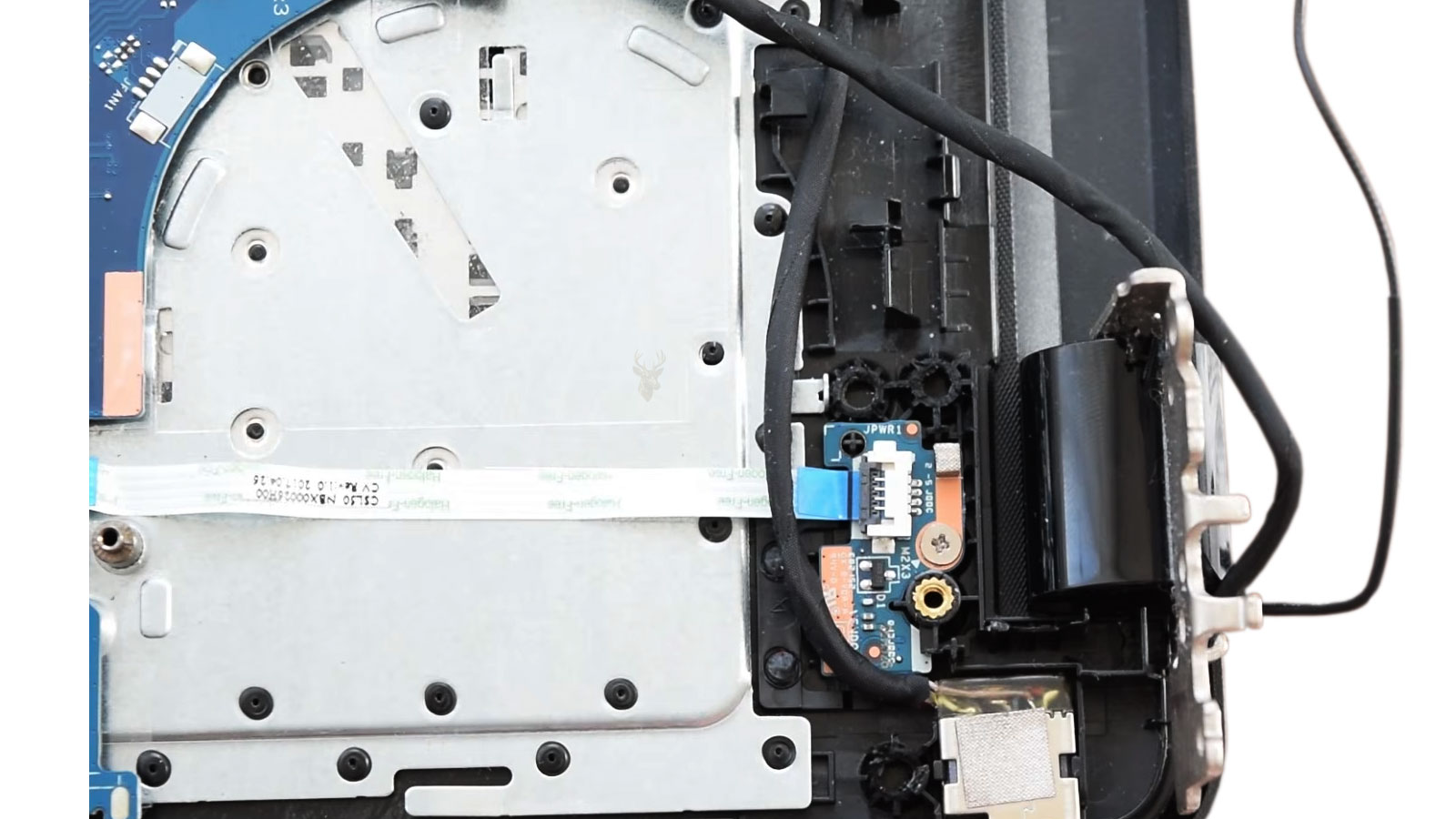
Many people think of a hinge as a single metal bracket, but the complete assembly includes several parts that must all remain secure. The hinges themselves are usually attached to reinforced mounting points inside the display cover and lower chassis using multiple screws.
If any of these attachment points loosen or crack, the hinge may begin transferring force into areas that were never designed to support repeated movement.
| Component | Purpose |
|---|---|
| Metal hinge | Allows controlled opening and closing. |
| Display cover | Supports the screen and upper hinge mounts. |
| Bottom chassis | Anchors the lower hinge assembly. |
| Screw inserts | Secure the hinges to the housing. |
| Internal brackets | Distribute mechanical stress. |
Most Hinge Failures Develop Gradually
Complete hinge failure rarely happens without warning. In many cases, the first symptoms appear weeks or even months before the damage becomes severe enough to prevent normal operation.
A slight increase in resistance while opening the display, a small clicking sound, or a tiny gap developing near one corner of the screen may seem insignificant at first. Over time, however, these symptoms often become more noticeable as additional stress is placed on nearby mounting points.
Unusual Resistance Should Never Be Ignored
A healthy laptop display normally opens with smooth, consistent resistance. If one side suddenly feels tighter than the other or requires noticeably more force, something inside the hinge assembly may be changing.
Increased resistance does not always mean the hinge itself is defective. Loose mounting hardware, internal distortion, damaged brackets, or shifting structural supports can all affect how the display moves.
Clicking Sounds Can Indicate Structural Movement
A clicking or popping sound while opening or closing the display often indicates that one component is moving against another unexpectedly. The noise may come from a shifting screw insert, a cracked mounting post, or a hinge beginning to bind.
Because several internal parts move together, identifying the exact source usually requires inspection after the computer is partially disassembled.
A hinge problem usually becomes easier to repair when addressed after the first unusual movement rather than after the surrounding plastic has fractured.
Cracking Sounds Often Mean Plastic Is Under Stress
Unlike ordinary clicking, a sharp cracking sound may indicate that internal plastic supports are beginning to separate. Modern laptops often use reinforced plastic around screw inserts to reduce weight while maintaining strength.
Once these supports begin breaking, each opening cycle can enlarge the damage until the hinge loses its secure attachment.
The Screen Should Move Evenly
Both hinges should operate together so the display opens in a controlled and balanced manner. If one corner lifts first, one side hesitates, or the display twists slightly while opening, uneven stress may already be developing inside the hinge assembly.
Twisting forces can eventually damage the display housing, bezel, or internal mounting points if the underlying cause is not corrected.
Small Gaps Around the Display Should Be Investigated
A display bezel that begins separating near one hinge, a corner that no longer sits flush, or trim that slowly lifts away from the screen can indicate that internal mounting points are moving under stress.
These gaps sometimes appear before any obvious hinge failure is visible from the outside.
The Keyboard Deck Can Also Show Warning Signs
Not every hinge problem appears near the screen. Some failures begin where the hinges attach to the lower chassis. A keyboard deck that flexes unusually near one rear corner or a palm rest that shifts while opening the display may indicate that lower mounting points have weakened.
These symptoms often become more noticeable as additional opening cycles place greater force on damaged supports.
Loose Screws Can Increase Structural Stress
Hinge assemblies rely on properly secured fasteners to distribute force evenly. If screws loosen because of repeated movement, vibration, or damaged mounting posts, the remaining attachment points may begin carrying more load than intended.
This uneven distribution can accelerate wear throughout the hinge assembly.
A Tight Hinge Is Not Always a Good Sign
Some users assume that a stiff hinge simply reflects good build quality. While moderate resistance is normal, an unusually tight hinge may place excessive force on plastic mounting points every time the display is opened.
If surrounding structural supports weaken before the hinge loosens, cracks can develop even though the hinge itself remains mechanically functional.
Repeated One-Handed Opening Can Concentrate Force
Opening a laptop from one corner instead of near the center of the display places uneven twisting force across the hinge assembly. Over hundreds or thousands of opening cycles, this habit can increase stress on one side more than the other.
Using both hands or lifting near the center helps distribute movement more evenly across both hinges.
Transporting the Laptop Incorrectly Can Affect the Hinges
Carrying a laptop by one corner of the display, lifting it by the screen, or placing heavy pressure on the closed lid can introduce forces that the hinge assembly was not designed to absorb.
Although one incident may not produce immediate damage, repeated mechanical stress can gradually weaken mounting points and supporting structures.
Accidental Drops Can Create Hidden Structural Damage
A laptop that appears to survive a fall without visible cosmetic damage may still develop internal hinge problems. Small fractures inside the display cover or lower housing may not become noticeable until normal opening and closing gradually enlarge the damage.
This delayed progression is one reason hinge problems sometimes appear weeks after an accidental impact.
Plastic and Metal Expand Differently
Laptop hinge assemblies combine metal brackets with plastic housings and threaded inserts. These materials expand and contract differently as temperatures change during normal operation.
While everyday temperature changes are expected during normal use, repeated thermal cycling over many years contributes to gradual material fatigue alongside ordinary mechanical wear.
Age Alone Can Affect Structural Strength
Even a carefully maintained laptop experiences thousands of opening cycles during its lifetime. Plastics slowly lose flexibility, adhesives age, and repeated movement gradually affects structural components.
These normal aging processes help explain why hinge problems become more common as laptops grow older, even when they have never been dropped or abused.
Hinge Damage Can Spread Into the Display Cover
When the upper hinge mounts begin separating from the display cover, the metal hinge may continue moving while the surrounding plastic remains partially stationary. This repeated pulling action can crack the inside of the lid and loosen additional fasteners.
As the damage expands, the screen may no longer remain centered inside the display housing.
The Bezel May Separate From the Screen
The display bezel is the trim surrounding the screen. It helps protect the panel edges, conceal internal cables, and hold the display assembly together.
A damaged hinge mount can push or pull against the bezel each time the laptop is opened. Small gaps may gradually develop near the lower corners before spreading farther along the display.
A Cracked Display Cover May Continue Worsening
A small crack near the hinge area can expand because the same section flexes whenever the display moves. Cosmetic damage can therefore become structural damage if the hinge continues applying force to the weakened area.
Once the mounting surface breaks away completely, replacing only the visible crack may no longer be sufficient.
Lower Chassis Damage Can Lift the Palm Rest
If the lower hinge mounts separate from the base, opening the screen can pull upward on the keyboard deck or palm rest. One rear corner may begin rising while the bottom cover remains in place.
This movement can create new gaps between the upper and lower sections of the laptop chassis.
The Bottom Cover May Begin Separating
Hinge force can also affect the bottom panel. If screw posts break or the chassis twists, the rear edge of the bottom cover may stop sitting flush.
A separating bottom cover should not automatically be blamed on the hinges because a swollen battery can produce similar symptoms. The cause should be identified before the laptop is used further.
Battery Swelling Can Be Mistaken for Hinge Damage
A swollen battery can push upward against the keyboard deck, touchpad, or bottom cover. This may create gaps that appear similar to structural separation caused by damaged hinges.
Battery swelling is a separate safety concern and should be evaluated promptly. A battery that changes the shape of the chassis should not remain under pressure inside the computer.
| Visible Symptom | Possible Cause |
|---|---|
| Gap near one rear corner | Broken lower hinge mount. |
| Bezel lifting near the screen | Upper hinge attachment damage. |
| Touchpad rising | Possible battery swelling. |
| Bottom cover separating across a wide area | Battery pressure or damaged chassis clips. |
| Corner moves only when the screen opens | Hinge-related structural movement. |
Display Cables Often Pass Close to the Hinges
The video cable connecting the motherboard to the screen commonly travels through or alongside one hinge. Wireless antenna cables may follow a similar route into the display assembly.
When a hinge becomes loose, bent, or misaligned, these cables can be pinched, stretched, folded sharply, or rubbed against damaged plastic and metal edges.
Screen Flickering Can Develop After Hinge Damage
A damaged or stressed display cable may cause the screen to flicker when the lid is moved. The image may appear normally at one angle and disappear or distort at another.
Although these symptoms can also result from a failing screen or graphics problem, movement-related changes often point toward the display cable or its connection.
Lines or Color Changes May Appear on the Display
Intermittent lines, unusual colors, image distortion, or brief signal loss can occur when the video cable is partially damaged. Continued hinge movement may worsen the cable until the display stops working completely.
Closing and reopening the screen repeatedly to restore the image can increase stress on both the cable and the damaged hinge assembly.
Wireless Performance Can Also Be Affected
Many laptop antennas are installed around the display panel, with thin cables routed through the hinge area. Structural damage can pinch or disconnect these cables.
A sudden reduction in Wi-Fi or Bluetooth range after hinge damage may therefore involve the antenna wiring rather than the wireless card itself.
Camera and Microphone Cables May Share the Same Route
Webcam, microphone, touch-screen, and sensor cables may also pass through the display assembly. The exact arrangement depends on the laptop design.
A damaged hinge can affect more than the visible screen if several cables are compressed or stretched in the same area.
Touch-Screen Models Can Be More Complex
Touch-screen laptops may combine the display panel, digitizer, glass, bezel, and cover into a tightly bonded assembly. Hinge damage can place pressure on the glass or distort the frame supporting the panel.
Repair options may be more limited when individual display components are not designed to separate easily.
Convertible Laptops Place Greater Demands on Their Hinges
Two-in-one and convertible laptops use hinges that rotate much farther than those on standard notebook computers. These mechanisms must support laptop, tablet, tent, and presentation positions while routing cables through a compact space.
The additional movement makes proper alignment and structural support especially important.
A Bent Hinge Can Damage Replacement Parts
Replacing a cracked cover without correcting a bent, seized, or excessively tight hinge can cause the new housing to fail again. The replacement part may be exposed to the same abnormal force that damaged the original assembly.
A complete repair should evaluate both the structural damage and the mechanical condition of the hinges.
Hinge Tension Must Be Appropriate for the Design
The display must remain at the selected viewing angle without requiring excessive force to move. If the hinges are too loose, the screen may fall backward or drift downward. If they are too tight, the mounting points may experience unnecessary stress.
Some hinges can be adjusted, while others are sealed assemblies that require replacement.
Lubrication Is Not a Universal Solution
Applying household oil or spray lubricant to a laptop hinge can create additional problems. Liquid may spread into the display, keyboard, motherboard, or surrounding plastics.
Some hinge designs are not intended to be lubricated externally, and added lubricant cannot repair broken mounting points or cracked housings.
A stiff hinge should be inspected before any lubricant is applied. The resistance may come from structural damage rather than a dry mechanical joint.
Glue Alone Rarely Restores the Original Strength
Adhesive may temporarily hold cracked plastic together, but hinge areas experience repeated pulling, twisting, and leverage. A surface repair may fail quickly if the original mounting post or threaded insert has separated.
Improper adhesive can also spread into screw holes, cables, vents, speakers, or other components and make later repair more difficult.
Missing Screws Should Not Be Replaced Randomly
Laptop screws vary in length, diameter, thread type, and head design. Installing a screw that is too long can puncture the palm rest, damage the motherboard, press against the battery, or break through the display cover.
Replacement screws should match the location and specifications of the original hardware.
Overtightening Can Break New Mounting Points
Hinge screws must be secure, but excessive tightening can strip threaded inserts or fracture the plastic surrounding them. This is especially important when installing replacement covers or chassis components.
Proper screw placement and controlled tightening help distribute force without damaging the repaired structure.
Replacement Parts May Include More Than the Hinges
The required parts depend on where the damage occurred. A repair may involve one or both hinges, the display back cover, bezel, bottom case, palm rest, keyboard deck, internal brackets, or cable guides.
- Left or right hinge assembly.
- Display back cover.
- Screen bezel or front trim.
- Palm rest and keyboard deck.
- Bottom chassis or base cover.
- Internal hinge brackets.
- Display or antenna cables.
- Correct replacement screws.
The Screen Panel May Need to Be Removed
Repairing upper hinge mounts often requires removing the bezel and display panel to reach the screws and brackets behind them. Thin panels must be handled carefully because pressure, bending, or incorrect tool placement can crack the screen.
Some modern displays are attached with adhesive strips rather than conventional screws, which changes the disassembly process.
Internal Cable Routing Must Be Restored Correctly
After hinge or housing replacement, display and antenna cables must follow their intended channels. Incorrect routing can trap a cable beneath a hinge, leave it exposed to sharp edges, or create tension whenever the lid moves.
A repair that looks correct externally may still fail later if the internal cables were not positioned properly.
Temporary Use Can Increase the Final Repair Cost
Continuing to open and close a laptop with a loose hinge can turn a limited mounting-point repair into a larger display and chassis repair. The longer the damaged structure moves, the more surrounding material may fracture.
Display cables and antenna wires can also become involved after the original hinge problem has already developed.
Leaving the Screen Open May Reduce Movement Temporarily
If a damaged laptop must remain in use briefly, leaving it open on a stable surface can avoid repeated hinge movement. This does not repair the problem, and the computer should not be transported while open.
The safest temporary approach depends on the severity of the damage and whether cables, batteries, or exposed components are affected.
External Monitors Can Reduce Display Movement
When the built-in screen still works but opening the lid causes structural movement, an external monitor may allow temporary access while the laptop remains stationary. The display should not be forced into position if the hinge or housing is separating.
This arrangement is only a temporary measure and does not prevent the existing structural damage from worsening if the laptop continues to be moved.
Closing a Severely Damaged Laptop Can Cause More Damage
If the bezel, cover, or palm rest is already separating, forcing the screen closed may crack additional plastic, damage the panel, or pinch internal cables.
A display that no longer moves normally should be left in the safest available position until the hinge assembly can be inspected.
Data Should Be Backed Up Before Structural Repair
Hinge repair often requires significant disassembly, and unexpected complications can occur when a laptop already has hidden damage from a fall or long-term stress.
Backing up important files before repair protects against unrelated storage problems and reduces the risk of losing valuable information if the computer becomes inaccessible.
Model Identification Is Important Before Ordering Parts
Laptops sold under the same product family may use different hinges, covers, screens, or chassis components depending on size, production revision, touch capability, and regional configuration.
Part selection should be based on the complete model number and, when available, the original component number rather than appearance alone.
Used Parts May Already Contain Hidden Wear
A used hinge or housing may appear intact while containing fatigued mounting points, worn pivots, stripped threads, or small cracks. These weaknesses may not become visible until the repaired laptop returns to regular use.
Replacement-part condition is especially important in hinge repairs because the components must withstand repeated mechanical stress.
Low-Cost Parts Can Differ in Fit and Strength
Aftermarket covers and hinge assemblies vary in quality. Differences in plastic thickness, reinforcement, screw alignment, and hinge tension can affect how well the repaired laptop operates.
A part that does not fit precisely can introduce new stress or prevent the chassis from closing correctly.
A Complete Inspection Should Look Beyond the Visible Crack
The visible damage may represent only one part of the problem. Both hinge assemblies, upper and lower mounting points, cable routes, display alignment, chassis condition, and battery shape should be examined before the repair plan is finalized.
This broader inspection helps prevent an overlooked issue from damaging newly installed parts.
Not Every Laptop Uses the Same Hinge Design
Manufacturers use a wide variety of hinge designs depending on the size, weight, intended use, and overall construction of the laptop. Some systems use compact hinges mounted directly to reinforced metal brackets, while others rely more heavily on molded plastic structures to reduce weight.
Because of these differences, the same visible symptom may require a different repair approach on another model.
Thin Laptops Often Have Less Structural Margin
Ultra-thin laptops are designed to maximize portability while minimizing thickness and weight. Their compact construction leaves less space for large reinforcement brackets around the hinge assembly.
Although these computers are engineered for everyday use, severe impacts or prolonged stress can affect their structural components differently than thicker laptop designs.
Business Laptops Frequently Include Additional Reinforcement
Many business-class laptops use stronger internal frames, metal reinforcement plates, or magnesium alloy structures around the hinge area. These features help the system withstand frequent travel and repeated opening throughout the workday.
Even with reinforced construction, damaged mounting points or worn hinges can still develop after years of regular use.
Gaming Laptops Present Different Mechanical Challenges
Gaming laptops often include larger cooling systems, heavier displays, higher-performance hardware, and thicker chassis designs. The additional weight of the display assembly can place different mechanical demands on the hinges compared to lightweight ultraportable systems.
Proper hinge alignment remains important regardless of the laptop’s size or intended purpose.
Frequent Travel Can Accelerate Wear
Computers that are opened and closed several times each day naturally experience more hinge movement than systems that remain on a desk most of the time. Constant transportation can also expose the chassis to vibration, pressure inside bags, and occasional impacts.
These conditions do not guarantee hinge failure, but they increase the importance of regular inspection and careful handling.
Protective Cases Help During Transportation
A padded carrying case helps reduce the chance of accidental impacts while transporting a laptop. Although it cannot prevent every type of damage, proper protection reduces the likelihood that force will be transferred directly into the display and hinge assembly.
Transporting the laptop securely also helps prevent pressure from being applied unevenly to the closed display.
Objects Left on the Keyboard Can Damage the Display
Closing the lid with headphones, charging cables, flash drives, pens, or other objects resting on the keyboard can create concentrated pressure inside the display assembly.
While this primarily risks screen damage, the additional force may also stress the hinges and surrounding structural components.
Regular Visual Inspection Can Reveal Early Changes
Occasionally checking the hinge area can help identify developing problems before they become major structural failures. Small cracks, widening gaps, exposed screw heads, shifting trim, or uneven display movement are often easier to address early.
Comparing both hinge areas side by side may reveal subtle differences that are difficult to notice during everyday use.
Avoid Forcing a Misaligned Display
If the display begins opening unevenly or appears twisted, forcing it into position can increase stress throughout the hinge assembly. Additional pressure may fracture mounting points that are only partially damaged.
The underlying cause should be identified before normal opening and closing continues.
Simple Habits Can Reduce Mechanical Stress
- Open the display near the center whenever possible.
- Close the lid gently without slamming it.
- Carry the laptop by its base instead of the screen.
- Avoid placing heavy objects on top of a closed laptop.
- Inspect unusual noises or movement promptly.
- Transport the computer in a padded case.
- Remove objects from the keyboard before closing the lid.
- Back up important files if structural damage develops.
Small Problems Often Lead to Larger Repairs
A loose hinge screw may eventually damage a mounting post. A cracked mounting post can pull apart the display housing. A separated housing may place additional strain on display cables, antenna wires, and the screen itself.
Addressing the original mechanical problem early often limits the number of components affected.
Many expensive hinge repairs begin as minor structural problems that were still inexpensive to correct when the first symptoms appeared.
Frequently Asked Questions About Laptop Hinge Damage
Can I continue using a laptop with a loose hinge?
It depends on the extent of the damage, but continued opening and closing can worsen cracked mounting points, damage display cables, and increase repair costs. Early inspection is generally recommended.
Can a hinge damage the laptop screen?
Yes. A failing hinge can place pressure on the display housing, pinch internal cables, or distort the screen assembly enough to contribute to display damage.
Why does my laptop make a popping sound when I open it?
Popping sounds may result from shifting mounting points, cracked plastic supports, loose inserts, or hinges that no longer move smoothly. The exact cause requires inspection.
Can glue permanently repair a broken hinge mount?
Usually not. Hinge areas experience repeated mechanical stress, and adhesive alone rarely restores the original structural strength of damaged mounting points.
Should a stiff hinge be lubricated?
Not automatically. Excessive resistance may result from structural damage rather than lack of lubrication, and applying household lubricants can introduce additional problems.
Can hinge damage affect Wi-Fi or the webcam?
Yes. Display, antenna, webcam, and microphone cables often pass through the hinge area and can be damaged if the hinge assembly shifts or breaks.
Will replacing only the hinge solve every problem?
Not always. Cracked display covers, damaged chassis components, broken mounting posts, bent hinges, and damaged cables may also require attention depending on the extent of the failure.
How can I help prevent hinge damage?
Open the display from the center, avoid lifting the laptop by the screen, transport it in a protective case, remove objects from the keyboard before closing the lid, and investigate unusual noises or resistance as soon as they appear.
Protecting the Entire Display Assembly
Laptop hinges do far more than allow the screen to open and close. They help support the entire display assembly while protecting cables, maintaining alignment, and distributing mechanical forces throughout the chassis. When one part of the hinge system begins to weaken, nearby components often experience increasing stress as well.
Recognizing unusual resistance, clicking sounds, separating trim, uneven display movement, or small structural cracks early can help limit the extent of the repair. By addressing hinge problems before they spread into the display housing, chassis, or internal cables, laptop owners can often avoid more extensive structural damage and help preserve the long-term reliability of their computers.











