
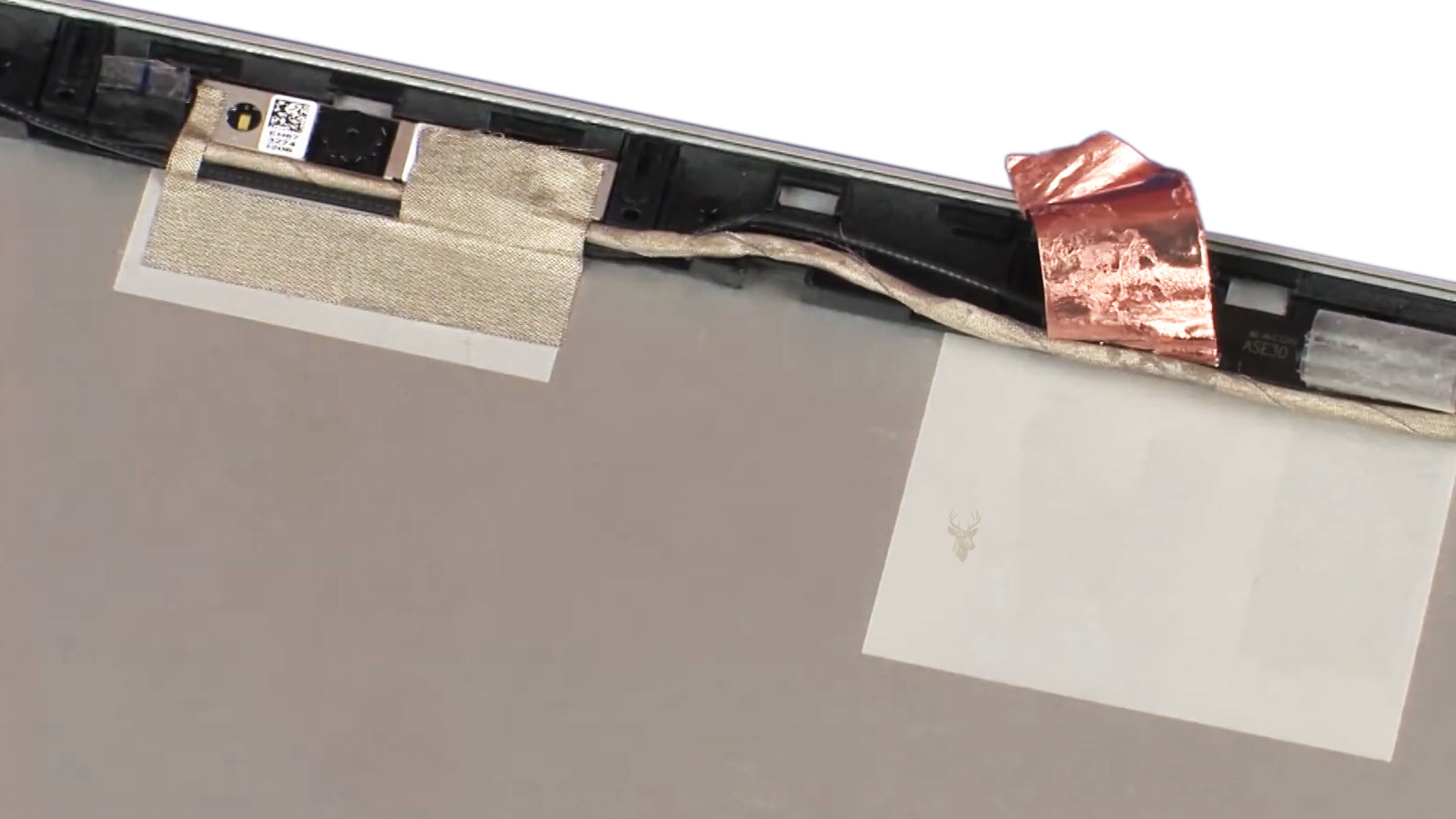
How Display Cables Travel Through a Laptop’s Hinge Mechanism
Opening and closing a laptop appears to be a simple mechanical movement, yet every motion places repeated stress on several internal components hidden beneath the display hinges. One of the most important is the display cable, which carries video signals and in many models additional data such as webcam, microphone, touchscreen, or backlight communication between the motherboard and the display assembly.
Because this cable bends slightly each time the lid moves, manufacturers carefully design its routing to balance flexibility, protection, and long-term durability. Understanding how the cable travels through the hinge assembly helps explain why certain display problems develop gradually rather than appearing as sudden hardware failures.
Although cable designs vary among manufacturers, the general routing principles remain similar across many modern laptop computers.
The Display Cable Connects Two Separate Assemblies
A laptop is divided into two major sections: the lower base that contains the motherboard, storage, cooling system, and keyboard, and the upper display assembly that contains the LCD or OLED panel along with other display-related components.
The display cable bridges these two assemblies. One end connects directly to the motherboard, while the opposite end connects to the display panel or an intermediate circuit board inside the screen assembly.
| Cable Endpoint | Primary Connection |
|---|---|
| Motherboard side | Graphics output from the system board |
| Display side | LCD, OLED, or display controller |
| Additional branches (model dependent) | Webcam, microphone, touchscreen, lid sensors, or other integrated devices |
Every video signal sent to the screen passes through this cable, making it one of the most frequently flexed wiring assemblies inside the computer.
The Hinge Area Creates a Controlled Flex Point
The display cable cannot remain completely stationary because the screen rotates every time the laptop is opened or closed. Instead, engineers intentionally create a controlled bend near one hinge where the cable can flex repeatedly without being sharply folded.
The objective is to distribute movement over a smooth curve so the extremely small conductors inside the cable experience as little mechanical stress as possible throughout thousands of opening and closing cycles.
A properly routed display cable is designed to bend gradually rather than crease sharply, helping reduce long-term mechanical fatigue.
Modern Display Cables Carry More Than Video
Older laptop designs often relied on multiple cables for various display-related functions. Modern systems frequently combine several of these connections into a single cable assembly, allowing manufacturers to reduce size while supporting additional integrated hardware.
Depending on the laptop model, the display cable may carry video data, display synchronization signals, webcam communication, microphone connections, touchscreen data, and other low-voltage communication required by components mounted within the display assembly.
- High-speed display data.
- Display timing and synchronization signals.
- Integrated webcam communication.
- Built-in microphone connections.
- Touchscreen communication on supported models.
- Various control signals for integrated display components.
Cable Routing Is Planned During System Design
The display cable is not simply placed wherever space is available inside the laptop. Engineers carefully design its path to avoid sharp metal edges, hinge hardware, screws, cooling components, and areas where repeated movement could gradually damage the insulation or internal conductors.
Fabric tape, foam padding, protective sleeves, and molded cable guides are commonly used to secure the cable and maintain its intended position throughout the normal life of the computer.
| Routing Component | Purpose |
|---|---|
| Fabric tape | Secures the cable to nearby structures |
| Foam padding | Reduces vibration and pressure points |
| Cable guides | Maintain the intended routing path |
| Protective sleeves | Reduce abrasion against surrounding components |
Repeated Movement Gradually Fatigues Internal Conductors
Although the outer insulation often remains intact, the tiny conductors inside the cable experience repeated flexing whenever the display moves. Over many years of normal use, this continuous motion can gradually weaken one or more conductors without producing any visible external damage.
Unlike a cable that has been cut or physically torn, fatigue-related damage often develops slowly. A conductor may continue functioning until the cable bends to a particular position, causing symptoms that appear inconsistent from one moment to the next.
This gradual progression helps explain why certain display problems become increasingly noticeable over time instead of appearing as an immediate hardware failure.
Display Position Can Affect the Symptoms
Because the display cable changes shape as the lid moves, the condition of its internal conductors may influence how the screen behaves at different opening angles. A laptop may operate normally in one position while exhibiting flickering, image distortion, or a blank display in another.
Changing symptoms do not automatically identify the display cable as the source of the problem, but they often indicate that movement within the hinge assembly is affecting one part of the display system.
Several Components Can Produce Similar Display Problems
Although hinge movement frequently draws attention to the display cable, similar symptoms may also originate from the display panel, graphics hardware, motherboard circuitry, damaged connectors, or other internal components. Because multiple parts work together to produce the image, identifying the exact cause requires evaluating the display system as a whole rather than focusing on a single component.
Laptop Manufacturers Use Different Cable Routing Designs
Although nearly every laptop routes its display cable through one of the hinge assemblies, the exact path varies from one manufacturer to another. The routing depends on factors such as display size, hinge construction, internal component placement, cooling layout, and the overall thickness of the computer.
Some designs route the cable directly alongside the hinge mechanism, while others guide it around structural brackets before it enters the display assembly. In every case, the objective is to maintain smooth movement while minimizing unnecessary twisting and mechanical stress.
| Routing Feature | Purpose |
|---|---|
| Gentle cable curves | Reduce repeated flexing stress |
| Cable guides | Keep wiring away from moving components |
| Retention tape | Prevent unwanted cable movement |
| Service loops | Allow controlled movement during lid operation |
Mechanical Fatigue Develops Slowly Over Thousands of Cycles
Display cable failures rarely occur after a single opening or closing of the lid. Instead, the cable experiences thousands of small bending movements throughout its service life. Although each individual movement produces very little stress, the cumulative effect can gradually weaken individual conductors inside the cable.
Because the internal wires are extremely small, fatigue may develop long before any visible damage appears on the outer insulation. This explains why a cable can look perfectly normal while still developing intermittent electrical problems.
Most display cable failures begin as microscopic internal fatigue rather than visible external damage.
Lid Position May Change How the Display Behaves
One characteristic of hinge-related cable problems is that symptoms often change as the display is opened or closed. The image may appear stable at one angle, flicker at another, or disappear entirely when the lid reaches a particular position.
These changing symptoms occur because the internal conductors flex differently as the cable bends. Small changes in cable position can temporarily improve or interrupt electrical continuity.
- Image flickers while adjusting the display.
- Display returns after slightly moving the lid.
- Colored lines appear only at certain angles.
- Backlight or image disappears intermittently.
Hinge Condition Directly Affects Cable Stress
The hinges themselves play an important role in protecting the display cable. Hinges that move smoothly distribute mechanical forces more evenly, while hinges that become excessively tight can increase the amount of stress transferred to the cable during normal operation.
Likewise, loose or damaged hinges may allow excessive movement within the display assembly, causing the cable to flex in ways that were not intended during the original design.
Protection Extends Throughout the Entire Cable Path
The hinge is only one section of the cable’s overall route. Throughout the computer, manufacturers use insulating films, foam cushions, protective sleeves, adhesive strips, and molded supports to prevent abrasion, vibration, and unnecessary movement.
These protective measures help maintain proper cable positioning while reducing wear caused by normal handling, transportation, and everyday use.
High-Speed Display Signals Require Careful Routing
Modern laptop displays exchange large amounts of digital information with the motherboard. As display resolutions and refresh rates continue increasing, maintaining signal quality becomes increasingly important. Proper cable routing helps preserve reliable communication while minimizing interference that could affect image stability.
| Design Consideration | Benefit |
|---|---|
| Stable cable routing | Reduces unnecessary movement |
| Consistent bend radius | Minimizes conductor fatigue |
| Protective shielding | Helps reduce electrical interference |
| Controlled cable length | Supports reliable signal transmission |
Cable Assemblies Are Designed for Specific Laptop Models
Display cable assemblies are rarely interchangeable between different laptop models. Even computers with similar screen sizes may use different connectors, routing paths, hinge designs, or cable lengths. Manufacturers tailor each assembly to the physical layout and engineering requirements of a particular system.
For that reason, replacement display cables are typically selected according to the exact laptop model rather than by screen size alone.
Reliable Cable Routing Is an Important Part of Laptop Engineering
Although users rarely see the display cable after a laptop is assembled, its routing plays an important role in long-term reliability. Proper placement helps protect delicate conductors from unnecessary stress while allowing the display to move smoothly through years of normal use. The design reflects a careful balance between mechanical movement, electrical performance, available space, and overall durability.
Not Every Intermittent Display Problem Is Caused by the Display Cable
Although display cable fatigue is a well-known cause of intermittent screen problems, it is only one component within a much larger display system. Similar symptoms may also originate from the display panel itself, graphics hardware, motherboard circuitry, connector damage, or even power-related problems inside the laptop.
Because multiple components interact to produce the final image, technicians evaluate the entire display path before determining which part is responsible for the observed behavior.
| Possible Source | Typical Effect |
|---|---|
| Display cable | Image changes as the lid moves |
| Display panel | Persistent visual defects regardless of lid position |
| Motherboard graphics circuitry | Video problems affecting both internal and external displays |
| Connector damage | Intermittent or unstable signal transmission |
Engineers Continue Improving Cable Durability
Modern laptops continue to evolve as manufacturers seek to make systems thinner, lighter, and more durable. Improvements in cable materials, protective insulation, routing methods, connector design, and hinge construction all contribute to extending the service life of display cable assemblies.
Although no mechanical component is immune to wear, careful engineering helps reduce the stresses that repeated lid movement places on delicate internal wiring.
Thin Laptop Designs Present Additional Engineering Challenges
As laptop computers become thinner, engineers have less internal space available for cable routing. The display cable must fit through increasingly compact hinge assemblies while still maintaining an appropriate bend radius and avoiding interference with nearby components.
This balance between compact construction and long-term reliability is one of the reasons display cable design remains an important aspect of modern laptop engineering.
Routine Handling Influences Long-Term Wear
Normal opening and closing of the display is expected during the life of a laptop, and display cables are designed to tolerate many thousands of movement cycles. However, the way a computer is handled can still influence how mechanical stress is distributed through the hinge assembly over time.
Smooth, controlled movement places less strain on the display assembly than forcing the lid beyond its intended range of motion or placing excessive pressure on one side of the screen while opening or closing it.
The display cable is engineered to flex repeatedly during normal operation, but proper mechanical support from the hinge assembly helps ensure that movement remains controlled throughout the life of the laptop.
Cable Routing Also Simplifies Manufacturing and Service
Well-planned cable routing benefits more than long-term reliability. Organized cable paths help manufacturers assemble computers consistently while allowing technicians to identify component locations more easily during inspection and repair. Clearly defined routing also reduces the likelihood of cables becoming pinched or misplaced during reassembly.
Display Technology Continues to Advance
Higher display resolutions, faster refresh rates, thinner bezels, touch functionality, and additional integrated sensors continue increasing the demands placed on laptop display assemblies. As these technologies evolve, display cable designs must also adapt to carry more information while fitting within increasingly compact mechanical structures.
The Bigger Picture
Laptop display cable routing is an important part of the overall engineering that allows modern portable computers to operate reliably despite constant mechanical movement. Carefully planned routing paths, controlled bend points, protective materials, and durable cable construction work together to reduce long-term wear while maintaining stable communication between the motherboard and display assembly. Understanding how these cables travel through the hinge mechanism provides useful insight into why intermittent display symptoms can develop gradually and why the entire display system must be considered when evaluating screen-related problems.











