
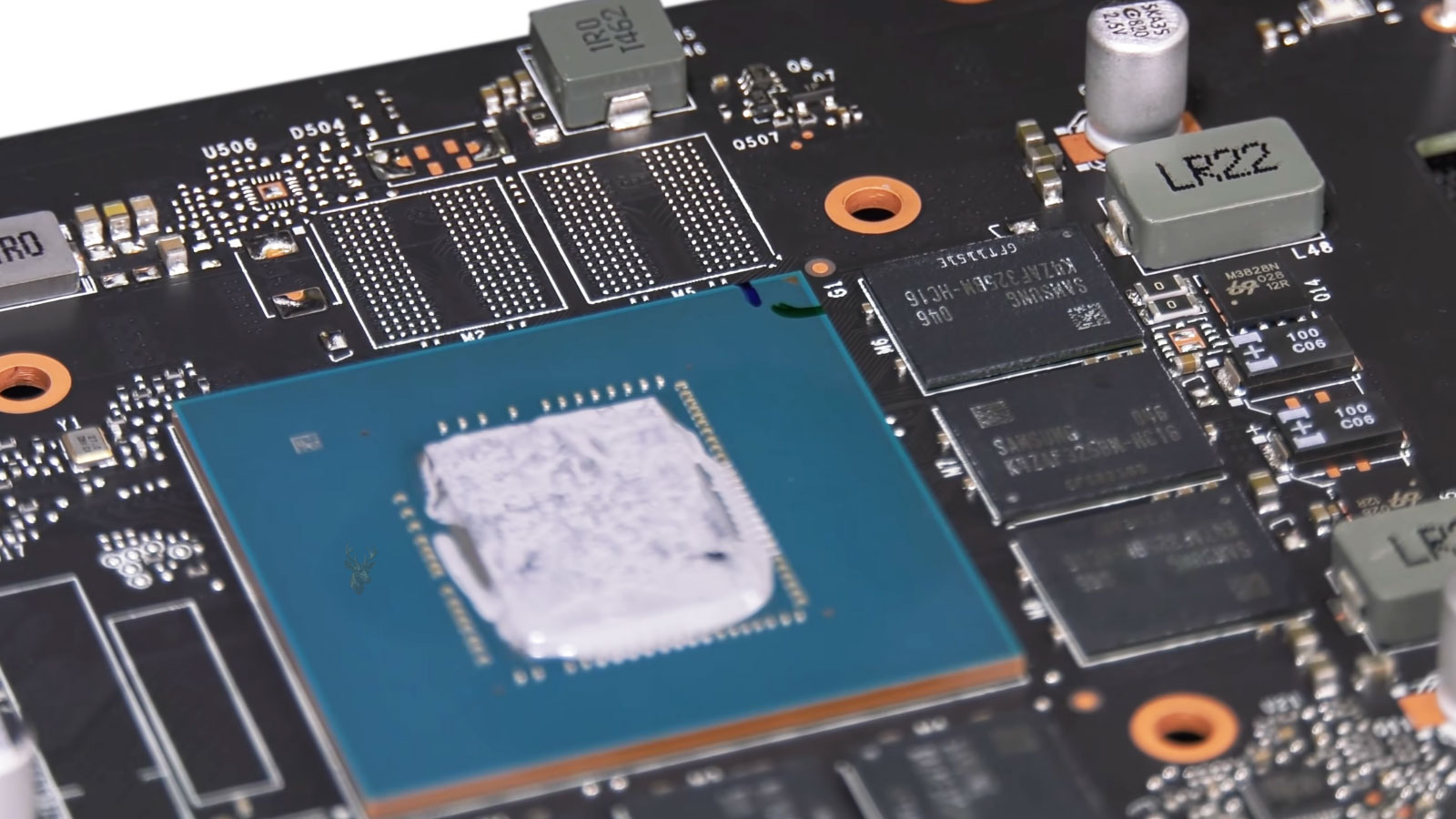
VRAM Stores the Graphics Data a GPU Needs While You Play
Video Random Access Memory, commonly known as VRAM, is the dedicated memory located on a graphics card. Unlike the system memory used by the processor, VRAM is designed specifically to hold graphical information that the graphics processing unit (GPU) must access quickly while rendering images.
Modern games constantly load textures, models, lighting information, shadows, geometry, frame buffers, and other visual assets into VRAM. The GPU retrieves this information thousands of times each second while producing every frame displayed on the monitor.
When enough VRAM is available, the graphics card can keep frequently used assets readily accessible. When available VRAM becomes limited, the game must continually move data between the graphics card and system memory, a process that is significantly slower and can affect overall performance.
VRAM Is Different From System Memory
Although both VRAM and system RAM temporarily store information, they serve different purposes. System memory primarily supports the operating system, applications, and the central processor, while VRAM is dedicated almost entirely to graphics operations.
The GPU accesses its own VRAM through an extremely wide and high-speed memory interface designed for graphics workloads. This allows large amounts of texture and rendering data to be transferred far more efficiently than if the GPU relied solely on system RAM.
| Memory type | Primary purpose |
|---|---|
| System RAM | Supports the operating system, applications, and CPU tasks |
| VRAM | Stores textures, frame buffers, geometry, shaders, and rendering data for the GPU |
Because each memory type is optimized for different workloads, adding more system RAM does not increase the amount of VRAM available to the graphics processor.
What Texture Streaming Actually Does
Modern games often contain far more texture data than can fit into VRAM at one time. Instead of loading every texture into memory before gameplay begins, game engines continuously load and unload texture information as needed. This process is known as texture streaming.
As the player moves through the game world, nearby objects receive higher-quality textures while textures that are no longer needed are removed from VRAM to make room for new assets.
Texture streaming allows enormous game worlds to operate without requiring graphics cards to contain enough memory for every visual asset simultaneously.
Only the Visible Portion of a Game Needs Immediate Access
A player exploring a large open-world environment may have access to hundreds of buildings, vehicles, characters, and landscape features. However, the GPU generally needs immediate access only to the objects that are currently visible or expected to become visible within the next few moments.
Game engines predict player movement and begin loading textures before they are required. When this prediction works effectively, transitions appear seamless and most players never notice the continuous movement of data occurring behind the scenes.
Texture streaming constantly replaces graphics data inside VRAM as the player’s view changes, allowing games to display environments that are much larger than the available graphics memory.
Higher Resolutions Increase VRAM Requirements
As display resolution increases, the GPU must process substantially more pixels for every frame. Higher resolutions often encourage games to use larger textures, larger frame buffers, and more detailed rendering information, all of which increase VRAM consumption.
For example, a graphics card that performs comfortably at 1080p may require considerably more VRAM when rendering the same game at 1440p or 4K with identical texture settings.
- Higher screen resolutions increase the amount of image data stored.
- Larger textures occupy more graphics memory.
- Additional rendering buffers consume extra VRAM.
- Advanced lighting and visual effects also require memory resources.
Increasing resolution therefore affects both GPU processing power and memory requirements.
Texture Quality Settings Directly Influence VRAM Usage
Many graphics settings primarily affect processing workload, but texture quality mainly influences how much memory the game reserves. Ultra-quality textures contain more detail and require significantly more storage space than medium or low-quality versions.
Lowering texture quality often reduces VRAM usage substantially while having less effect on frame rate than reducing options such as shadows, reflections, or ray tracing.
This is why some games specifically recommend adjusting texture quality when available graphics memory becomes limited.
Frame Buffers Also Occupy Graphics Memory
Textures are not the only information stored inside VRAM. Every rendered frame requires one or more frame buffers that temporarily hold image data before it is displayed on the monitor.
Additional rendering techniques such as depth buffers, shadow maps, anti-aliasing, motion vectors, and post-processing effects also consume graphics memory throughout gameplay.
As visual quality increases, these supporting buffers may occupy a significant portion of the available VRAM even before textures are considered.
Large Open-World Games Rely Heavily on Streaming
Games featuring expansive cities, forests, highways, or continuously explorable environments depend heavily on texture streaming. Instead of loading an entire world into VRAM, the game continually updates memory based on the player’s location.
Fast storage devices and efficient game engines help maintain this continuous flow of assets without interrupting gameplay. However, if textures cannot be delivered quickly enough, visual artifacts or temporary reductions in image quality may become visible.
VRAM Capacity Is Only One Part of Graphics Performance
A graphics card with more VRAM is not automatically faster than one with less. GPU architecture, processing cores, clock speeds, memory bandwidth, cache design, and software optimization all contribute significantly to overall gaming performance.
Additional VRAM primarily provides more space for graphical resources. If the graphics processor itself lacks sufficient rendering capability, increasing VRAM alone will not dramatically improve frame rates.
In the next part, we’ll examine what happens when VRAM becomes full, why textures sometimes appear blurry or load late, and how memory management affects stuttering, pop-in, and overall gameplay smoothness.
When VRAM Fills, the Game Must Move Data Elsewhere
When a game approaches the available VRAM limit, the graphics driver and game engine must decide which resources remain in dedicated graphics memory and which ones can be moved, reduced, or replaced. Frequently used textures and rendering data are usually kept in VRAM, while less important assets may be transferred to system memory or reloaded later.
This process allows the game to continue running, but system memory is not as fast or as directly accessible to the GPU as dedicated VRAM. Moving data across the system bus introduces additional delay, especially when large textures or several resources must be transferred in a short period.
A game may therefore continue operating after exceeding its preferred VRAM budget, but the experience can become less consistent as memory traffic increases.
Allocated VRAM Is Not Always the Same as Actively Used VRAM
Performance monitoring tools often show that a game has allocated nearly all available VRAM. This does not always mean the game is actively using every stored resource at that moment.
Many game engines reserve memory in advance so that textures and other assets can remain available without being loaded repeatedly. The driver may also use unused VRAM as a cache because leaving memory empty provides no performance benefit.
| Memory measurement | What it represents |
|---|---|
| Allocated memory | VRAM reserved by the game, driver, or graphics system |
| Resident memory | Resources currently stored in VRAM |
| Active working data | Resources being accessed regularly during rendering |
| Shared GPU memory | System RAM made available for graphics use when needed |
For this reason, a high VRAM reading alone does not prove that the graphics card is running out of memory. Performance symptoms and changes in memory behavior are more useful than a single percentage or capacity figure.
Exceeding the VRAM Budget Can Cause Stuttering
One of the most noticeable signs of VRAM pressure is intermittent stuttering. The average frame rate may appear acceptable, but individual frames can take much longer to render when the game must retrieve resources that are no longer available in dedicated graphics memory.
This often occurs when entering a new area, turning the camera quickly, driving at high speed, or encountering a scene containing many unique objects and textures.
- Frame times may spike during rapid camera movement.
- Stuttering may appear when entering a new section of the map.
- Performance may become less stable after extended gameplay.
- Reducing texture quality may improve smoothness without greatly changing the average frame rate.
These symptoms develop because frame delivery becomes uneven, even when the graphics processor is capable of producing a high average number of frames.
Texture Pop-In Occurs When Detailed Assets Arrive Late
Texture pop-in happens when a low-detail texture is displayed first and then suddenly replaced by a sharper version. The game uses the lower-quality version temporarily because the higher-resolution asset has not yet reached VRAM.
This can be normal in games that aggressively manage large environments, but excessive or delayed pop-in may indicate that storage, system memory, VRAM capacity, or the texture-streaming system cannot keep pace with movement through the game world.
Texture pop-in is the visible result of a higher-detail asset arriving after the object has already appeared on screen.
The effect is especially noticeable on walls, road surfaces, clothing, vegetation, and distant scenery that suddenly become sharper as the player approaches.
Blurry Textures Can Be an Intentional Memory-Saving Response
Some games reduce texture detail automatically when memory becomes limited. Instead of allowing the game to pause or crash, the engine may load lower-resolution texture levels until enough VRAM becomes available.
This behavior can make surfaces appear unusually soft, muddy, or lacking in detail even when the texture-quality setting remains high. The game may restore sharper textures after memory pressure decreases or after the player leaves a demanding area.
Dynamic texture reduction is not supported by every game, but it is one method developers use to keep gameplay running on graphics cards with different memory capacities.
Mipmap Levels Reduce the Need to Load Full-Resolution Textures Everywhere
Most game textures contain several versions of the same image at progressively lower resolutions. These versions are known as mipmaps. The game selects an appropriate mipmap level based on the object’s distance, size on the screen, and viewing angle.
A distant object does not need the full-resolution texture used when the player is standing nearby. Loading a smaller mipmap reduces VRAM usage and avoids processing detail that would not be visible at that distance.
As the player approaches, higher-resolution mipmaps are streamed into memory. If this transition is delayed, the object may remain blurry until the sharper texture level becomes available.
Storage Speed Influences How Quickly Textures Reach Memory
Texture streaming begins with data stored on the computer’s storage drive. Before the GPU can use an asset, the game must locate it, read it from storage, decompress or prepare it, and transfer it through system memory into VRAM.
A slow or heavily occupied storage device can delay this sequence. Mechanical hard drives are especially vulnerable when the game requests many small files from different locations at once.
| Component | Role in texture streaming |
|---|---|
| Storage drive | Reads texture and asset files |
| CPU | Processes requests and may decompress asset data |
| System RAM | Temporarily holds data moving toward the GPU |
| PCIe connection | Transfers prepared resources to the graphics card |
| VRAM | Stores assets for immediate GPU access |
A delay at any stage can prevent the required texture from reaching VRAM before it is needed on screen.
System RAM Becomes More Important When VRAM Is Limited
When dedicated graphics memory becomes crowded, some resources may be placed in system RAM. This shared memory arrangement provides additional capacity, but it does not offer the same bandwidth or low latency as VRAM located directly on the graphics card.
If the computer also has limited system RAM, Windows may begin moving inactive memory pages to the storage drive. At that point, graphics data can be delayed by both insufficient VRAM and insufficient system memory.
This combination can produce severe pauses, delayed loading, unstable frame times, or application crashes during demanding scenes.
Memory Bandwidth Affects How Quickly VRAM Can Be Used
VRAM capacity describes how much data can be stored, while memory bandwidth describes how quickly that data can move between memory and the GPU. Two graphics cards may contain the same amount of VRAM but provide very different performance because their memory type, bus width, speed, and compression methods differ.
A large memory capacity does not compensate fully for low bandwidth when the GPU must read and write large amounts of data every frame.
- Capacity determines how many resources can remain resident.
- Bandwidth determines how quickly those resources can be accessed.
- Cache design can reduce repeated trips to VRAM.
- Memory compression can lower the amount of data transferred.
Graphics performance therefore depends on both the amount of memory available and the efficiency of the entire memory subsystem.
Ray Tracing Can Increase Graphics Memory Demand
Ray-traced lighting and reflections require additional acceleration structures, geometry information, history buffers, denoising data, and rendering targets. These resources consume VRAM beyond the textures already used by the game.
Enabling ray tracing can therefore increase memory usage even when texture quality and display resolution remain unchanged. The effect varies by game and by the specific ray-tracing features enabled.
When VRAM is already close to its limit, adding ray tracing may introduce stuttering or force other resources to be managed more aggressively.
Anti-Aliasing and Upscaling Use Different Amounts of Memory
Anti-aliasing methods reduce visible jagged edges, but they do not all use graphics memory in the same way. Techniques that render or store multiple samples can require larger buffers than simpler post-processing methods.
Modern upscaling systems render the game at a lower internal resolution and reconstruct a higher-resolution image. This can reduce some rendering and memory requirements, although the reconstruction process may introduce its own history buffers and supporting data.
The final VRAM effect depends on the game engine, resolution, selected quality mode, and the specific anti-aliasing or upscaling method.
Background Applications Can Also Reserve VRAM
The game is not always the only program using graphics memory. Web browsers, video playback, recording software, overlays, streaming applications, desktop effects, and additional monitors can all reserve a portion of VRAM.
On a graphics card with limited capacity, these background demands may reduce the amount available to the game. The difference may be small during light use but more noticeable when playing at high resolutions or using large texture packs.
Closing unnecessary graphics-intensive applications can help determine whether background VRAM use is contributing to unstable performance.
Modded Textures Can Exceed the Game’s Original Memory Design
Community texture packs and visual modifications can replace original assets with much higher-resolution versions. These changes may greatly increase VRAM consumption because the game engine must store larger files than its original memory targets anticipated.
A game that runs smoothly with standard textures may begin stuttering, loading assets slowly, or crashing after a high-resolution texture package is installed.
The graphics card may have enough processing power for the modified visuals while still lacking sufficient memory capacity to keep the expanded assets resident.
Long Gaming Sessions Can Reveal Memory-Management Problems
Some games gradually consume more graphics memory during extended play because resources are not released correctly. This type of software behavior is often described as a memory leak, although not every increase in VRAM use represents a true leak.
Performance may begin normally and deteriorate after visiting several areas, changing maps repeatedly, or playing for many hours. Restarting the game may temporarily restore normal memory usage.
If the problem occurs only in one game and follows a consistent pattern after extended use, the game engine, graphics driver, or a modification may be contributing to the issue.
Texture Settings Often Provide the Most Direct VRAM Adjustment
When graphics memory is limited, lowering texture quality is usually the most direct way to reduce VRAM demand. Lower texture settings use smaller assets while leaving many other aspects of rendering unchanged.
Reducing shadows, reflections, ray tracing, resolution, or anti-aliasing may also help, but those settings affect a mixture of GPU processing load and memory usage.
| Graphics setting | Typical effect on VRAM |
|---|---|
| Texture quality | Often produces a large and direct change |
| Display resolution | Changes frame-buffer and rendering-resource size |
| Ray tracing | Adds acceleration structures and supporting buffers |
| Shadow quality | Can increase shadow-map memory |
| Anti-aliasing | Varies according to the method used |
Changing one setting at a time makes it easier to identify which option is creating the largest memory demand.
VRAM Pressure Should Be Evaluated Through Frame-Time Behavior
A memory counter can show that usage is high, but frame-time behavior reveals whether that usage is affecting gameplay. Smooth and consistent frame delivery suggests that the game is managing memory effectively, even when most VRAM is allocated.
Sudden frame-time spikes that improve after lowering textures provide stronger evidence of a memory limitation than a high usage number by itself.
In the final part, we’ll examine practical ways to evaluate VRAM limitations, how in-game memory meters should be interpreted, why graphics cards with equal capacity can perform differently, and how to choose settings that balance visual quality with stable frame delivery.
In-Game VRAM Meters Are Estimates Rather Than Exact Limits
Many games display a graphics-memory meter beside the video settings. This meter estimates how much VRAM the selected options may require, but it should not be treated as a precise measurement of real-time usage.
The estimate may not account fully for the current map, background applications, driver behavior, resolution scaling, additional monitors, texture modifications, or changes that occur during gameplay. Some games also reserve extra memory beyond the amount shown in the settings menu.
A setting that remains below the displayed VRAM limit may still produce stuttering in a demanding area, while another game may operate smoothly even when its estimate slightly exceeds the graphics card’s listed capacity.
Monitoring Tools Can Show Dedicated and Shared GPU Memory
Windows and third-party monitoring utilities can report several forms of graphics-memory activity. Dedicated GPU memory refers to VRAM physically located on the graphics card, while shared GPU memory refers to a portion of system RAM that Windows can make available to graphics workloads.
Shared memory can prevent an immediate failure when dedicated VRAM is full, but it is not equivalent to adding more physical graphics memory. The GPU must access that data across the system connection, which introduces additional latency and lower effective bandwidth.
| Reported value | Interpretation |
|---|---|
| Dedicated GPU memory | Physical VRAM currently allocated or used |
| Shared GPU memory | System RAM made available to graphics workloads |
| Total GPU memory | Combined dedicated and shared capacity reported by Windows |
| GPU utilization | How heavily the graphics processor is working |
The total GPU memory figure should not be mistaken for the amount of high-speed VRAM installed on the graphics card.
High VRAM Usage Is Not Automatically a Problem
A game may intentionally occupy most available VRAM to keep useful assets close to the GPU. This can improve performance by reducing the need to reload textures repeatedly from storage or system memory.
Unused VRAM does not provide a performance advantage simply because it remains empty. Efficient engines often use available capacity as a cache and release or replace resources only when new data is required.
High VRAM allocation becomes important when it is accompanied by stuttering, delayed textures, crashes, or a clear improvement after memory-heavy settings are reduced.
The presence of symptoms is therefore more meaningful than the usage number alone.
Repeated Tests Should Use the Same Game Location
VRAM demand can change considerably from one scene to another. A quiet interior area may use less memory than a crowded city, a large outdoor environment, or a scene containing many unique textures and effects.
Testing different settings in unrelated locations can produce misleading results because the game workload has changed at the same time as the graphics configuration.
- Select a repeatable area that produces the problem consistently.
- Record the current texture, resolution, and effects settings.
- Observe frame times and visible texture behavior.
- Change one memory-related setting at a time.
- Repeat the same movement through the same location.
This approach makes it easier to determine whether a specific setting is reducing memory pressure or whether the problem remains unchanged.
Lowering Textures Without Restarting May Not Clear Existing Allocations
Some games apply texture changes immediately, while others keep previously loaded high-resolution assets in memory until the map is reloaded or the game is restarted.
As a result, lowering the texture setting during gameplay may not produce an immediate reduction in reported VRAM usage. The new setting can affect future asset loading while older resources remain resident temporarily.
Restarting the game after changing texture quality provides a cleaner comparison because the engine rebuilds its memory allocation using the new configuration.
Graphics Cards With Equal VRAM Can Behave Differently
Two graphics cards with the same VRAM capacity may produce very different results in the same game. Capacity is only one characteristic of the graphics-memory system.
Memory type, memory speed, bus width, cache size, compression efficiency, PCIe connection, GPU architecture, and driver optimization all influence how effectively the card can use its available VRAM.
| Graphics-card characteristic | Effect on memory performance |
|---|---|
| VRAM capacity | Determines how many graphics resources can remain resident |
| Memory bandwidth | Influences how quickly data moves between VRAM and the GPU |
| Cache design | Reduces repeated access to external graphics memory |
| GPU processing power | Determines how quickly rendering work can be completed |
| Driver and game optimization | Affects allocation, streaming, and resource replacement behavior |
A newer card with the same memory capacity may manage data more efficiently, while an older card with more VRAM may still be limited by processing performance or bandwidth.
A Wider Memory Bus Does Not Always Guarantee Better Performance
Memory bus width contributes to bandwidth, but it must be considered together with memory speed, compression, and cache design. A modern GPU with a narrower bus may still achieve strong performance through faster memory and a larger on-chip cache.
Comparing bus width alone can therefore create an incomplete picture. Effective bandwidth and real game performance provide more useful information than one hardware specification viewed in isolation.
The same principle applies to VRAM capacity: a larger number is useful only when the rest of the graphics card can support the intended workload.
Resolution Scaling Can Reduce Some Memory Pressure
Lowering the internal rendering resolution reduces the size of several rendering targets and can decrease the workload placed on the GPU. Upscaling technologies allow the final image to be presented at the monitor’s native resolution even though the game renders fewer pixels internally.
This can reduce frame-buffer and effects-related memory use, but it may not reduce texture consumption by the same amount. A game can continue loading high-resolution textures even while rendering the scene at a lower internal resolution.
When textures are the main source of VRAM pressure, lowering texture quality may produce a larger improvement than changing the upscaling mode.
Texture Quality and Texture Filtering Are Different Settings
Texture quality controls the resolution of the texture assets loaded into memory. Texture filtering controls how those textures are sampled when viewed at angles or different distances.
Anisotropic filtering can improve the clarity of roads, floors, walls, and other surfaces viewed at shallow angles. It generally has a much smaller effect on VRAM capacity than replacing medium-resolution textures with ultra-resolution versions.
- Texture quality changes the size and detail of loaded assets.
- Texture filtering changes how existing textures are displayed.
- Lowering texture quality usually reduces VRAM demand more directly.
- Lowering filtering may reduce image clarity without freeing much memory.
Confusing these two settings can lead to visual compromises without addressing the actual memory limitation.
Shader Compilation Stutter Is Not the Same as VRAM Stutter
Not every frame-time spike in a PC game is caused by insufficient VRAM. Games may also stutter while compiling shaders, loading new world data, processing background tasks, or waiting for the CPU.
Shader-related stutter often occurs the first time a new effect appears and may become less noticeable after the required shader has been compiled. VRAM-related stutter is more likely to repeat in scenes that require large texture transfers or to improve when texture quality is reduced.
| Observed pattern | Possible explanation |
|---|---|
| Stutter appears the first time an effect is shown | Shader compilation |
| Stutter repeats when entering texture-heavy areas | VRAM pressure or asset streaming |
| Stutter occurs with low GPU utilization | CPU, storage, shader, or engine limitation |
| Stutter improves after lowering textures | Graphics-memory demand was likely involved |
Correctly identifying the pattern prevents every performance problem from being attributed to graphics-memory capacity.
Storage Problems Can Resemble a VRAM Limitation
Texture streaming depends on the storage device supplying assets quickly enough. A slow hard drive, failing SSD, background disk activity, or nearly full storage device can delay texture delivery even when the graphics card has sufficient VRAM.
In these cases, textures may appear late or gameplay may pause while data is read from storage. Monitoring disk activity alongside VRAM and frame times can help reveal whether the delay begins before the asset reaches the graphics card.
Moving a game from a mechanical hard drive to an SSD may improve asset streaming, but it does not increase the graphics card’s physical memory capacity.
Driver Problems Can Affect Memory Management
The graphics driver coordinates memory allocation between the game, operating system, and GPU. A driver fault can cause abnormal VRAM growth, failed resource release, crashes, or stuttering even when the hardware has adequate capacity.
If a problem begins immediately after a driver update, comparing behavior with another stable driver version may help determine whether memory management changed.
Driver changes should be evaluated carefully because the same update may improve one game while introducing a problem in another.
Game Updates Can Change VRAM Requirements
A game can require more or less VRAM after an update. Developers may replace textures, change streaming behavior, add graphical effects, revise memory budgets, or correct resources that were not being released properly.
Performance that changes after a patch does not automatically indicate that the graphics card has developed a hardware problem. Comparing patch timing, settings, and other player reports can help identify a software-related change.
Rechecking the graphics settings after a major update is useful because some games reset options or introduce new features that increase memory demand.
Choosing Settings Requires Balancing Detail and Stability
The highest available preset is not always the most appropriate configuration for a particular graphics card. A visually demanding setting may provide only a small improvement in image quality while consuming enough VRAM to create uneven frame delivery.
A balanced configuration keeps the most noticeable visual improvements while reducing options that exceed the practical memory budget.
- Begin with the game’s recommended settings for the detected hardware.
- Reduce texture quality first when dedicated memory is clearly limited.
- Use a repeatable scene to compare frame-time stability.
- Restart the game when a setting does not release memory immediately.
- Consider background applications and additional displays during testing.
The most useful setting is the one that remains stable throughout demanding gameplay rather than only in a quiet test area.
More VRAM Can Extend the Useful Life of a Graphics Card
As games adopt larger textures, more complex geometry, ray tracing, and higher display resolutions, graphics-memory requirements tend to increase. Additional VRAM can allow a capable GPU to retain higher-quality assets without relying as heavily on system memory.
However, extra capacity cannot prevent the graphics processor itself from becoming too slow for newer rendering workloads. A card may have sufficient memory while lacking the processing performance needed for acceptable frame rates.
Long-term value therefore depends on both VRAM capacity and the overall capability of the graphics architecture.
VRAM Limitations Are Best Identified Through Consistent Evidence
No single monitoring number proves that a game is limited by VRAM. A reliable diagnosis combines dedicated-memory usage, shared-memory growth, frame-time spikes, texture behavior, repeatable testing, and the response to lower memory-intensive settings.
When stuttering decreases after textures are reduced, shared memory use falls, and delayed assets become less noticeable, the evidence supports a graphics-memory limitation. When the same symptoms remain unchanged, attention should shift toward storage, drivers, shader compilation, the CPU, or the game engine.
Texture Streaming Connects Storage, System Memory, and the GPU
VRAM is the final high-speed workspace for textures and rendering resources, but it operates as part of a larger data path. Game assets begin on the storage drive, may be processed by the CPU, pass through system memory, and then travel to the graphics card.
When each stage keeps pace, detailed environments can appear smoothly even when the entire game world cannot fit into VRAM at once. When one stage falls behind, the result may appear as stuttering, texture pop-in, blurry surfaces, pauses, or unstable performance.
Understanding the difference between VRAM capacity, allocation, bandwidth, and texture streaming makes it easier to evaluate graphics settings accurately and avoid assuming that every gaming slowdown requires a new graphics card.











