
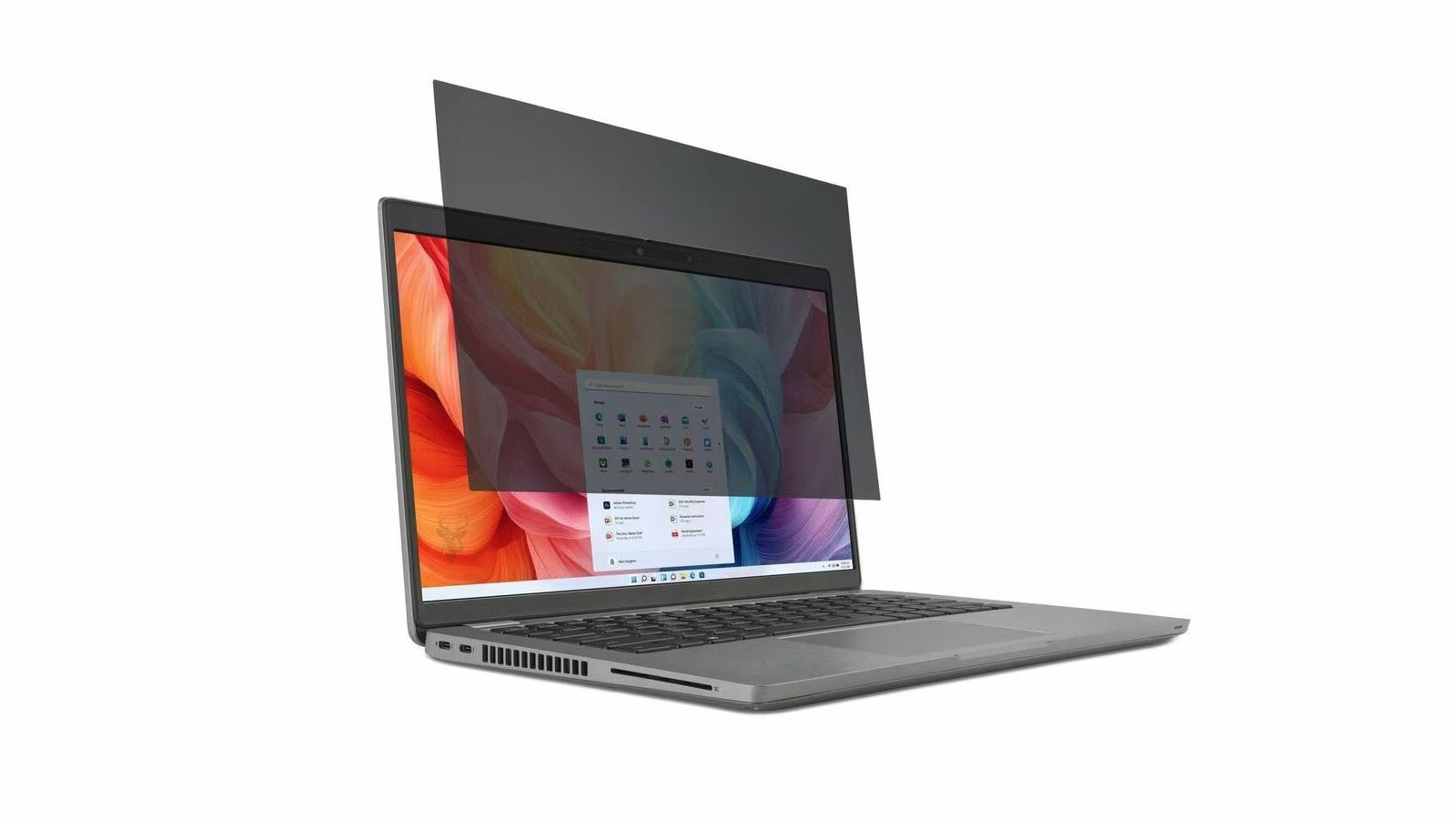
How Laptop Privacy Screens Limit Side Viewing
A laptop privacy screen is a thin filter placed over the display to make information harder to read from the sides. The person sitting directly in front of the computer can continue viewing the screen, while someone positioned at an angle sees a darker or less recognizable image.
These filters are commonly used in offices, airports, waiting rooms, shared workspaces, schools, and other locations where confidential information may be visible to nearby people.
The added privacy can be useful, but it changes how light leaves the display. Brightness, viewing angles, color appearance, sharpness, reflections, and touch-screen behavior may all be affected depending on the filter and laptop.
A privacy screen does not hide the information stored on the computer. It only reduces how clearly the active display can be viewed from certain angles.
Privacy Filters Control the Direction of Displayed Light
A laptop display normally sends visible light across a wide range of angles. This allows the image to remain visible when the user moves slightly to the left, right, above, or below the center of the screen.
A privacy filter contains extremely small structures that restrict the direction in which much of that light can travel. The effect is similar to a microscopic set of blinds positioned in front of the display.
Light traveling toward the intended user passes through more easily, while light moving toward the sides is reduced. The image therefore appears darker as the viewing angle increases.
The Clearest View Remains Near the Center
Privacy screens are designed around a central viewing position. The user normally receives the best image when sitting directly in front of the display with the eyes aligned near the middle of the screen.
Moving the head sideways can cause part of the image to dim. On larger laptop screens, the far edges may also appear slightly darker because they are viewed at a greater angle than the center.
The usable viewing area depends on the filter design, screen size, display brightness, and distance between the user and the laptop.
| Viewing Position | Typical Appearance |
|---|---|
| Directly in front of the screen | The image remains the clearest and brightest |
| Slightly to one side | Brightness and contrast may begin to decrease |
| Farther to the side | Text and images become difficult to recognize |
| Above or below the screen | The effect depends on whether the filter limits vertical viewing |
Two-Way Filters Limit Horizontal Viewing
A two-way privacy filter primarily reduces viewing from the left and right sides. The display usually remains more visible from above and below.
This design is common for ordinary laptop use because it protects against people sitting or standing beside the user while preserving a wider vertical viewing range.
A person looking down from behind the user may still see more of the display than someone positioned directly beside it.
Four-Way Filters Limit More Viewing Directions
A four-way filter restricts viewing from the sides as well as from above and below. This can provide more privacy in crowded locations where people may be standing behind or above the seated user.
The stronger restriction also makes the user’s position more important. Tilting the laptop or changing posture may darken the image more quickly than it would with a two-way filter.
Four-way filters may be appropriate for sensitive information, but they can be less forgiving during ordinary movement.
More restricted viewing angles provide greater visual privacy but require more precise screen positioning.
The user may need to remain closer to the center of the display.
Privacy Screens Reduce the Amount of Visible Light
Because the filter blocks or redirects part of the light leaving the display, the image normally appears darker after installation.
The user may increase screen brightness to compensate. This can improve visibility but may also increase battery use and cause the display to operate at a higher brightness level for longer periods.
The amount of brightness loss varies according to the filter material, surface finish, display type, and viewing position.
A privacy screen cannot restrict side viewing without also changing some of the light available to the person sitting in front.
Low-Brightness Displays May Be More Difficult to Use
Older laptops and inexpensive displays may have limited maximum brightness. Adding a privacy filter can make these screens difficult to read in brightly lit rooms.
A display that is already dim because of age, backlight wear, power settings, or hardware failure may become uncomfortable after the filter is installed.
The original display should provide sufficient brightness before a privacy accessory is used to reduce it further.
Battery Runtime Can Decrease When Brightness Is Raised
The display is one of the components that consumes battery power. Increasing brightness to overcome the filter’s light loss can shorten the amount of time the laptop operates away from a charger.
The effect depends on the screen technology, original brightness level, battery condition, and amount of adjustment required.
A filter that works comfortably at moderate brightness may have little effect on runtime, while one that requires maximum brightness may produce a more noticeable change.
| Display Condition | Possible Effect After Adding a Privacy Filter |
|---|---|
| Bright modern display | May remain readable without a large brightness increase |
| Older dim display | May become difficult to view in normal room lighting |
| Laptop used at maximum brightness | Little additional adjustment remains available |
| Laptop used mainly on battery | Higher brightness may reduce runtime |
| Laptop used while connected to power | Battery impact is less important, but visual quality still changes |
Color Appearance Can Change
A privacy filter can alter color intensity, contrast, and overall screen tone. Whites may appear slightly gray, and dark details may become harder to distinguish.
Some filters add a subtle warm, cool, or tinted appearance. The effect may be minor during email or document work but more noticeable when editing photographs, video, or design projects.
Color-sensitive work should be evaluated with the filter installed because the displayed image no longer matches the unfiltered screen exactly.
Color Accuracy Becomes Less Reliable at an Angle
The center of the display may retain acceptable color, while the edges begin to darken or shift as the viewing angle changes.
A person moving slightly from the central position may see different shadow detail, saturation, or contrast even though the image itself has not changed.
This behavior is part of how the privacy effect is created and is not necessarily evidence of a defective display.
Photo and Video Editing May Be More Difficult
Image editing requires consistent brightness, contrast, and color across the screen. A privacy filter can interfere with this consistency by darkening the image and narrowing the acceptable viewing position.
Fine shadow detail may be hidden, and colors may appear less accurate than they do without the filter.
Users performing color-critical work may need to remove the filter temporarily or use an external calibrated display in a controlled environment.
Visual privacy and color accuracy can conflict with each other.
A filter designed to restrict viewing angles changes the conditions required for accurate image evaluation.
Text Sharpness May Appear Slightly Reduced
A filter adds another physical layer between the user and the display. Fine text, thin lines, and small interface elements may appear slightly softer.
The effect can be more noticeable on matte filters, low-resolution screens, or displays that already have reduced contrast.
Users who work with small fonts may need to adjust text scaling or sit closer to the screen after the filter is installed.
Incorrect Sizing Can Create Blurred Edges
A privacy screen must match the visible display area and aspect ratio. A filter that is too large may overlap the bezel, while one that is too small can leave unprotected edges.
If the filter does not sit flat against the screen, small air gaps can create reflections, shadows, or areas that appear less sharp.
The laptop model, diagonal screen size, width, height, and corner shape should all be considered before selecting a filter.
| Fit Problem | Possible Result |
|---|---|
| Filter is too narrow | Information may remain visible along the sides |
| Filter is too tall | It may interfere with the bezel, camera, or closing lid |
| Aspect ratio does not match | Part of the display may remain uncovered |
| Filter bows away from the screen | Reflections and uneven sharpness may appear |
| Mounting tabs are misplaced | The filter may shift or fail to sit flat |
Screen Size Alone Does Not Guarantee Compatibility
Two laptops can both have a 15.6-inch display while using different aspect ratios, bezel sizes, camera positions, and corner shapes.
The diagonal measurement does not describe the exact width and height of the visible panel.
A filter should be selected according to the manufacturer’s measured dimensions or confirmed compatibility rather than only the advertised screen size.
Display Aspect Ratio Changes the Filter Shape
Laptop displays commonly use aspect ratios such as 16:9, 16:10, or 3:2. Screens with the same diagonal measurement can therefore have different physical shapes.
A 16:9 filter placed on a 16:10 display may leave part of the screen exposed or cover an unintended area.
The aspect ratio should be confirmed before ordering a filter intended for a specific size.
The Bezel Design Affects Mounting Options
Older laptops often have raised bezels that can hold slide-in mounting tabs. Newer systems may use thin borders and edge-to-edge glass.
A mounting method that works well on a thick plastic bezel may cover part of a modern narrow display or fail to attach securely.
The filter should not press against the active display area or interfere with sensors located around the panel.
A correctly sized filter must match both the display dimensions and the physical design surrounding the screen.
Adhesive Mounting Tabs Allow the Filter to Slide Out
Some privacy screens use small adhesive tabs attached to the bezel. The filter slides between the tabs and the display, allowing it to be removed when privacy is not required.
This method is convenient for users who alternate between confidential work and color-sensitive tasks.
The tabs must be positioned carefully so they do not cover the screen, interfere with lid closure, or place pressure on the panel.
Direct Adhesive Filters Remain Closer to the Display
Other privacy filters use adhesive strips or a reusable surface that attaches directly to the display.
A close fit can reduce movement and reflections between the filter and screen. Removal may be less convenient, and improper installation can trap dust or produce visible bubbles.
The adhesive must be designed for electronic displays and should not leave residue or damage the screen coating.
| Mounting Method | Advantage | Possible Limitation |
|---|---|---|
| Slide-in bezel tabs | Filter can be removed easily | May not suit thin bezels |
| Direct adhesive strips | Filter stays close to the display | Alignment and removal require care |
| Reusable static attachment | Can provide a clean appearance | Dust and bubbles may become trapped |
| Magnetic mounting | Fast installation and removal | Requires compatible frame or included magnetic strips |
Magnetic Filters Are Convenient but Add Thickness
Magnetic privacy screens attach to a compatible metal frame or to thin magnetic strips placed around the display.
They can be removed quickly and are useful when the user needs privacy only in certain locations.
The added frame thickness may prevent some laptops from closing completely or can leave a small gap between the lid and keyboard area.
The Laptop Lid Must Still Close Without Pressure
A privacy filter adds material between the display and the keyboard. Even a thin layer can matter on laptops designed with very little clearance when closed.
If the filter or mounting tabs press against the keyboard, touchpad, or palm rest, force can be transferred into the display panel.
The lid should close naturally without resistance, bending, or visible separation around the edges.
A filter should never require the laptop lid to be forced shut.
Excess pressure can damage the display, hinges, bezel, or keyboard surface.
Keyboard Contact Can Leave Marks on the Filter
Some laptops already allow the keyboard or palm rest to sit close to the display when the lid is closed. Adding a privacy filter can reduce the remaining space.
Key outlines, oil, and pressure marks may appear on the filter surface. Continued pressure can also transfer into the display beneath it.
The filter may need to be removed before the laptop is transported if the closed clearance is too small.
Webcams and Sensors Must Remain Uncovered
The top bezel may contain a webcam, microphone openings, infrared camera, ambient-light sensor, facial-recognition hardware, or lid sensor components.
A filter or mounting strip placed over these areas can reduce camera quality or interfere with automatic brightness and sign-in features.
Filters designed for a specific laptop may include cutouts that preserve access to the required sensors.
| Covered Component | Possible Symptom |
|---|---|
| Webcam lens | Dark, blurred, or partially blocked video |
| Infrared camera | Facial recognition may fail |
| Ambient-light sensor | Automatic brightness may respond incorrectly |
| Microphone opening | Recorded sound may become muffled |
| Camera indicator | The user may not see when the camera is active |
Automatic Brightness Can React to the Filter
Some laptops adjust display brightness according to room lighting. If a mounting strip or filter covers the ambient-light sensor, the computer may interpret the room as darker than it is.
The screen may become too bright, too dim, or change unexpectedly as the lid moves.
Sensor locations should be identified before attaching any permanent mounting material.
Touch Screens Require Compatible Filter Materials
A touch-screen laptop detects contact through the display surface. Adding another layer can affect sensitivity, accuracy, and the amount of pressure needed for input.
Filters designed for touch screens use materials intended to preserve finger and stylus response. A filter intended only for a standard display may not work reliably.
Touch behavior should be tested across the entire screen after installation.
Touch Accuracy May Change Near the Edges
If the filter does not sit flat, the distance between the finger and touch sensor can vary across the display.
Edge gestures, small buttons, drawing tools, and handwriting may become less precise in areas where the filter lifts or bends.
A poor fit should be corrected rather than applying additional pressure to the screen.
A touch-compatible label does not guarantee perfect input if the filter is misaligned or unable to remain flat.
Stylus Use Can Feel Different
A privacy filter changes the surface texture between the stylus tip and display. The pen may feel smoother, rougher, or less direct depending on the filter finish.
Parallax can appear more noticeable because the stylus tip is physically farther from the image beneath the filter.
Artists and handwriting users should test line accuracy, pressure response, and cursor alignment before relying on the filter for detailed work.
Glossy and Matte Filters Produce Different Reflections
A glossy privacy screen can preserve stronger contrast and color but may reflect lights, windows, and the user’s surroundings.
A matte filter diffuses reflections and can make the screen easier to view under overhead lighting. The same surface texture may reduce sharpness or create a slight grain across bright backgrounds.
The preferred finish depends on the environment and the type of work being performed.
| Filter Finish | Possible Advantage | Possible Limitation |
|---|---|---|
| Glossy | Stronger contrast and clearer-looking colors | More visible reflections |
| Matte | Reduces glare from surrounding light | May soften fine text and add visible grain |
| Reversible | Allows the user to choose either surface | Each side still changes display quality differently |
Anti-Glare and Privacy Are Separate Functions
A filter can reduce reflections without providing strong privacy, and another can restrict viewing angles while remaining glossy.
Product descriptions may combine terms such as privacy, anti-glare, blue-light reduction, and screen protection even though each feature works differently.
The primary need should be identified before selecting a filter with several advertised functions.
Bright Windows Can Make the Display Harder to See
A privacy screen reduces available display light, while a bright window or lamp increases the amount of surrounding light reaching the user’s eyes.
The combination can lower perceived contrast and make dark text or interface elements more difficult to distinguish.
Repositioning the laptop away from direct light may improve readability without increasing screen brightness further.
Outdoor Use Can Exceed the Filter’s Practical Limits
Direct sunlight is much brighter than most laptop displays. A privacy screen can make outdoor viewing even more difficult because it removes part of the light reaching the user.
Maximum brightness may not be sufficient to overcome both the filter and sunlight reflections.
Shade, careful positioning, and a high-brightness display are more important when privacy is needed outdoors.
A privacy filter is generally most effective in controlled indoor lighting.
Strong sunlight can reduce both readability and the practical privacy effect.
Dim Rooms Can Make Side Viewing More Noticeable
In a dark room, even reduced light from the side of the display may remain visible to nearby people.
The screen may appear as a bright rectangle even when the text cannot be read clearly. High brightness can increase this effect.
Reducing brightness to a comfortable level can improve privacy and prevent the display from standing out unnecessarily.
Very Large Text Can Remain Recognizable
A privacy screen reduces clarity from the sides, but large headings, high-contrast graphics, and familiar screen layouts may still be recognizable.
A nearby person may not read every word but could identify the type of application, customer record, financial chart, or message being displayed.
Sensitive information should not remain exposed simply because a privacy filter is installed.
The Filter Does Not Prevent Direct Observation
A person standing directly behind the user may see the display through the same central viewing area intended for the user.
The filter is less effective when someone’s eyes are positioned close to the user’s line of sight.
Seat selection, screen positioning, and awareness of the surrounding area remain important.
| Observation Position | Expected Privacy Level |
|---|---|
| Directly beside the user | Often strongly restricted |
| Several seats away at an angle | Usually difficult to read |
| Directly behind the user | May remain visible through the central viewing area |
| Standing above a two-way filter | May retain more visibility |
| Viewing a large high-contrast image | General content may remain recognizable |
Privacy Screens Are Only One Layer of Protection
A visual filter does not prevent screenshots, screen recording, malware, remote access, account compromise, or unauthorized file access.
It also does not encrypt information or control what happens when the laptop is left unattended.
Passwords, screen locking, encryption, access controls, secure networks, and careful handling remain necessary for protecting sensitive data.
Visual privacy protects the viewing angle, while computer security protects the information and the system itself.
Automatic Screen Locking Remains Important
A privacy screen provides no protection when the laptop is left open and another person sits directly in front of it.
Windows and other operating systems can lock the session after a period of inactivity. Users should also lock the computer manually before walking away.
The filter should be treated as support for active use rather than protection for an unattended device.
Confidential Work Requires Careful Screen Positioning
The laptop should be positioned so that the central viewing path does not point toward a walkway, waiting area, reflective surface, or person standing behind the user.
A wall, corner, or less exposed seat can improve privacy more than the filter alone.
Screen brightness should remain only as high as needed for comfortable use.
Reflections Can Reveal Information Indirectly
A glossy screen or filter can reflect the displayed image into a window, glass partition, polished wall, or mirror behind the user.
The privacy filter may restrict direct side viewing while the reflection remains visible from another position.
The surrounding environment should be checked when highly sensitive information is displayed.
| Privacy Measure | What It Helps Protect Against |
|---|---|
| Privacy screen | Side-angle observation of the active display |
| Automatic screen lock | Access when the laptop is unattended |
| Strong account password | Unauthorized sign-in attempts |
| Drive encryption | Offline access to stored data |
| Careful seat positioning | Direct viewing from behind or through reflections |
Privacy Filters Can Collect Fingerprints and Dust
The added surface collects fingerprints, oil, dust, and cleaning residue. On touch-screen laptops, the buildup may appear more quickly.
Dirt can reduce contrast and make the display appear cloudy or uneven.
The filter should be cleaned with materials and methods approved for its surface rather than assuming it can be treated like ordinary glass.
Harsh Cleaners Can Damage the Filter
Ammonia, strong solvents, abrasive cloths, and excessive liquid can damage coatings or leave permanent cloudy areas.
Liquid should not be sprayed directly onto the laptop because it can run beneath the bezel or into the keyboard.
A clean microfiber cloth and a suitable screen-cleaning method are normally safer.
The filter should be cleaned as a separate optical surface.
Damage to its coating can reduce both image quality and privacy performance.
Dust Between the Filter and Screen Creates Visible Spots
Removable filters can trap dust, hair, and small fibers between the filter and display.
These particles may appear as dark marks or blurred areas when the screen displays a bright background.
The display and filter should both be cleaned before installation in a low-dust area.
Scratches Become More Visible on Bright Backgrounds
A privacy filter can protect the original display from light contact, but the filter itself may scratch during transport, cleaning, or repeated removal.
Fine scratches can scatter light and become noticeable when viewing documents, websites, or other bright content.
A storage sleeve can protect removable filters when they are not installed.
Daily use reveals additional differences between privacy filters that may look similar when first installed. The way a filter handles office lighting, multiple applications, video calls, travel, and shared work can determine whether it remains practical over time.
A useful privacy screen should reduce side visibility without making the laptop unnecessarily difficult to read. The balance depends on screen brightness, filter quality, mounting method, work environment, and the amount of movement required during normal use.
Privacy Filters Can Make Small Interface Elements Harder to Read
Modern applications often use thin text, small icons, light gray labels, and narrow interface controls. A privacy filter can reduce the contrast that separates these details from the background.
The effect may be especially noticeable in spreadsheets, accounting programs, remote desktop sessions, and software with dense menus.
Increasing Windows scaling or application text size can improve readability without requiring the user to remain excessively close to the screen.
Display Scaling May Need Adjustment
Windows display scaling enlarges text, icons, and interface elements while keeping the display at its native resolution.
A user who previously worked comfortably at a low scaling level may find that the privacy filter makes fine details more difficult to distinguish.
Raising the scaling percentage can improve comfort, but it also reduces the amount of information visible on the screen at one time.
| Adjustment | Possible Benefit | Possible Tradeoff |
|---|---|---|
| Increase screen brightness | Improves image visibility | May reduce battery runtime |
| Increase display scaling | Makes text and controls larger | Reduces available workspace |
| Increase application font size | Improves document readability | May alter page layout |
| Move closer to the screen | Keeps the user within the central viewing area | May reduce ergonomic comfort |
| Adjust the lid angle | Improves alignment with the filter | May change reflections or camera position |
Higher Resolution Displays Can Show Filter Texture More Clearly
High-resolution screens display very fine text and detailed images. The physical pattern within a privacy filter can sometimes become visible as a slight grain, shimmer, or texture across bright areas.
This effect may be more noticeable when viewing white documents, spreadsheets, or solid backgrounds.
A higher-quality filter may reduce the visible texture, but every added optical layer can affect the appearance of fine detail.
Screen Resolution Should Remain at the Native Setting
Lowering the display resolution to make text larger can introduce additional softness because the image no longer aligns directly with the physical pixels of the panel.
The privacy filter can make this softness more noticeable. Windows scaling is generally a better approach than reducing the resolution.
The native resolution preserves the clearest image the display can produce before the filter is considered.
A privacy filter already reduces some visual clarity, so the display should avoid additional softness caused by an incorrect resolution.
Refresh Rate Is Not Usually Changed by the Filter
A privacy filter does not normally alter the electrical refresh rate of the display. A 60 Hz, 120 Hz, or higher-refresh panel continues operating at the setting selected by the computer.
However, the darker image and added surface texture can make motion appear less clear to some users.
This visual difference should not be confused with an actual reduction in the display’s refresh rate.
Motion Can Look Different Through a Matte Surface
Matte privacy filters scatter light to reduce reflections. During fast scrolling, gaming, or video playback, this texture may make moving details appear slightly less crisp.
The effect varies with the display response time, filter quality, viewing distance, and type of content.
A glossy filter may preserve a clearer-looking image but introduce stronger reflections instead.
The privacy filter does not change how quickly the pixels update.
It changes how the updated image reaches the user’s eyes.
Video Calls Require Careful Screen and Camera Positioning
During a video call, the laptop screen is often tilted to position the camera correctly. The best camera angle may not match the best viewing angle through the privacy filter.
If the lid is tilted too far backward or forward, the image can darken even though the user remains centered horizontally.
The filter should also remain clear of the camera lens, infrared sensors, and microphone openings.
Other People May Have Difficulty Viewing Shared Content
A privacy filter is designed to prevent side viewing, which can become inconvenient when two or more people need to review the same laptop screen.
Colleagues sitting beside the user may see a dark image or incorrect colors. They may need to move directly behind the central viewing position.
A removable filter is more practical when the laptop frequently switches between private work and group collaboration.
| Work Situation | Privacy Filter Consideration |
|---|---|
| Individual confidential work | The narrow viewing area can be useful |
| Two people reviewing a document | Side viewing may be too restricted |
| Small group presentation | An external monitor may be more practical |
| Video call with screen sharing | Remote participants are unaffected by the physical filter |
| In-person technical support | The technician may need the filter removed to see the display clearly |
Screen Sharing Is Not Limited by the Physical Filter
When the screen is shared through conferencing or remote-support software, the other participant receives a digital copy of the displayed content.
The privacy filter affects only the light leaving the physical laptop display. It does not darken or restrict the remotely transmitted image.
Users should review what is being shared because confidential information can remain fully visible to remote participants.
A privacy screen protects against nearby viewing, not digital screen sharing or remote access.
Remote Support Sessions May Require Filter Removal
A remote technician can view the digital desktop clearly, but the person sitting at the laptop may have difficulty following instructions if the filter makes small text or prompts harder to see.
Some hardware messages, startup screens, and firmware menus cannot be viewed remotely. A local user or technician may need a clear view of the physical screen.
A removable filter can simplify troubleshooting when display quality must be evaluated accurately.
Display Problems Can Be Mistaken for Filter Problems
A dim backlight, damaged panel, incorrect color profile, low brightness setting, or failing display cable can make the image look worse after a filter is installed.
The filter may reveal an existing weakness rather than create the entire problem.
Removing the filter temporarily helps determine whether the display itself remains bright, sharp, and evenly illuminated.
Uneven Backlighting Becomes More Noticeable
A laptop panel may have brighter and darker areas because of backlight design, age, pressure damage, or manufacturing variation.
The privacy filter reduces overall brightness and can make these differences easier to notice, especially on solid backgrounds.
Uneven lighting that remains visible without the filter should be evaluated as a display condition rather than a privacy-screen defect.
| Visible Symptom | Possible Source |
|---|---|
| Entire image becomes darker | Normal light reduction from the privacy filter |
| One side remains darker without the filter | Display or backlight condition |
| Cloudy marks move with the filter | Dirt, damage, or coating problem on the filter |
| Lines remain after the filter is removed | Display panel or cable problem |
| Image clears when the filter is repositioned | Alignment or mounting problem |
A Filter Can Create a Moiré Pattern
The fine structure inside a privacy filter can interact visually with the pixel grid of the display. This may create waves, bands, or a repeating pattern known as moiré.
The effect can change as the filter moves, the lid angle changes, or the user shifts position.
A correctly fitted filter designed for the screen size may reduce the pattern, but some combinations of panel and filter remain more susceptible than others.
Rainbow Effects Can Appear on Some Displays
Certain filters can produce faint colored bands or rainbow-like patterns when viewed at an angle.
These effects result from the interaction between display polarization, filter layers, and viewing direction.
The pattern may become more visible on white backgrounds or when the laptop uses a particular panel technology.
Optical patterns that move with the filter usually come from the added filter layers rather than the displayed image.
Removing or repositioning the filter can help identify the source.
Polarized Sunglasses Can Affect Visibility
Laptop displays and privacy filters may both use polarized layers. Polarized sunglasses can interact with these layers and make the image appear unusually dark or nearly black at certain angles.
Rotating the head or laptop may change the effect because the polarization directions are no longer aligned in the same way.
Users who frequently work outdoors while wearing polarized glasses should test compatibility before relying on the filter.
OLED Displays Can Respond Differently From LCD Panels
OLED displays generate light at each pixel, while most laptop LCD panels use a separate backlight. Both can be used with privacy filters, but their brightness, contrast, and viewing characteristics differ.
An OLED screen may retain strong black levels through the filter while still losing brightness and side visibility.
Color shifts, reflective coatings, and touch-screen layers can vary between models, so compatibility should be evaluated with the specific laptop.
High-Brightness Screens May Compensate More Easily
A laptop with a bright display has more adjustment range available after a privacy filter is installed.
The user may be able to restore comfortable visibility without operating at the maximum setting.
Higher brightness does not eliminate the filter’s effects on viewing angles, color, reflections, or sharpness.
| Display Feature | Possible Interaction With a Privacy Filter |
|---|---|
| High maximum brightness | Provides more room to compensate for light loss |
| Wide color gamut | Color may still appear muted or shifted |
| Glossy glass surface | Reflections may increase with another glossy layer |
| Matte panel coating | A second matte surface may add more grain |
| Touch capability | Requires a compatible filter and flat installation |
HDR Content May Lose Some of Its Visual Impact
High dynamic range content depends on bright highlights, dark shadows, and strong contrast. A privacy filter reduces visible light and may hide subtle detail in darker areas.
The display may still operate in HDR mode, but the user does not receive the same visual result as the unfiltered screen.
Users evaluating HDR photographs or video may prefer to remove the filter temporarily.
Dark Mode Can Be Easier or Harder Depending on the Filter
Dark mode reduces the amount of bright background area on the screen. This can make the display more comfortable in dim environments and reduce how much light is visible from a distance.
However, a privacy filter can hide low-contrast details in dark interfaces. Gray text, thin borders, and shadowed controls may become difficult to distinguish.
The application theme should provide enough contrast for comfortable use with the filter installed.
Lower overall brightness can improve discretion, but insufficient contrast can make the computer harder for the intended user to operate.
High-Contrast Modes Can Improve Accessibility
Windows contrast themes and application accessibility settings can make text, controls, and selected items easier to identify.
These options may help users who experience reduced visibility after adding a privacy filter.
The appearance can change substantially, so the settings should be tested with the applications used most often.
Eye Strain Can Increase When the Screen Is Too Dark
A user may lean forward, squint, or remain unusually still when the visible area becomes too narrow or dim.
These adjustments can increase discomfort during long work sessions even though the filter is functioning as intended.
Brightness, scaling, chair position, screen height, and room lighting should be adjusted so the privacy benefit does not require an uncomfortable posture.
Constant Head Position Can Affect Neck Comfort
A narrow viewing zone encourages the user to remain centered. Frequent movement to reach documents, write notes, or use another monitor can cause the laptop image to darken repeatedly.
The user may compensate by turning only the neck or leaning toward the display.
A larger central viewing area or a two-way filter may be more comfortable when strong vertical restriction is unnecessary.
| Comfort Problem | Possible Adjustment |
|---|---|
| Screen appears too dark | Increase brightness or improve room lighting |
| Text is difficult to read | Increase scaling or font size |
| Image darkens during normal movement | Use a wider-angle or two-way filter |
| User leans forward continuously | Move the laptop closer and improve screen height |
| Reflections remain distracting | Reposition lights or use a matte finish |
Room Lighting Should Not Be Excessively Bright or Dim
Very bright lighting reduces perceived screen contrast, while a very dark room makes the display stand out and can increase eye fatigue.
Balanced ambient lighting allows the screen to remain readable at a moderate brightness level.
Lights should be positioned so they do not reflect directly from the filter surface.
Overhead Lights Can Create a Diffuse Haze
A matte filter scatters reflected light rather than producing a sharp mirror image. Under strong overhead lighting, this can appear as a broad gray or white haze.
The haze lowers contrast across a larger area of the screen.
Changing the screen angle or moving away from the light source may improve visibility more effectively than increasing brightness.
Anti-glare treatment reduces sharp reflections but does not eliminate the light reaching the screen.
Strong lighting can still reduce contrast through a matte surface.
Window Placement Can Affect Privacy
A laptop positioned in front of a bright window may require higher brightness for the intended user. The stronger display output can make the screen more noticeable to other people in the room.
A window behind the user can create reflections on a glossy filter and reveal portions of the displayed image indirectly.
Turning the workstation away from direct window light can improve both visibility and discretion.
Airplane and Train Seating Creates Unique Viewing Angles
Privacy screens are often used while traveling because passengers sit close together. The filter can reduce visibility from the adjacent seat.
A person standing in the aisle or leaning from the seat behind may still approach the central viewing angle.
Limited tray-table space can also force the laptop into a low or tilted position that makes the filtered display harder for the user to see.
Seat Reclining Can Change the Privacy Effect
When the passenger in front reclines, the laptop lid may need to be tilted downward. A four-way filter can darken significantly when the user is no longer aligned vertically with the screen.
A two-way filter may remain easier to view in this situation because it preserves more vertical visibility.
The stronger four-way restriction should be chosen only when the additional protection from above and below is necessary.
| Travel Condition | Possible Limitation |
|---|---|
| Narrow airplane seat | The user may sit outside the ideal central angle |
| Passenger beside the laptop | Horizontal privacy can be effective |
| Person standing in the aisle | Vertical visibility may remain with a two-way filter |
| Reclined seat ahead | The lid may require an uncomfortable angle |
| Bright terminal window | The filtered display may become difficult to read |
Public Workspaces Still Require Awareness
A filter can make casual side viewing more difficult, but it should not encourage the user to ignore people moving behind the workstation.
Highly sensitive records should be minimized or closed when someone enters the central viewing area.
The screen should be locked whenever the user leaves the seat, even briefly.
The filter reduces accidental visibility, but the user remains responsible for where and when sensitive information is displayed.
Privacy Screens Can Be Useful in Medical and Financial Work
Medical records, financial statements, customer accounts, payroll information, and legal documents may contain information that should not be visible to nearby visitors or employees.
A privacy filter can reduce casual observation in reception areas, shared offices, and temporary work locations.
It should be used together with access controls, screen locking, secure storage, and organizational privacy procedures.
Office Layout May Provide Better Protection Than a Stronger Filter
Turning a desk away from a doorway or placing the screen against a wall can reduce direct viewing without further darkening the display.
Partitions, monitor placement, visitor seating, and restricted work areas can also reduce exposure.
A less restrictive filter may be sufficient when the physical workspace already limits viewing angles.
Shared Offices May Require Removable Filters
A worker may need privacy while processing confidential information and a wider viewing angle during meetings or training.
A slide-in or magnetic filter allows the laptop to switch between these uses more easily.
The removed filter should be stored flat and protected from dust, bending, and scratches.
A removable design is useful when the laptop alternates between private individual work and collaborative viewing.
Permanent attachment provides convenience only when privacy is needed most of the time.
External Monitors Need Their Own Privacy Protection
A privacy filter on the laptop does not affect an external monitor connected through HDMI, DisplayPort, USB-C, or a docking station.
Confidential windows moved to the external display remain visible according to that monitor’s normal viewing angles.
Each active screen should be positioned or filtered according to the information it displays.
Mirrored Displays Can Expose the Same Information Elsewhere
When Windows duplicates the laptop display onto an external monitor, both screens show the same content.
The laptop privacy filter may work correctly while the external monitor remains fully visible from the side.
Display mode should be checked before confidential information is opened in a meeting room, hotel, or shared office.
| Multiple-Display Mode | Privacy Consideration |
|---|---|
| PC screen only | Only the filtered laptop display is active |
| Duplicate | The same information appears on the unfiltered external monitor |
| Extend | Confidential windows may be moved between displays |
| Second screen only | The laptop filter provides no protection for the active monitor |
Docking Stations Can Change the Normal Work Arrangement
A laptop may use its filtered built-in display while traveling and larger external monitors at the office.
The privacy needs of the two environments may differ. A removable laptop filter is convenient when the built-in screen is not used at the desk.
Office monitors displaying sensitive information may require separate filters or a less exposed desk arrangement.
A Privacy Filter Can Affect Screen Calibration
Display calibration adjusts color, brightness, contrast, and tone according to measurements taken from the screen.
Adding or removing a privacy filter changes the light reaching the calibration device and the user.
A calibration profile created without the filter may no longer describe the filtered display accurately.
Any optical layer placed over a calibrated display changes the conditions under which the calibration was created.
Calibration Through the Filter Has Limited Value
A display can be measured with the filter installed, but the result applies only to that filter, mounting position, viewing angle, and screen brightness.
Removing or shifting the filter changes the optical path again.
Users requiring dependable color accuracy should perform critical work without the privacy layer or use a separate controlled display.
Night Light and Color Temperature Settings Still Apply
Windows Night light and similar features reduce blue-toned light by shifting the display toward warmer colors.
A privacy filter may add its own subtle tint, causing the combined image to appear more yellow, gray, or muted.
Color-sensitive work should not be evaluated while several color-changing features are active.
Blue-Light Reduction Claims Should Be Considered Separately
Some privacy filters are advertised as reducing part of the blue light produced by the display.
This feature is separate from the structures that restrict viewing angles. The amount of reduction and its visual effect vary by product.
A stronger tint may change color appearance even when the privacy performance remains similar to another filter.
| Advertised Feature | Primary Purpose |
|---|---|
| Privacy | Restricts viewing from selected angles |
| Anti-glare | Diffuses reflected light |
| Blue-light reduction | Reduces selected wavelengths reaching the user |
| Scratch protection | Adds a replaceable surface over the display |
| Fingerprint resistance | Attempts to reduce visible oil and smudges |
Touch-Screen Gestures Should Be Tested Individually
A filter may allow basic tapping while making edge swipes, pinch gestures, handwriting, or drag operations less consistent.
The added surface can also change friction, causing the finger to move differently across the screen.
Every commonly used gesture should be tested before the filter is considered suitable for daily touch operation.
Stylus Hover Distance May Feel Different
Some active pens show a cursor before the tip touches the screen. The privacy filter adds physical distance between the pen tip and the image.
The cursor may appear slightly displaced from the tip when viewed at an angle, especially near the edges.
Precise drawing and handwriting should be tested across the full display area.
A filter suitable for occasional touch input may not be ideal for detailed pen work.
Accuracy, friction, and visual alignment all matter during stylus use.
Fingerprint Readers Near the Display Must Remain Clear
Some convertible laptops place a fingerprint reader near the screen edge, power button, or side bezel.
An oversized filter or mounting tab can interfere with access to the sensor.
The complete laptop layout should be checked before installing adhesive strips or magnetic frames.
Convertible Laptops Place More Stress on the Filter
A two-in-one laptop may rotate into tablet, tent, stand, or presentation mode. The privacy filter must remain secure through repeated movement.
Slide-in filters can shift or fall when the screen is turned upside down. Thick magnetic frames may interfere with folding the display fully backward.
A filter designed specifically for convertible use is more likely to remain practical across all positions.
Tablet Mode Can Change the Desired Viewing Angle
When a convertible laptop is used flat like a tablet, the display may be viewed from above rather than directly in front.
A four-way filter can make this position difficult because it restricts vertical viewing.
A two-way filter may preserve more visibility from above while continuing to reduce side observation.
| Convertible Position | Possible Filter Concern |
|---|---|
| Standard laptop mode | Usually matches the intended central view |
| Tablet mode | Vertical restriction may darken the image |
| Tent mode | Filter attachment must remain secure upside down |
| Presentation mode | Other viewers may be unable to see the content |
| Fully folded closed | Added thickness may affect fit and pressure |
Repeated Removal Can Wear Mounting Components
Slide-in tabs can loosen, adhesive strips can collect dust, and magnetic frames can become misaligned after frequent removal.
The filter may begin shifting during travel or normal lid movement.
Mounting parts should be inspected before they allow the filter to fall against the keyboard or floor.
Adhesive Residue Can Affect the Bezel
Low-quality adhesive can leave residue, discolor the bezel, or pull away a surface coating when removed.
Heat from sunlight or a warm laptop can soften some adhesives and allow the mounting strips to move.
Only mounting materials intended for laptop displays and bezels should be used.
A removable privacy filter should not require permanent damage to the display frame.
Magnetic Strips Can Collect Metal Debris
Small magnetic particles, staples, paper clips, or metal fragments can attach to magnetic mounting strips.
Debris trapped between the filter and laptop can scratch the bezel or screen surface.
The magnetic edges should be inspected and cleaned before the filter is reattached.
Warping Prevents the Filter From Sitting Flat
A filter stored under pressure, exposed to heat, or bent during transport may develop a curve.
The warped area can create reflections, uneven sharpness, touch problems, or gaps that allow more side visibility.
The filter should be stored flat in a protective sleeve when it is not installed.
| Filter Condition | Possible Result |
|---|---|
| Scratched surface | Visible lines and scattered light |
| Warped material | Uneven contact and reflections |
| Loose mounting tabs | Filter shifts or falls |
| Dirty adhesive | Poor attachment and trapped debris |
| Damaged magnetic edge | Misalignment or incomplete attachment |
Heat Can Affect Filter Shape and Adhesive
A laptop left inside a hot vehicle or near direct sunlight can expose the filter to temperatures beyond ordinary office use.
Plastic material may warp, coatings may change, and adhesive strips may soften or move.
The laptop and privacy filter should not be stored in environments that can damage electronic equipment or plastic accessories.
Cold Temperatures Can Make Some Filters Less Flexible
Plastic filters can become stiffer in cold conditions. Bending or forcing them into mounting tabs immediately after cold storage may cause cracks.
Condensation can also develop when a cold laptop is moved into a warm, humid room.
The equipment should be allowed to return gradually to room conditions before installation or use.
The privacy filter should be handled as an optical accessory rather than a disposable sheet of plastic.
Heat, cold, bending, scratches, and improper cleaning can permanently affect its performance.
Carrying the Laptop With the Filter Installed Can Create Pressure
A tightly packed bag can press against the laptop lid. If a thick filter or raised mounting system is installed, the added pressure may be concentrated against the display.
Objects stored in the same compartment can also push against the outer lid and transfer force toward the panel.
The laptop should fit loosely enough that the lid is not compressed during transport.
Loose Filters Should Be Removed Before Transport
A slide-in filter can move while the laptop is carried. Its edge may rub against the display, bezel, keyboard, or palm rest.
The filter can also fall out when the laptop is opened in a vertical position.
A removable filter should be placed in a protective sleeve when its mounting system does not hold it securely during travel.
The Filter Should Not Press Against the Webcam Shutter
Some laptops include a physical camera shutter that slides across the webcam lens.
A privacy filter or mounting strip can block the shutter movement or hold it partly open.
The camera cover should remain fully functional after installation.
| Transport Concern | Possible Damage |
|---|---|
| Tight laptop sleeve | Pressure against the display panel |
| Loose slide-in filter | Scratches or movement inside the closed laptop |
| Heavy objects in the bag | Concentrated force on the lid |
| Exposed filter edge | Bending, cracking, or chipping |
| Unprotected removed filter | Dust and scratches during storage |
A Privacy Filter Can Protect Against Light Surface Contact
The added layer may protect the original display coating from fingerprints, light scratches, and repeated cleaning.
It does not provide structural protection against impact, lid pressure, drops, or objects pressing into the screen.
The filter should not be treated as a substitute for careful laptop handling.
Cracked Filters Should Be Replaced
A crack can create sharp edges, distort the image, interfere with touch input, and spread across the filter during movement.
The damaged section may also press unevenly against the laptop display.
A cracked privacy screen should be removed carefully rather than continued in normal use.
A damaged filter can stop being a protective accessory and begin placing the display at risk.
Cleaning Frequency Depends on the Mounting Method
A directly attached filter collects dirt mainly on its outer surface. A removable filter can collect dust on both sides and on the display beneath it.
Frequent removal increases the opportunity for fingerprints and particles to become trapped.
The filter should be handled by its edges whenever possible.
Excessive Cleaning Can Wear the Coating
Repeated wiping with rough fabric or strong cleaning solution can gradually damage anti-glare, fingerprint-resistant, or optical coatings.
Cleaning should use light pressure and only as much moisture as necessary.
A filter that remains permanently cloudy after cleaning may have coating damage rather than removable dirt.
| Cleaning Practice | Recommended Approach |
|---|---|
| Removing loose dust | Use a clean, dry microfiber cloth gently |
| Removing fingerprints | Use a suitable screen-cleaning method with minimal moisture |
| Applying liquid | Apply to the cloth rather than spraying the laptop |
| Cleaning adhesive areas | Follow the filter manufacturer’s instructions |
| Storing after cleaning | Allow the filter to dry and place it in a protective sleeve |
The Filter Should Be Removed Before Display Repair
A privacy screen can hide scratches, pressure marks, dead pixels, backlight problems, and surface damage during inspection.
Repair technicians need to evaluate the original display without the added optical layer.
Removable mounting parts should also be taken off if they interfere with bezel removal or display disassembly.
Adhesive Filters May Complicate Screen Replacement
A directly attached filter may need to be removed before the display assembly can be replaced.
The filter may not remain reusable after removal, especially when its adhesive surface becomes contaminated or stretched.
The cost of replacing the filter should be considered when choosing a permanent mounting method.
A privacy screen can affect how a display problem is diagnosed.
The original panel should always be inspected separately when image quality or touch response changes unexpectedly.
Dead Pixels Are Not Caused by Normal Filter Use
A properly installed privacy filter does not change the electronic operation of individual display pixels.
A dark spot caused by dust, a scratch, or coating damage can resemble a pixel defect while the filter is installed.
Removing the filter helps determine whether the mark remains fixed on the display itself.
Pressure During Installation Can Damage the Panel
Laptop displays are thin and can be damaged by concentrated finger pressure. Pressing firmly to attach adhesive strips, remove bubbles, or flatten a warped filter can create temporary or permanent marks.
The filter should be installed with gentle, even handling and without pushing directly into the active panel.
A filter that cannot sit flat without force is not fitting correctly.
Hinge Movement Can Shift a Poorly Mounted Filter
Opening and closing the lid creates movement and slight flex around the display assembly.
Loose tabs or weak adhesive may allow the privacy filter to slide downward or rotate.
Alignment should be checked periodically, especially after travel.
| Installation Warning | Possible Consequence |
|---|---|
| Strong pressure on the panel | Pressure marks or display damage |
| Filter forced under the bezel | Bezel separation or panel stress |
| Adhesive covering a sensor | Camera or brightness problems |
| Filter too thick for lid clearance | Pressure against the keyboard or screen |
| Loose mounting hardware | Movement, scratches, or misalignment |
Low-Cost Filters May Have Inconsistent Optical Quality
Two filters with the same advertised size and viewing angle can produce different brightness loss, color shift, grain, and side protection.
Uneven internal structures may cause one section of the screen to appear darker than another.
Product specifications alone may not reveal how the filter performs on a particular display.
A Stronger Privacy Effect May Reduce Front Visibility
A filter that becomes very dark from the sides may also require the intended user to remain within a narrower central area.
The screen edges can darken during normal head movement, and brightness loss may be greater.
The most restrictive filter is not automatically the best choice for every workplace.
Privacy strength should be matched to the exposure risk rather than selected only by the narrowest advertised viewing angle.
Advertised Viewing Angles Are Approximate
A product may describe a specific viewing range, but the practical result depends on screen brightness, room lighting, text size, contrast, and viewing distance.
A person outside the stated angle may still recognize large shapes or bright interface elements.
The filter should be tested with realistic confidential content rather than judged only by the package description.
Privacy Performance Changes With Screen Brightness
A very bright screen can remain more visible from the sides than the same display at a moderate setting.
Lowering brightness may improve side privacy while also extending battery runtime.
The brightness should remain high enough for the intended user to read comfortably without strain.
| Factor | Effect on Practical Privacy |
|---|---|
| High screen brightness | Side content may remain more noticeable |
| Large high-contrast text | General information may remain recognizable |
| Dark room | The glowing screen can attract attention |
| Bright room | Side visibility may decrease, but front readability also suffers |
| Observer near the center line | The filter provides less protection |
The Best Filter Depends on the Information Being Protected
Ordinary email, scheduling, and internal documents may require moderate side privacy. Medical, financial, legal, or customer records may justify stronger protection and more careful seating.
The required level can also change according to whether the laptop is used in a private office, shared workspace, airport, or public waiting area.
The accessory should be selected according to actual use rather than only laptop size.
Two-Way Privacy Is Often More Comfortable for Desk Work
A two-way filter protects against people sitting beside the user while preserving more freedom to adjust the lid and viewing height.
This can be useful in offices where the main exposure comes from neighboring desks rather than people standing above the screen.
The wider vertical view can also make convertible and travel use easier.
Four-Way Privacy May Be Better in Crowded Locations
A four-way filter provides additional restriction against people standing in aisles, behind seating, or above the user.
The user must accept a narrower viewing zone and more sensitivity to screen tilt.
The additional restriction is most useful when observation can occur from several directions.
Two-way and four-way filters solve different viewing risks.
The choice should reflect the work environment, not only the desire for maximum restriction.
Removability Matters for Mixed Work
A user who edits images, presents information, draws with a stylus, or shares the laptop screen may not want the filter installed continuously.
Magnetic and slide-in designs allow the display to return closer to its original brightness and viewing quality when privacy is unnecessary.
The convenience of removal should be balanced against fit, lid clearance, and the possibility of losing or damaging the filter.
Permanent Filters Are Better Suited to Dedicated Private Work
A directly attached filter may be practical when the laptop is used almost entirely for confidential individual tasks.
The filter remains aligned and does not need to be handled repeatedly.
The user accepts that display quality, touch feel, and brightness remain altered at all times.
| User Need | Potential Filter Choice |
|---|---|
| Frequent travel with confidential documents | Removable two-way or four-way filter |
| Permanent private workstation use | Secure direct-attached filter |
| Photo editing and confidential office work | Easy-removal magnetic or slide-in filter |
| Convertible tablet use | Thin touch-compatible two-way filter |
| Strong overhead observation risk | Four-way filter with careful alignment |
The Filter Should Be Tested With Normal Applications
A privacy screen may look acceptable on a bright product image but perform differently with spreadsheets, dark software interfaces, fine text, or video.
The user should test the applications, font sizes, lighting conditions, and sitting positions used during a normal workday.
A practical return policy is valuable because compatibility cannot always be predicted from measurements alone.
Side Visibility Should Be Tested With Real Content
A blank or dark screen does not show how recognizable actual information remains from the side.
Documents with large headings, spreadsheets with colored cells, email layouts, and customer records should be viewed from realistic positions.
The test should confirm whether the content is unreadable or merely darker.
A privacy filter should be evaluated by what an observer can recognize, not only by how dark the screen appears.
Front Visibility Should Be Evaluated for an Entire Work Session
A filter may appear acceptable during a short test while becoming tiring after several hours of reading and typing.
Eye strain, neck position, brightness, reflections, text clarity, and the need to remain centered should be considered over time.
The privacy benefit is less useful when the intended user cannot work comfortably.
When a Privacy Screen Is a Practical Choice
A privacy screen is most useful when confidential information is regularly viewed in places where other people may be nearby. Offices with shared desks, medical facilities, financial institutions, airports, trains, coffee shops, libraries, classrooms, and hotel business centers are common examples.
In these situations, reducing casual side viewing may provide a meaningful improvement without changing the software or the files stored on the laptop.
The filter becomes one component of an overall privacy strategy rather than the only protective measure.
Situations Where a Filter May Provide Limited Benefit
Not every laptop benefits equally from a privacy filter. A computer used almost exclusively in a private home office or a room where other people cannot view the screen may gain little practical advantage.
Users performing graphic design, photography, video editing, color correction, engineering drawings, or detailed artwork may notice the changes in brightness, color, and viewing consistency more than the privacy improvement.
The decision should reflect the actual environment instead of assuming every laptop requires the same accessory.
| Work Environment | Privacy Filter Suitability |
|---|---|
| Busy airport or train | Often beneficial |
| Shared office workspace | Usually beneficial |
| Private office with controlled access | May provide limited additional benefit |
| Professional photo editing studio | Often removed during color-critical work |
| Home office used only by one person | Depends on individual privacy needs |
Choosing the Correct Filter Size
The physical measurements of the visible display should be confirmed before purchasing a privacy filter. Screen size alone is not enough because laptops with the same diagonal measurement can use different aspect ratios and bezel designs.
Manufacturer compatibility lists or carefully measured dimensions are generally more reliable than estimating from the advertised screen size.
A correctly sized filter is easier to install, provides more consistent privacy, and reduces the likelihood of pressure against the display.
Confirming Touch Compatibility Before Purchase
Touch-screen laptops require filters designed specifically for touch input. A product intended only for non-touch displays may interfere with finger gestures or stylus operation.
The product description should clearly indicate support for touch screens if that feature is required.
Compatibility should include the mounting method as well as the filter material itself.
A filter that fits the screen physically may still be unsuitable if it changes the way the laptop is intended to be used.
Testing Before Permanent Installation
If the mounting system allows temporary positioning, the filter should first be evaluated using the applications and lighting conditions encountered during everyday work.
Brightness, viewing comfort, camera operation, touch response, lid closure, and side visibility can all be checked before permanent adhesive is applied.
This approach reduces the likelihood of discovering compatibility problems after installation has been completed.
Verifying Webcam and Sensor Operation
After installation, the webcam, microphone, facial recognition system, ambient-light sensor, and any privacy shutter should all be tested.
These components are commonly located near the top bezel where mounting strips or magnetic frames may also be installed.
Correcting interference early helps avoid problems during meetings or normal daily use.
Every feature located around the display should be checked after installation.
Successful attachment involves more than simply covering the visible screen area.
Evaluating the Screen Under Normal Lighting
A filter should be tested in the same lighting conditions where the laptop will normally be used. A display that appears comfortable in a dim room may become difficult to read under bright office lighting or near large windows.
Likewise, reflections and viewing angles can change substantially between indoor and outdoor environments.
Practical testing provides more useful information than specifications alone.
Checking Viewing Angles With Another Person
One practical method of evaluating a privacy filter is to have another person observe the display from realistic side positions while normal documents remain open.
This allows the user to determine whether text, charts, photographs, or interface elements remain recognizable from common viewing locations.
Testing should include both seated and standing observers if the laptop will be used in public places.
| Recommended Test | Purpose |
|---|---|
| Normal office lighting | Evaluate everyday readability |
| Bright window nearby | Check reflections and contrast |
| Another person viewing from the side | Measure practical privacy |
| Touch and stylus testing | Confirm input compatibility |
| Open and close the laptop several times | Verify mounting stability |
Maintaining the Filter During Everyday Use
Regular inspection helps identify dust buildup, loose mounting components, scratches, or developing warping before they begin affecting image quality.
A removable filter should be stored flat in a protective sleeve whenever it is not installed on the laptop.
Simple maintenance can extend the useful life of the accessory while preserving its optical performance.
Replacing a Worn Privacy Filter
Over time, repeated cleaning, handling, transportation, and normal wear may reduce the quality of the filter surface.
Persistent scratches, cloudiness, damaged coatings, cracked material, or weakened mounting systems may justify replacement even when the laptop display remains in good condition.
The filter should continue providing clear front visibility while maintaining its intended privacy characteristics.
A privacy screen is considered a replaceable accessory, while the laptop display is the component it is intended to protect and complement.
Common Misunderstandings About Privacy Screens
Several misconceptions appear frequently when privacy filters are discussed. Understanding what the accessory can and cannot do helps set realistic expectations before installation.
- It does not encrypt or secure stored data.
- It does not prevent remote access or malware.
- It does not guarantee complete invisibility from every direction.
- It does not improve display brightness.
- It does not replace proper computer security practices.
Its primary purpose is simply to reduce how clearly the display can be viewed from selected physical angles.
Balancing Privacy With Everyday Usability
Every privacy filter represents a compromise between protecting visible information and preserving the original appearance of the display. Greater viewing restriction usually comes with some reduction in brightness, color consistency, or viewing flexibility.
The most appropriate solution is often the one that provides enough privacy for the work environment without unnecessarily reducing the user’s comfort or productivity.
Considering both security needs and display quality leads to a more practical long-term choice.
Frequently Asked Questions
Do privacy screens reduce display brightness?
Can a privacy screen affect color accuracy?
Will a privacy filter prevent someone behind me from seeing the screen?
Do privacy filters work with touch-screen laptops?
Can I remove a privacy filter when I need accurate colors?
Does a privacy screen improve computer security?
Can a privacy filter damage a laptop display?
Conclusion
Laptop privacy screens are designed to reduce side viewing of displayed information, making them valuable in many public and shared work environments. At the same time, they influence brightness, color appearance, viewing angles, reflections, touch behavior, and overall display comfort.
Selecting the correct size, mounting method, and privacy level allows the accessory to work more effectively while minimizing unwanted effects on everyday use. Understanding these tradeoffs helps users choose a filter that supports both confidentiality and practical productivity.











