
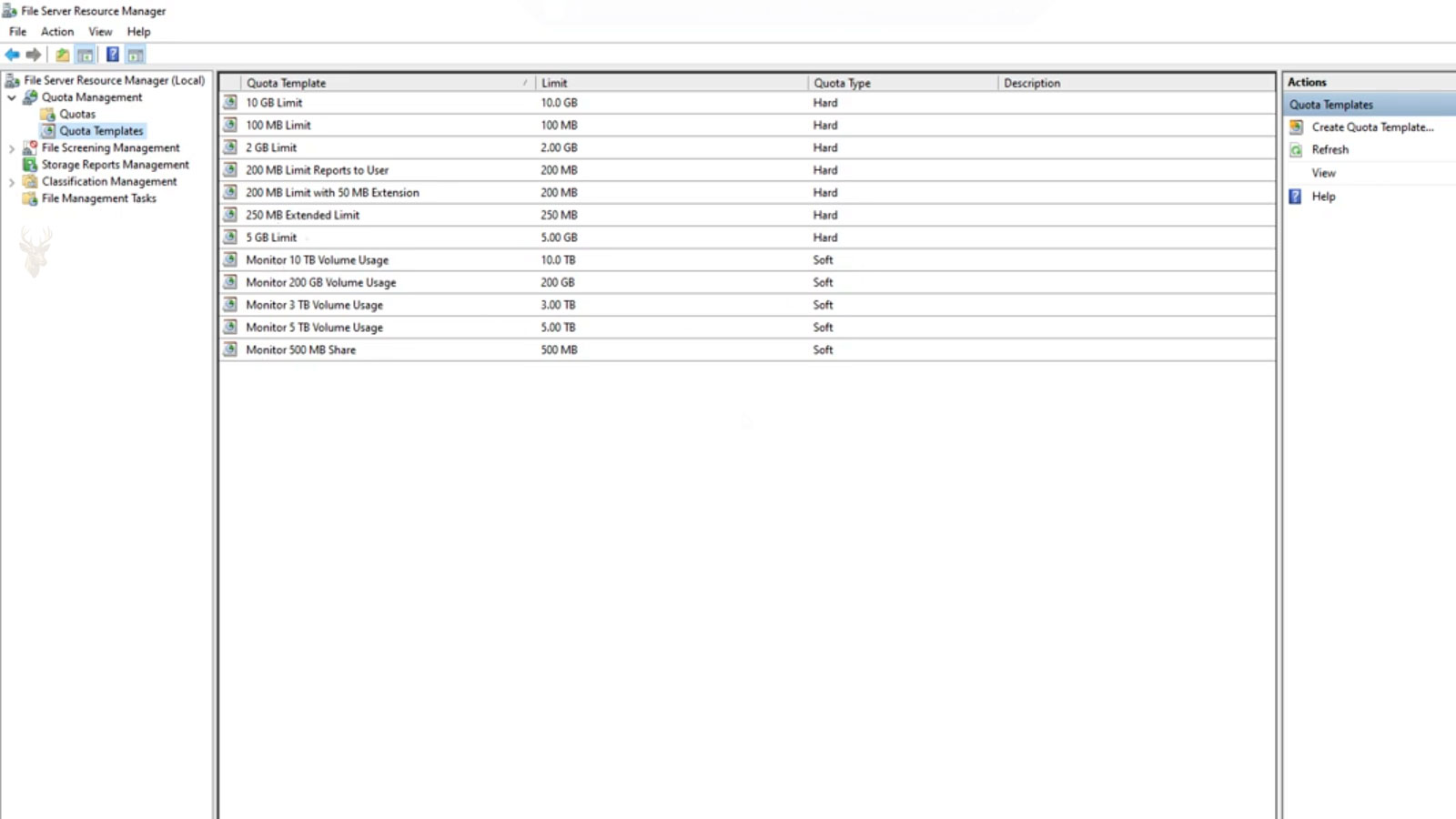
Controlling Storage Usage on Shared Computers and File Servers
As organizations accumulate documents, images, spreadsheets, and other business data, shared storage can fill much faster than expected. A few users storing unusually large files or unnecessary archives may consume a significant portion of the available space, leaving less capacity for everyone else.
One method Windows provides to help manage this situation is the use of disk quotas. A disk quota allows administrators to define how much storage a user may consume on a particular volume. Rather than waiting until a drive becomes completely full, quotas encourage balanced storage usage while providing administrators with better visibility into capacity planning.
Disk quotas are commonly found on business file servers, educational environments, and shared computers where multiple users save files to the same storage device.
What Disk Quotas Do
A disk quota monitors the amount of storage used by each individual user on a volume. Depending on the organization’s configuration, Windows may simply record usage, issue warning notifications, or prevent additional files from being saved after a defined storage limit has been reached.
- Tracks storage consumption by user.
- Issues warning thresholds.
- Applies maximum storage limits.
- Helps prevent unexpected disk exhaustion.
- Supports long-term capacity planning.
Because usage is monitored individually, one person’s storage habits are less likely to negatively affect every other user sharing the same volume.
Warning Levels and Hard Limits
Administrators often configure two quota levels. The first is a warning threshold that alerts users or administrators as storage usage approaches the assigned limit. The second is a hard limit that prevents additional data from being written once the maximum allowed space has been reached.
| Quota Level | Purpose |
|---|---|
| Normal usage | User continues saving files normally. |
| Warning threshold | Storage usage is approaching the assigned limit. |
| Hard limit | Additional storage may be denied until space is available. |
Quotas Are Different From Free Disk Space
A user can reach an assigned quota even when the storage device still contains a large amount of free space. Likewise, a storage volume can become completely full before every user reaches their individual quota if many people are using the same server.
This distinction helps administrators reserve storage fairly while still monitoring the overall capacity of the storage system itself.
A disk quota controls how much storage one user may consume, not how much free space remains on the entire drive.
Different Users Can Have Different Limits
Not every employee requires the same amount of storage. Someone working primarily with documents may need relatively little space, while engineers, designers, photographers, or video editors may legitimately require much larger allocations.
Windows allows administrators to assign different quota limits to different users or groups based on business requirements instead of applying one identical limit to everyone.
- Standard office employees.
- Engineering departments.
- Graphic design teams.
- Accounting personnel.
- Administrative staff.
Quota Reports Help Administrators Monitor Storage Growth
Windows can record how much storage each user consumes over time, allowing administrators to identify trends before a storage volume reaches capacity. Instead of waiting until users begin receiving errors, quota reports provide an opportunity to plan storage upgrades or adjust user allocations in advance.
Regular monitoring also helps identify unusually rapid growth that may indicate unnecessary file duplication, abandoned projects, or applications generating excessive temporary data.
- Track individual storage usage.
- Identify unusually large folders.
- Monitor long-term capacity trends.
- Plan future storage expansion.
- Review unexpected increases in disk usage.
Large Files Can Consume a Quota Quickly
Not every file contributes equally to quota usage. Thousands of small office documents may occupy less space than a single high-resolution video, engineering model, or virtual machine image. Users working with multimedia or technical data can reach their assigned quota much sooner than employees who primarily create text-based documents.
Understanding the types of files being stored helps administrators assign quota limits that reflect actual business requirements instead of applying identical limits to every employee.
| File Type | Typical Impact on Quota |
|---|---|
| Text documents | Usually very small. |
| Spreadsheets and presentations | Generally moderate. |
| Photos and graphics | Can consume space quickly. |
| Video files | Often very large. |
| Virtual machine files | May occupy tens or hundreds of gigabytes. |
Quotas Encourage Better File Management
When users know that storage space is limited, they are often more likely to remove duplicate files, delete obsolete information, and organize their folders more efficiently. This not only conserves storage but also makes important documents easier to locate.
Organizations that combine reasonable quotas with clear file retention policies often experience slower storage growth than environments where unlimited space is available.
Reasonable storage limits often encourage users to keep only the information they truly need.
Quota Warnings Reduce Unexpected Interruptions
A warning threshold gives users time to free space or request additional capacity before reaching the maximum limit. Without advance notification, employees may suddenly discover they can no longer save important documents during normal work.
Early warnings allow administrators to determine whether the increased storage usage is temporary, justified, or the result of unnecessary data accumulation.
- Review stored files.
- Remove unnecessary duplicates.
- Archive completed projects.
- Request additional storage when appropriate.
- Prevent work interruptions.
Quota Limits Should Match Business Requirements
Setting quota limits too low may interfere with normal work, while excessively large limits reduce the value of quota management. Organizations should evaluate how employees actually use storage before deciding on appropriate allocation levels.
Departments that regularly work with large engineering drawings, medical images, architectural plans, or multimedia projects often require considerably more storage than employees who primarily create office documents.
| Quota Strategy | Potential Outcome |
|---|---|
| Quota too small | Users frequently reach storage limits. |
| Quota appropriately sized | Storage remains balanced and productive. |
| Quota unnecessarily large | Storage growth becomes difficult to control. |
Quotas Work Alongside Other Storage Policies
Disk quotas are only one component of an overall storage management strategy. Organizations often combine quotas with scheduled backups, file retention policies, shared folder permissions, and storage monitoring to maintain both availability and long-term capacity.
Using these technologies together helps organizations manage growing amounts of data while reducing unnecessary storage consumption and maintaining access to important business information.
Storage quotas are most effective when combined with thoughtful data management rather than used as the only control mechanism.
File Ownership Determines Whose Quota Is Used
Quota usage is generally associated with the user who owns a file rather than the person who most recently opened or edited it. This distinction becomes important when administrators move data, restore files from backups, or transfer documents between employees.
If ownership is assigned incorrectly, storage may be counted against the wrong account. One employee could appear to exceed a quota even though much of the data belongs to someone else, while another user may seem to consume very little space despite maintaining a large collection of files.
- Restored files may retain older ownership information.
- Administrators can become the owner of copied data.
- Transferred projects may remain assigned to a former employee.
- Shared files may count against one specific account.
- Ownership changes can alter quota calculations.
Deleting Files May Not Reduce Usage Immediately
Users may expect their available space to increase as soon as files are deleted, but this does not always happen immediately. Deleted information may remain in a server-side Recycle Bin, snapshot, synchronization folder, or another protected location that continues to consume storage.
Quota records may also require time to update after large amounts of data are removed. If usage does not change as expected, administrators should confirm where the deleted files were moved and whether the quota system has completed its recalculation.
| Deletion Condition | Possible Effect |
|---|---|
| File permanently removed | Quota usage should decrease. |
| File moved to a Recycle Bin | Storage may still be counted. |
| Snapshot retains the data | Overall disk usage remains higher. |
| Quota records have not refreshed | Available space may appear unchanged temporarily. |
| Another copy exists | Deleting one version may free little space. |
Compressed Files Still Count Toward Storage Usage
Compressing files can reduce the amount of physical disk space they occupy, but quota behavior may depend on how the storage system measures usage. Some quota systems calculate the logical size of the files, while others consider the actual space consumed on the volume.
Users should not assume that enabling compression will always provide an equal increase in available quota. The amount saved depends on file type, compression efficiency, and the way the quota system records storage consumption.
A smaller file on disk does not always produce an identical reduction in recorded quota usage.
Moving Files Between Volumes Changes Quota Tracking
Disk quotas are typically applied to a specific storage volume. Moving a file from one volume to another removes its usage from the original quota system and adds it to the destination volume, provided quotas are enabled there.
Copying the same file instead of moving it creates an additional version, causing storage to be consumed in both locations. This can lead to unexpected quota growth when users duplicate large folders while reorganizing their data.
- Moving within the same volume usually preserves quota accounting.
- Moving to another volume transfers storage usage.
- Copying creates a second file and consumes additional space.
- External storage may not use the same quota rules.
- Cloud-synchronized copies can create additional storage demands.
Applications Can Fail When a Hard Limit Is Reached
When a user reaches a hard quota limit, the effect may extend beyond being unable to save a new document. Applications often create temporary files, recovery copies, databases, and configuration data while operating. If these files cannot be written, the program may display errors or stop working correctly.
Users may report that an application freezes, fails to save changes, or repeatedly asks for another location. The underlying problem may be insufficient quota space rather than a defect in the application itself.
| Observed Problem | Possible Quota Connection |
|---|---|
| Document will not save | The user has reached the hard limit. |
| Application cannot create a temporary file | No additional storage is available. |
| Profile settings are not retained | Configuration changes cannot be written. |
| Database operation fails | The application cannot expand its data file. |
| Export stops unexpectedly | The destination volume lacks available quota. |
Service Accounts May Need Separate Quota Planning
Some applications and automated processes store files under service accounts rather than normal employee accounts. Backup tools, scanners, reporting systems, and document management applications may generate large amounts of data without appearing in an individual user’s quota report.
Administrators should identify these accounts and assign limits carefully. A quota that is too restrictive can interrupt an essential business process, while no limit at all may allow automated data growth to fill the entire storage volume.
- Backup applications.
- Network scanning systems.
- Automated report generators.
- Database services.
- Document management platforms.
Increasing a Quota Does Not Solve Every Storage Problem
Raising a user’s storage limit may be appropriate when legitimate business files have outgrown the original allocation. However, repeatedly increasing quotas without reviewing the stored data can postpone a larger capacity problem rather than resolve it.
Administrators should determine whether the additional usage comes from active projects, duplicate files, abandoned archives, application data, or content that belongs in another storage location. This review helps separate genuine business needs from avoidable storage growth.
Additional capacity is useful when justified, but it should not replace regular storage review.
Quota Policies Need Periodic Review
Storage requirements change as organizations add employees, adopt new applications, and work with larger files. A quota policy that was reasonable several years earlier may become too restrictive or too generous as business needs evolve.
Periodic reviews allow administrators to adjust limits, evaluate warning thresholds, remove inactive accounts, and compare quota allocations with the actual capacity of the storage system.
- Review total storage capacity.
- Identify users approaching their limits.
- Examine unusually rapid growth.
- Adjust justified allocations.
- Archive or remove obsolete information.
- Plan future storage expansion.
Keeping Shared Storage Available
Disk quotas help prevent individual users or automated processes from consuming an unreasonable portion of shared storage. They provide warning levels, enforce limits, and give administrators a clearer view of how available capacity is being used.
Effective quota management requires more than selecting a maximum number. File ownership, business requirements, application behavior, deletion practices, and long-term storage growth all influence whether the policy works as intended. When limits are reviewed regularly and combined with backups, retention rules, and capacity monitoring, shared storage can remain organized and available to the people who depend on it.











