
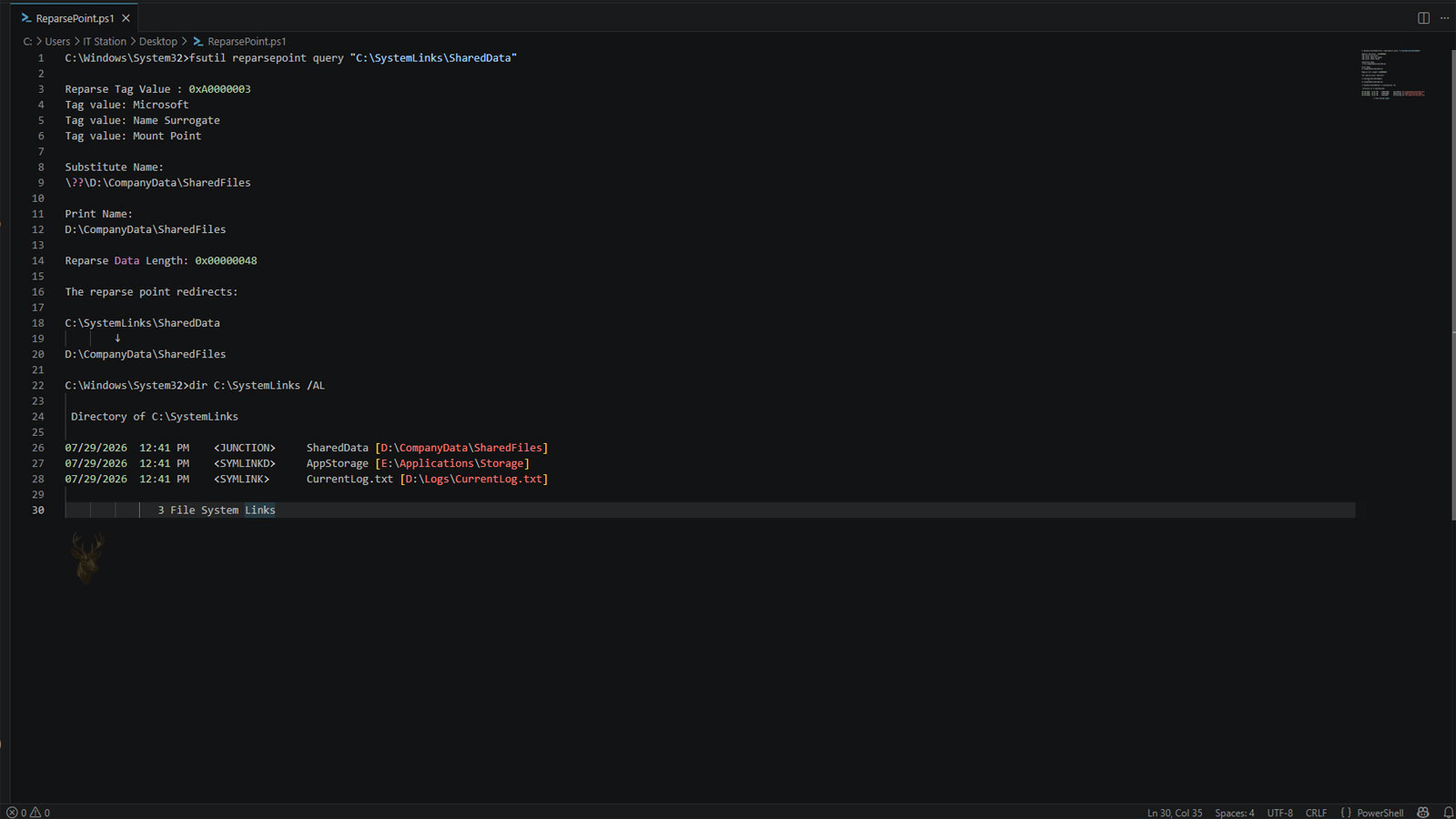
How NTFS Redirects File System Requests
Windows normally opens files and folders by following the information stored within the NTFS file system. Most directories behave exactly as they appear, allowing applications to read and write data directly. Some objects, however, contain additional information that instructs Windows to process the request differently. These special objects are known as reparse points.
A reparse point does not store user data itself. Instead, it contains metadata that tells Windows or an installed file system component how the access request should be handled before the operation continues.
Many advanced Windows storage features depend on reparse points, even though most users never realize they are being used.
A Reparse Point Changes How Windows Processes a Path
When Windows encounters a file or folder containing a reparse point, it pauses normal processing and examines the additional metadata associated with that object. Based on the stored information, Windows may redirect the request, invoke a specialized file system driver, or perform another supported action before continuing.
This process allows sophisticated storage features to work without changing how most applications access files.
A reparse point tells Windows to process a file system request differently before continuing normal access.
Several Windows Features Depend on Reparse Points
Reparse points provide the foundation for multiple NTFS technologies. Rather than being a single feature, they serve as a framework that allows Windows to implement several kinds of redirection and storage behavior.
| Windows Feature | Uses Reparse Points? |
|---|---|
| Directory junctions | Yes. |
| Symbolic links | Yes. |
| Volume mount points | Yes. |
| Certain cloud file providers | Yes. |
| Some third-party storage solutions | Yes. |
The Reparse Tag Identifies the Type
Each reparse point includes a tag that identifies how Windows should interpret the stored metadata. The tag allows the operating system to determine which file system component should process the request.
Different tags support different Windows features, making it possible for several technologies to coexist while sharing the same NTFS infrastructure.
- The tag identifies the reparse point type.
- Windows determines which handler should respond.
- Different storage features use different tags.
- Applications usually remain unaware of the process.
- The metadata itself depends on the feature being used.
Most Programs Continue Working Normally
One advantage of reparse points is that most software does not need to understand how they work internally. Applications simply request access to a file or folder, while Windows performs the necessary redirection before returning control to the program.
This compatibility allows advanced storage technologies to operate without requiring modifications to ordinary software.
Reparse Points Do Not Replace the File System
NTFS continues managing permissions, file records, timestamps, and storage allocation. Reparse points simply add instructions that modify how specific objects are processed during access.
Because they build upon NTFS rather than replacing it, existing file system features continue functioning alongside reparse-based technologies.
| NTFS Function | Handled By |
|---|---|
| Permissions | NTFS security. |
| Storage allocation | NTFS. |
| File metadata | NTFS. |
| Redirection behavior | Reparse point processing. |
| Application access | Windows I/O manager. |
Cloud Storage Can Use Reparse Points
Modern cloud synchronization services often rely on reparse points to represent files that appear available even though their contents are downloaded only when needed. Windows displays these placeholder files while retrieving the actual data when the user opens them.
This approach reduces local storage usage while allowing cloud-based files to appear as part of the normal directory structure.
Some cloud storage providers use reparse points so files can appear locally before their contents are downloaded.
Applications Usually Access the Final Destination
In many situations, programs never interact directly with the reparse point itself. Instead, Windows completes the required processing and presents the resulting file or folder to the application as though it had been accessed normally.
This transparent behavior is one reason reparse points are widely used throughout modern versions of Windows.
- An application requests a file or folder.
- Windows detects a reparse point.
- The associated handler processes the metadata.
- The request is redirected or otherwise modified.
- The application continues working with the resulting location.
A Foundation for Several Advanced Windows Features
Reparse points provide the mechanism that allows Windows to implement folder redirection, symbolic links, cloud storage placeholders, and other advanced storage capabilities while maintaining compatibility with everyday applications.
In the next part, we’ll examine how reparse points behave during backups, file transfers, software installations, security checks, and troubleshooting, along with the situations where redirected file system operations can produce unexpected results.
Copying a Reparse Point Can Change What Gets Transferred
File-copy programs do not all interpret reparse points the same way. One utility may preserve the special metadata, while another may follow the reparse point and copy the files found at the resulting destination.
This distinction matters because a transfer that appears to contain one folder may unexpectedly include a much larger collection of data located somewhere else.
Copying a reparse point may preserve the instruction or follow it to the data it represents.
The Result Depends on the Reparse Point Type
A symbolic link, junction, volume mount point, and cloud placeholder can all use reparse-point technology, but they do not produce identical results during a copy operation. Each type contains different instructions and may require a different Windows component or storage provider to interpret it.
For that reason, software must identify the reparse tag before deciding how the object should be handled.
| Reparse Point Type | Possible Copy Behavior |
|---|---|
| Symbolic link | The link may be preserved or its target may be copied. |
| Junction point | The redirect may remain intact or the destination folder may be expanded. |
| Volume mount point | The mounted volume may be treated as a separate storage location. |
| Cloud placeholder | The file may be downloaded before copying. |
| Third-party reparse point | Specialized software may be required to interpret it. |
Backups Must Decide Whether to Preserve or Follow
Backup software faces the same choice as a copy utility. It can record the reparse point as a special NTFS object, follow the redirection and save the destination data, or use a combination of both approaches.
A backup that follows every redirect without recognizing repeated destinations may store the same files more than once. A backup that preserves only the reparse information may later require the original target or software provider to restore access correctly.
- The reparse point metadata may be backed up.
- The destination data may be included separately.
- Redirected folders may be counted more than once.
- Cloud placeholders may need to be hydrated before backup.
- Restoration behavior depends on the backup application.
Restoring to Another Computer May Not Recreate the Same Behavior
A restored reparse point may depend on a drive, folder, service, or software component that existed on the original computer. If that supporting environment is missing, the restored object may remain visible without functioning as intended.
This is especially important when backups are restored to a different Windows installation or a computer with a different storage layout.
| Missing Requirement | Possible Result |
|---|---|
| Original destination path | The redirect cannot be completed. |
| Expected drive or volume | The target remains unavailable. |
| Cloud storage provider | Placeholder files may not retrieve their contents. |
| Third-party file system driver | The reparse data may not be recognized. |
| Required permissions | Access may be denied after restoration. |
Cloud Placeholders May Download During File Operations
A cloud placeholder can appear in File Explorer even when its full contents are not currently stored on the computer. Opening, copying, scanning, or backing up the file may cause the cloud provider to retrieve the data from its remote storage service.
This process is commonly called hydration. Once hydrated, the file contains locally accessible data rather than only the information required to request it.
A file that appears present may still require an internet connection before its complete contents become locally available.
Offline Access Depends on the File’s Current State
Some placeholder files remain available only while the computer can communicate with the associated cloud service. Others have already been downloaded and can be opened without an active connection.
The visible filename alone may not reveal whether the complete file is stored locally, so transfer and recovery work should account for the file’s availability state.
- Windows detects the placeholder reparse point.
- The cloud provider receives the access request.
- The provider checks whether the contents are stored locally.
- Missing data is downloaded when connectivity is available.
- The application receives access after hydration finishes.
Security Permissions Still Control the Final Location
A reparse point does not automatically bypass NTFS permissions. Windows still evaluates whether the user or application has permission to access the file, folder, mounted volume, or service reached through the reparse operation.
A user may therefore be able to see the original object but receive an Access Denied message when Windows attempts to continue into the destination.
- The visible path may have its own permissions.
- The destination can have different security settings.
- Cloud providers may require account authentication.
- Mounted volumes retain their own access controls.
- Security software may block unusual reparse behavior.
Security Tools Pay Close Attention to Redirected Paths
Reparse points can make one directory lead to another location, which creates additional considerations for antivirus software, backup agents, system scanners, and administrative tools. These programs must decide whether to inspect only the original object or continue through the redirect.
Proper reparse-point handling helps prevent malicious software from hiding files behind unexpected paths or causing a scanner to process the same location repeatedly.
| Security Concern | Protective Response |
|---|---|
| Redirect to a protected folder | Verify destination permissions. |
| Repeated directory loop | Stop recursive scanning. |
| Unknown reparse tag | Require a trusted handler. |
| Unexpected cloud download | Inspect the retrieved file. |
| Redirect outside an expected location | Apply path validation. |
Damaged Reparse Data Can Make an Object Inaccessible
If the metadata associated with a reparse point becomes corrupted, Windows may be unable to determine how the request should be processed. The file or folder can still appear in a directory listing while refusing to open correctly.
The resulting error may resemble a missing file, unavailable location, unsupported format, or general file system problem, depending on the type of reparse point involved.
An Unrecognized Tag Can Produce Unexpected Errors
Windows must locate a compatible component for the tag stored in the reparse point. If the required driver, cloud provider, or third-party application has been removed, the operating system may no longer know how to continue processing the object.
This can occur after uninstalling software, restoring files to another computer, or connecting a drive that was previously used with specialized storage tools.
The reparse point may still exist even after the software responsible for interpreting it has been removed.
File System Repairs Must Avoid Removing Valid Metadata
Reparse points are legitimate NTFS structures, so they should not be deleted simply because they appear unusual. Removing one without identifying its purpose can break Windows compatibility paths, cloud-file access, mounted storage, or application data locations.
A proper investigation first determines the reparse tag, the expected handler, and the destination or service associated with the object.
- Confirm that the file or folder contains a reparse point.
- Identify the reparse tag and feature type.
- Determine which component should process it.
- Verify that the destination or provider remains available.
- Repair or recreate the object only after its purpose is understood.
Storage Calculations May Include the Same Data More Than Once
A storage analyzer that follows every reparse point may encounter the same files through multiple paths. This can make folder totals appear larger than the amount of physical disk space actually consumed.
NTFS-aware utilities usually detect reparse points and offer options for excluding redirects, mount points, or cloud placeholders from repeated calculations.
The Visible Object May Depend on Something Else
Reparse points allow Windows to present files and folders that rely on another directory, storage volume, cloud provider, or specialized file system component. Their behavior during copying, backups, restoration, scanning, and permission checks depends on the instructions stored within the reparse data.
In the final part, we’ll examine volume mount points, cloud integration, administrative uses, troubleshooting practices, and the role reparse points play in modern Windows storage management.
Volume Mount Points Are Built on Reparse Point Technology
One of the most practical uses of reparse points is the creation of volume mount points. Instead of assigning every storage volume a drive letter, Windows can mount an entire volume within an existing folder. Applications continue using the folder while Windows transparently redirects access to another storage device.
This allows administrators to expand storage without changing familiar folder structures or modifying application settings.
A storage volume can appear as an ordinary folder because a reparse point redirects access behind the scenes.
Modern Cloud Storage Relies on Reparse Points
Several cloud synchronization platforms use reparse points to support on-demand file access. Placeholder files occupy very little local storage until a user opens them, at which point the cloud provider retrieves the actual contents.
This approach allows large cloud libraries to remain visible in File Explorer without requiring every file to be stored permanently on the local drive.
| Storage Feature | Benefit |
|---|---|
| Volume mount point | Adds storage without requiring another drive letter. |
| Cloud placeholders | Reduce local disk usage. |
| Directory junctions | Maintain compatibility with existing folder paths. |
| Symbolic links | Redirect applications to another location. |
| Specialized storage software | Extends Windows storage capabilities. |
Reparse Points Support Windows Without Drawing Attention
Most Windows users interact with reparse points every day without realizing it. Opening folders, browsing synchronized cloud storage, accessing compatibility paths, or using mounted volumes often involves reparse-point processing that happens entirely in the background.
Because Windows performs the redirection before applications receive access, the experience usually appears identical to working with ordinary files and folders.
- Applications usually require no modification.
- Users continue working with familiar folder paths.
- Storage devices can be organized more flexibly.
- Cloud services integrate with File Explorer.
- Compatibility with older software is preserved.
Administrative Tools Can Reveal Hidden Redirection
Although File Explorer often hides the complexity of reparse points, Windows includes administrative utilities capable of identifying them. System administrators frequently inspect these objects when diagnosing storage problems, investigating unusual folder behavior, or validating backup configurations.
Recognizing that a file or folder contains a reparse point often explains behavior that initially appears inconsistent or unexpected.
Not Every File System Supports Reparse Points
Reparse points are an NTFS feature. When files are copied to storage that does not support them, the special metadata may be removed or converted into ordinary files and folders, depending on the destination and the copy utility being used.
This is one reason administrators verify storage formats before migrating systems that rely on advanced NTFS features.
| Storage Scenario | Possible Outcome |
|---|---|
| Copy between NTFS volumes | Reparse metadata may be preserved. |
| Copy to another file system | Redirection information may be lost. |
| Restore from an NTFS-aware backup | Original behavior can often be maintained. |
| Archive using unsupported software | Special metadata may not be retained. |
| Move within the same NTFS volume | Behavior is generally preserved. |
Troubleshooting Begins With Identifying the Reparse Type
Because several Windows technologies share the same reparse-point framework, identifying the specific reparse tag is often the first step in diagnosing a problem. A symbolic link, junction, cloud placeholder, and mount point may appear similar at first glance while requiring completely different troubleshooting methods.
Determining which component owns the reparse point helps identify whether the issue involves storage, cloud synchronization, permissions, or a missing software provider.
Understanding the type of reparse point is usually more important than simply knowing that one exists.
Removing a Reparse Point Should Never Be the First Step
Deleting a reparse point without understanding its purpose can disconnect applications from their data, break compatibility paths, interfere with cloud synchronization, or make mounted storage inaccessible. The safer approach is to determine why the object exists before deciding whether any changes are necessary.
Many reparse points are intentional parts of Windows and should remain untouched during normal system maintenance.
- Identify the technology using the reparse point.
- Confirm that the supporting software is still installed.
- Verify the destination or storage provider.
- Review backup and synchronization requirements.
- Remove the reparse point only when its purpose is fully understood.
Windows Continues Expanding Their Role
As Windows storage technologies continue to evolve, reparse points remain an important mechanism for introducing new capabilities without changing how most applications access files. They provide the flexibility needed for cloud integration, storage virtualization, compatibility improvements, and other advanced file system features.
Because the framework already exists within NTFS, Microsoft and software developers can build additional storage features while maintaining compatibility with existing applications.
- Windows receives a file-system request.
- A reparse point is detected.
- The appropriate handler examines the reparse tag.
- The request is redirected or processed according to the stored metadata.
- The application continues working with the resulting file or folder.
The Foundation Behind Advanced Windows Storage Features
Reparse points are one of the mechanisms that allow Windows to extend the capabilities of the NTFS file system without changing how most applications interact with files and folders. Technologies such as symbolic links, junction points, mount points, and cloud file placeholders all rely on this framework to redirect or modify file-system operations in a controlled manner.
Although they usually remain invisible during everyday computing, reparse points play an essential role in modern Windows storage management. Understanding how they function helps explain file redirection, cloud synchronization, backup behavior, and advanced troubleshooting scenarios that would otherwise appear difficult to understand.











