
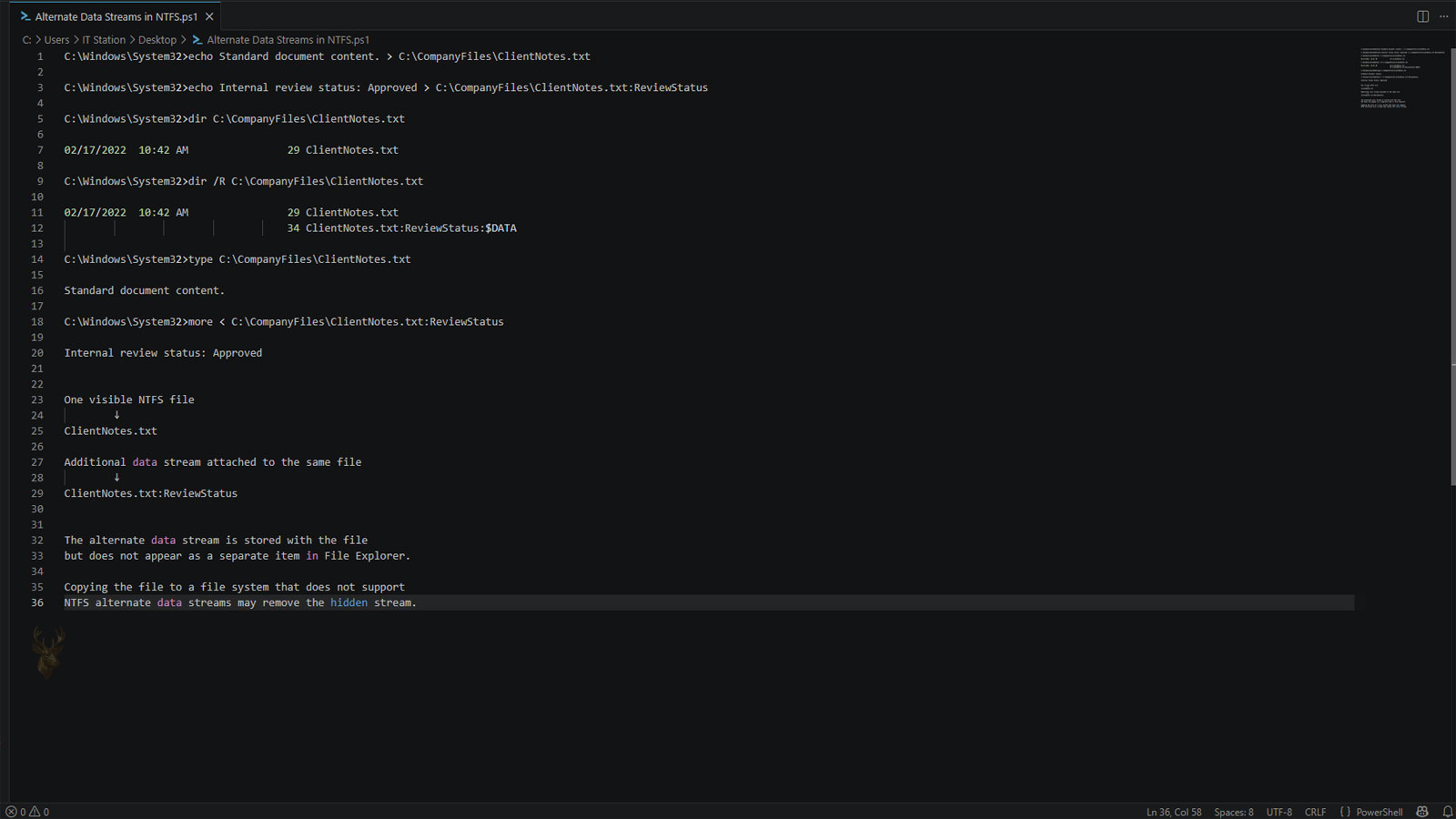
NTFS Files Can Store More Than One Stream of Information
Most Windows users think of a file as containing a single body of information. A document contains text, a photograph contains image data, and a video contains audio and video streams. Within the NTFS file system, however, a file can also contain additional streams that are separate from its primary contents.
These additional storage areas are known as Alternate Data Streams (ADS). They allow extra information to be associated with a file without changing what normally appears when the file is opened.
Although Alternate Data Streams have existed since the early versions of NTFS, many Windows users never encounter them directly because they operate almost entirely behind the scenes.
Why Alternate Data Streams Exist
Alternate Data Streams were introduced primarily to improve compatibility with other file systems while providing Windows with a flexible way to associate additional information with existing files. Instead of creating separate companion files, certain information can remain attached to the original document.
This design allows applications and Windows itself to store supporting data while keeping the primary file unchanged from the user’s perspective.
A single NTFS file can contain multiple streams even though only one is normally visible during everyday use.
The Primary Stream Holds the Visible Contents
Every ordinary file includes a default data stream that stores the information users expect to see. When a document is opened in a word processor or an image is viewed in a photo application, that primary stream is the portion being read.
Alternate streams do not replace this primary data. Instead, they provide additional storage areas that software may use for other purposes.
| Stream Type | Purpose |
|---|---|
| Primary data stream | Stores the visible file contents. |
| Alternate data stream | Stores additional information associated with the file. |
| Metadata | Describes properties of the file itself. |
| File attributes | Record characteristics such as Hidden or Read-only. |
| Security information | Maintains ownership and permission details. |
Windows Uses Alternate Streams for Certain Features
Some Windows features rely on Alternate Data Streams to store information that helps the operating system make security or usability decisions. Because this information remains attached to the file, it continues traveling with the file while it stays on an NTFS volume.
One familiar example is the information Windows may attach to files downloaded from the internet. This helps Windows determine whether additional security warnings should be displayed before the file is opened.
- Security-related information.
- Application-specific data.
- Compatibility features.
- Supporting information used by Windows.
- Additional content linked to the primary file.
Most Applications Ignore Alternate Streams
The majority of programs open only the primary data stream because that contains the information users expect to work with. Unless an application is specifically designed to read or write Alternate Data Streams, those additional streams remain invisible during normal operation.
This explains why a file can contain more information than is immediately apparent when viewed in File Explorer or opened in a standard application.
Alternate Streams Are Unique to NTFS
Alternate Data Streams are a feature of the NTFS file system. If a file is copied to another storage format that does not support them, the additional streams may be discarded while the primary file contents remain intact.
For this reason, information stored in Alternate Data Streams is not guaranteed to survive every file transfer or storage migration.
| Storage Location | Alternate Data Streams Supported? |
|---|---|
| NTFS volume | Yes. |
| FAT32 volume | No. |
| exFAT volume | No. |
| Optical media | Typically no. |
| Many cloud storage services | Varies depending on the service. |
An Overlooked Feature of the NTFS File System
Alternate Data Streams are rarely visible during everyday computer use, yet they provide Windows and compatible applications with a flexible way to associate additional information with existing files. In the next part, we’ll examine how Alternate Data Streams are created, when they disappear, and the practical situations in which Windows relies on them.
Downloaded Files May Carry Security Information
One of the most common uses of Alternate Data Streams in Windows is to record where a file came from. When a file is downloaded from the internet or received through certain applications, Windows may attach an additional stream containing zone information.
This information allows Windows and supported programs to recognize that the file originated outside the local computer. The operating system can then display a warning, block certain actions, or request confirmation before the file is opened.
| File Source | Possible Windows Response |
|---|---|
| Local computer | The file usually opens without an internet-origin warning. |
| Internet download | Windows may display a security warning. |
| Email attachment | The file may be treated as coming from an external source. |
| Network location | Behavior can depend on the assigned security zone. |
| Trusted internal source | Fewer warnings may appear when policies allow it. |
The Mark of the Web Is Stored Separately
The security information attached to many downloaded files is commonly known as the Mark of the Web. On NTFS volumes, this information is often stored in an Alternate Data Stream rather than inside the visible contents of the file.
Because the warning information remains separate, the document, program, archive, or image does not need to be modified internally. Windows can evaluate the additional stream while the primary data remains unchanged.
A downloaded file can look identical to a local file while still carrying an invisible record of its origin.
Security Warnings Depend on the Program Opening the File
Windows may store the origin information, but the way it is used depends partly on the application opening the file. Some programs check the stream and display a warning, while others may ignore it completely.
Office applications, browsers, archive utilities, and executable-file protections may interpret this information differently. As a result, the same downloaded file may produce different behavior depending on the program used to open it.
- Windows may show an Open File security warning.
- Office applications may open documents in Protected View.
- Archive utilities may preserve or remove the origin information.
- Some applications do not examine Alternate Data Streams.
- Security policies can change how warnings are handled.
Extracted Files May Inherit the Download Warning
When a compressed archive is downloaded, the archive itself may receive the Mark of the Web. Some extraction tools transfer that security information to the files removed from the archive, while others do not.
This can explain why a document or installer extracted from a downloaded ZIP file still produces a warning even though the extracted item was not downloaded separately.
| Action | Possible Result |
|---|---|
| Open the downloaded archive | The archive may display a warning. |
| Extract with Windows tools | Extracted items may inherit origin information. |
| Extract with another utility | Behavior varies by application. |
| Copy extracted files to another NTFS folder | The stream may remain attached. |
| Copy to unsupported storage | The stream may be removed. |
Copying Between NTFS Locations Usually Preserves Streams
When a file is copied from one NTFS location to another, Alternate Data Streams can normally travel with it. This applies whether the destination is another folder on the same volume or a different NTFS-formatted drive.
The exact result can still depend on the application or transfer method. Some backup programs, synchronization tools, and network services preserve Alternate Data Streams, while others copy only the primary contents.
Unsupported File Systems Can Strip the Additional Streams
If an NTFS file is copied to FAT32, exFAT, or another destination that does not support Alternate Data Streams, Windows may warn that some properties cannot be copied. The visible file usually remains usable, but the additional streams can be lost.
Returning the file to an NTFS volume later does not automatically restore the discarded information. Once the stream has been removed, only another source containing that stream can provide it again.
- The original file contains a primary stream and one or more alternate streams.
- The file is copied to a destination that does not support ADS.
- The primary contents are transferred.
- The unsupported streams are discarded.
- The returned copy contains only the information that survived the transfer.
A File’s Displayed Size May Not Tell the Complete Story
File Explorer normally displays the size of the primary data stream. Additional information stored in Alternate Data Streams may not be obvious from the standard size shown beside the file.
This means two files with identical visible contents and matching displayed sizes could still differ because one contains additional streams and the other does not.
The size shown in File Explorer may describe the main contents without revealing every stream attached to the file.
Renaming a File Does Not Normally Remove Its Streams
Changing a filename does not usually affect Alternate Data Streams because the streams remain associated with the underlying NTFS file record. The visible name changes, but the file and its attached information continue to exist together.
Moving the file within the same NTFS volume also tends to preserve the streams because Windows is updating the file’s location rather than rebuilding it on a different file system.
| Operation | Typical Effect on ADS |
|---|---|
| Rename the file | Streams normally remain attached. |
| Move within the same NTFS volume | Streams are generally preserved. |
| Copy to another NTFS volume | Streams are often preserved. |
| Copy to FAT32 or exFAT | Streams are usually lost. |
| Upload through a web service | Preservation varies by service. |
Unblocking a File Can Remove Its Origin Stream
Windows may provide an Unblock option in the properties of a downloaded file. Using this option removes or changes the information that causes Windows to treat the file as originating from an external security zone.
Unblocking does not verify that the file is safe. It only removes the warning information, so the file should be trusted and examined before that protection is disabled.
- Confirm where the file came from.
- Verify that the sender or website is trusted.
- Scan the file when appropriate.
- Review digital signatures when available.
- Unblock only after the file has been evaluated.
Backup Software May Handle ADS Differently
A backup is not necessarily an exact copy of every NTFS feature. Some backup applications preserve Alternate Data Streams, permissions, timestamps, and other file system information, while simpler tools may save only the primary contents.
This difference can matter when restoring downloaded-file warnings, application-specific data, or other information stored outside the main stream.
| Backup Method | Possible ADS Handling |
|---|---|
| Full system image | Often preserves NTFS structures more completely. |
| NTFS-aware backup software | May retain Alternate Data Streams. |
| Basic file copy | Depends on the destination and copy method. |
| Cloud synchronization | May discard unsupported streams. |
| Copy to removable exFAT storage | Usually removes ADS information. |
Alternate Streams Can Be Used for More Than Security
Although internet-origin information is the most familiar example, applications can use Alternate Data Streams for other purposes. A program may store classifications, compatibility information, identifiers, or supporting data that belongs with the primary file.
The usefulness of this design depends on the data remaining on a compatible NTFS volume and being accessed by software that understands the stream.
Additional Streams Can Change During Ordinary Transfers
Alternate Data Streams can remain attached through renaming, local moves, and many NTFS-to-NTFS copies, yet disappear when files pass through unsupported drives, cloud services, archives, or applications that copy only the primary contents.
In the final part, we’ll examine the security risks associated with hidden streams, methods used to identify them, their role in troubleshooting, and the precautions that should be taken before removing unfamiliar data from an NTFS file.
Hidden Streams Can Complicate Security Investigations
Because Alternate Data Streams are not normally visible in File Explorer, they have occasionally attracted attention in computer security discussions. While most streams are created for legitimate Windows functions, software can also store additional information in these hidden areas.
The existence of an Alternate Data Stream does not automatically indicate malware or suspicious activity. Many streams are created by Windows itself or by trusted applications performing normal operations.
An Alternate Data Stream is simply an NTFS feature. Its purpose depends entirely on how it is being used.
Most Computer Users Never Encounter Alternate Data Streams Directly
For everyday tasks such as editing documents, viewing photographs, installing software, or browsing files, Alternate Data Streams usually remain invisible. Windows handles them automatically whenever they are needed.
As a result, many users work with NTFS for years without realizing that files can contain more than one stream of information.
| Everyday Activity | ADS Usually Visible? |
|---|---|
| Opening a document | No. |
| Viewing photographs | No. |
| Copying files within NTFS | No. |
| Installing software | No. |
| Browsing folders | No. |
Specialized Tools Can Display Alternate Streams
Although File Explorer normally focuses on the primary file contents, administrators and technicians can use specialized utilities to identify Alternate Data Streams attached to files. These tools help determine whether streams exist and what type of information they contain.
This capability is useful during troubleshooting, security reviews, and forensic investigations where understanding every component of a file may be important.
- File system diagnostic utilities.
- Administrative command-line tools.
- Digital forensic software.
- Security auditing applications.
- NTFS inspection utilities.
Removing Streams Can Affect Windows Features
Deleting an Alternate Data Stream may remove useful information along with any unwanted data. For example, removing the Mark of the Web eliminates the information Windows uses to determine that a file originated from the internet.
Applications that depend on their own Alternate Data Streams may also lose supporting information if those streams are removed without understanding their purpose.
Business Environments May Rely on Attached Information
Organizations sometimes use software that stores classification information, workflow identifiers, or document-management data in Alternate Data Streams. These applications expect the additional information to remain attached while the file stays on an NTFS volume.
If files are transferred through systems that remove Alternate Data Streams, certain business functions may no longer operate as intended even though the documents themselves remain readable.
| Possible Use | Benefit |
|---|---|
| Document management | Stores supporting information with the file. |
| Security classification | Associates labels with documents. |
| Workflow tracking | Supports business processes. |
| Application settings | Retains software-specific information. |
| Windows security | Records internet-origin information. |
File Integrity Remains Separate From Alternate Streams
In most situations, removing or losing an Alternate Data Stream does not damage the primary contents of the file. A document, photograph, or spreadsheet usually remains readable because its main data stream has not been altered.
However, the supporting information stored in the additional stream may no longer be available, which can change how Windows or another application treats the file.
The primary document and its Alternate Data Streams are related, but they are not the same thing.
Copy Methods Can Produce Different Results
Not every method of copying files preserves Alternate Data Streams. Two files that appear identical after a transfer may differ internally because one still contains its additional streams while the other does not.
This distinction is one reason administrators often verify important file transfers instead of assuming every NTFS feature survived the move.
- Select the files to transfer.
- Choose the destination storage.
- Perform the copy operation.
- Verify whether NTFS features were preserved.
- Confirm that the copied files behave as expected.
Alternate Streams Are Not a Replacement for Metadata
Metadata and Alternate Data Streams serve different purposes. Metadata describes properties such as dates, authors, and attributes, while Alternate Data Streams provide additional storage areas that software can use independently of the primary file contents.
Although both remain associated with a file, they are separate NTFS features and should not be confused with one another.
| Feature | Main Purpose |
|---|---|
| Metadata | Describes characteristics of the file. |
| Alternate Data Stream | Stores additional information alongside the file. |
| File attributes | Control operating system behavior. |
| NTFS permissions | Manage access to the file. |
| Primary data stream | Contains the visible contents. |
Preserving NTFS Features Depends on the Entire Storage Path
Whether Alternate Data Streams survive a transfer depends on every step involved. A file may begin on an NTFS drive, pass through cloud synchronization, removable media, email, or another file system before reaching its destination. Any stage that does not support Alternate Data Streams can remove them.
Understanding the complete transfer path helps explain why identical-looking copies of the same file can behave differently on different computers.
- Keep files on NTFS when Alternate Data Streams must be preserved.
- Verify transfers involving removable media.
- Expect different behavior after cloud synchronization.
- Review application requirements before removing streams.
- Understand that not every storage system supports NTFS features.
Conclusion
Alternate Data Streams are a long-standing feature of the NTFS file system that allows Windows and compatible applications to associate additional information with a file while leaving its primary contents unchanged. Most users never interact with them directly, yet they support important operating system functions such as downloaded-file security information and application-specific features.
Because Alternate Data Streams are supported only by NTFS, they may disappear when files are copied through unsupported storage systems or transfer methods. Understanding how they work helps explain differences between seemingly identical files and highlights the importance of preserving NTFS features whenever those additional streams are required.











