
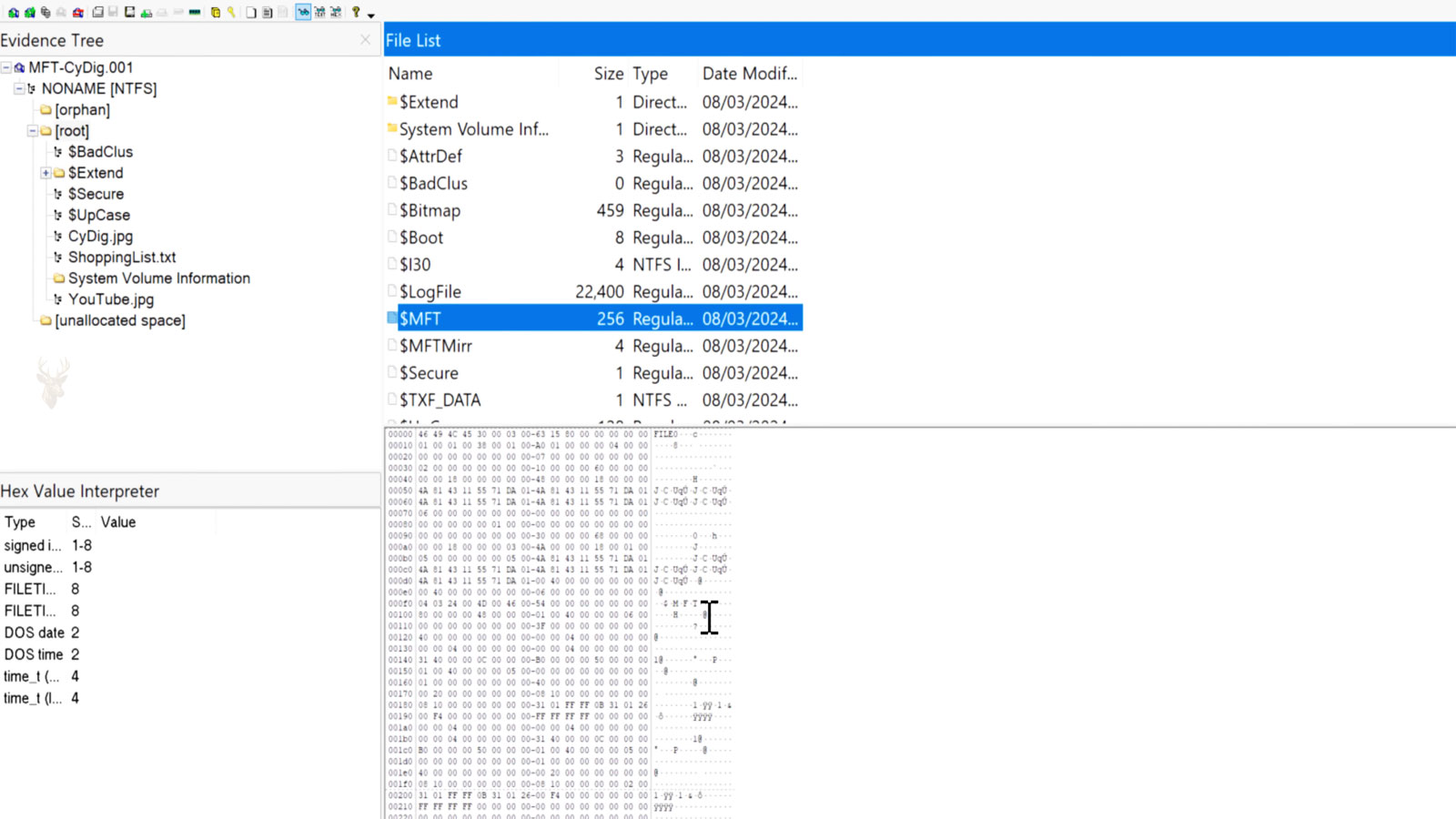
The Master File Table Is the Foundation of the NTFS File System
When Windows displays a file or opens a folder, it does not search the entire storage drive to locate the information. Instead, the NTFS file system consults an internal database called the Master File Table (MFT), which keeps records describing every file and folder stored on the volume.
The Master File Table acts as the central index of an NTFS partition. It records where files are located, their names, sizes, timestamps, attributes, security information, and many other details that allow Windows to access data quickly and consistently.
Without this organized structure, locating millions of files on modern storage devices would be far slower and considerably less reliable.
Every File Receives an Entry
Each file and folder stored on an NTFS volume is represented by its own record inside the Master File Table. Rather than storing only the filename, the record contains numerous attributes describing the object and where its data is located.
Even the Master File Table itself is represented as a special file within NTFS, demonstrating how consistently the file system organizes information.
The Master File Table is essentially the directory that tells Windows where every NTFS file belongs.
What Information Is Stored in an MFT Record?
| Stored Information | Purpose |
|---|---|
| File name | Identifies the file or folder. |
| File attributes | Stores information such as Read-only, Hidden, or System. |
| Timestamps | Records creation, modification, and access times. |
| Security descriptor | References ownership and NTFS permissions. |
| Data location | Points Windows to where the file contents are stored. |
| File size | Records the amount of stored data. |
The MFT Stores Information, Not the Entire File
Most files are too large to fit inside an MFT record. Instead of storing the complete document, the record normally contains references that identify the storage clusters containing the actual data.
When a user opens a file, Windows reads the corresponding MFT entry, locates the required storage clusters, and retrieves the file contents from those locations.
- The MFT identifies the file.
- It records where the data is stored.
- Windows follows those references to read the file.
- The application receives the requested data.
- The user sees the completed document.
Small Files May Be Stored Directly Inside the MFT
Very small files can sometimes fit entirely within their own MFT record. These are known as resident files because both the metadata and the file contents remain together inside the Master File Table.
Larger files become non-resident, meaning the MFT stores only the descriptive information while the file data occupies separate storage clusters elsewhere on the drive.
Folders Also Receive MFT Entries
Directories are managed in much the same way as ordinary files. Each folder has its own MFT record containing information about the directory itself and references to the files and subfolders it contains.
This consistent structure allows Windows to navigate through complex folder hierarchies efficiently without scanning every storage location individually.
| NTFS Object | MFT Role |
|---|---|
| File | Stores descriptive information and data references. |
| Folder | Tracks contained files and subdirectories. |
| System file | Maintains essential NTFS information. |
| Resident file | Stores both metadata and file contents together. |
| Non-resident file | Uses references to external storage clusters. |
The MFT Allows Windows to Find Files Efficiently
Every time Windows opens, copies, renames, deletes, or searches for a file on an NTFS volume, it depends on the Master File Table to identify that object’s location and characteristics. In the next part, we’ll examine how the MFT grows, how fragmentation affects it, and why corruption within the Master File Table can make an otherwise healthy storage device appear to have lost its files.
The Master File Table Expands as Storage Is Used
Every time a file or folder is created on an NTFS volume, Windows adds another record to the Master File Table (MFT). As more information is stored, the MFT grows to accommodate additional entries while maintaining an organized index of the file system.
On computers containing hundreds of thousands or even millions of files, the Master File Table can become quite large. Even so, Windows is designed to manage this growth efficiently without requiring users to interact with the MFT directly.
| Activity | Effect on the MFT |
|---|---|
| Create a file | A new record is added. |
| Create a folder | A directory record is created. |
| Delete a file | The record is marked as available for reuse. |
| Rename a file | The existing record is updated. |
| Move within the same NTFS volume | The record is updated without creating a new file. |
Windows Reserves Space for Future Growth
NTFS attempts to reduce fragmentation by reserving space near the beginning of the volume for future expansion of the Master File Table. This reserved area allows additional records to be added without immediately scattering them across different parts of the storage device.
If the drive becomes heavily filled with data, portions of the reserved area may eventually be used for ordinary files. The MFT can still continue growing, although it may no longer remain in one continuous location.
NTFS plans ahead by leaving room for the Master File Table to expand as the volume grows.
Fragmentation Can Affect the Master File Table
Ideally, the Master File Table occupies a mostly continuous area of storage. As free space becomes limited, however, additional MFT records may need to be written into separate locations.
This fragmentation generally has less impact on modern solid-state drives than on traditional hard drives, but maintaining an orderly structure still helps Windows locate file records efficiently.
- Nearly empty drives provide room for orderly MFT growth.
- Very full drives increase the likelihood of fragmentation.
- Large numbers of files require additional MFT records.
- Modern SSDs reduce mechanical access delays.
- NTFS continues tracking files regardless of MFT size.
Deleting a File Does Not Remove Its Record Immediately
When a file is deleted, its MFT entry is not instantly erased. Instead, Windows marks the record as available so it can be reused later if needed. Until that happens, portions of the previous record may still exist on the storage device.
This behavior helps explain why some deleted files can sometimes be recovered before new data overwrites the available space.
Each Record Contains Multiple Attributes
An MFT record is made up of several attributes rather than one block of information. These attributes describe different characteristics of the file, allowing NTFS to separate names, timestamps, permissions, and storage locations into organized components.
Because of this flexible design, NTFS can support a wide variety of file types while maintaining a consistent internal structure.
| Attribute | Purpose |
|---|---|
| Standard Information | Stores timestamps and basic attributes. |
| File Name | Records the displayed filename. |
| Security Information | References permissions and ownership. |
| Data | Contains or references the file contents. |
| Index Information | Supports folder organization. |
File Records Are Identified Internally
Every MFT record receives its own internal record number. Windows uses these identifiers when managing files behind the scenes, even though users normally work with filenames and folders instead.
This separation between user-friendly names and internal records allows files to be renamed without changing the underlying record that represents them.
- Windows locates the appropriate MFT record.
- The record identifies the required storage clusters.
- NTFS reads the requested data.
- The information is sent to the application.
- The document is displayed to the user.
Corruption Can Prevent Windows From Locating Files
If important portions of the Master File Table become damaged, Windows may no longer know where certain files are located even though much of their actual data still exists elsewhere on the storage device.
This is one reason file system corruption can make a drive appear empty or inaccessible despite the storage media itself continuing to function.
When the Master File Table cannot describe stored data correctly, Windows may lose track of otherwise intact files.
Damage to the MFT Does Not Always Mean Data Is Gone
A damaged Master File Table affects the map that Windows uses to locate files, not necessarily the file contents themselves. Depending on the extent of the corruption, specialized recovery tools may still identify data by rebuilding portions of the file system or scanning storage directly.
The success of these methods depends on how much of the MFT remains intact and whether new information has overwritten the affected storage areas.
| Situation | Possible Result |
|---|---|
| Minor file system inconsistency | Windows may repair the structure automatically. |
| Partial MFT corruption | Some files remain accessible while others do not. |
| Severe corruption | The volume may appear unreadable. |
| Healthy MFT | Files are located normally. |
| Successful reconstruction | Previously inaccessible files may become available again. |
Routine File Operations Depend on the MFT
Opening, copying, renaming, deleting, searching, and moving files all involve reading or updating information stored in the Master File Table. Although users rarely notice its activity, the MFT is involved in nearly every interaction with an NTFS storage volume.
Its continuous maintenance allows Windows to manage millions of files while presenting them through the familiar folders and filenames seen in File Explorer.
The Master File Table Keeps NTFS Organized
As files are created, modified, moved, and deleted, the Master File Table grows and changes to reflect the current state of the storage volume. In the final part, we’ll examine backup records, repair mechanisms, recovery considerations, and why protecting file system integrity is just as important as protecting the stored data itself.
NTFS Maintains a Backup of Critical File System Information
Because the Master File Table is essential to locating files, NTFS stores additional information to improve reliability. One important safeguard is the Master File Table mirror, commonly called the MFT Mirror, which contains copies of several critical MFT records.
The mirror is not a complete duplicate of the entire Master File Table. Instead, it preserves enough key information to help Windows recover from certain types of file system damage.
The MFT Mirror improves file system resilience by protecting the most important NTFS records.
File System Damage Can Have Many Causes
Problems affecting the Master File Table are often caused by unexpected interruptions while Windows is writing data. Sudden power loss, improper shutdowns, failing storage devices, controller errors, or memory corruption can damage important file system structures.
In many situations the storage device itself remains functional, but Windows can no longer interpret the information describing where files are stored.
| Possible Cause | Potential Effect |
|---|---|
| Unexpected power loss | Incomplete file system updates. |
| Storage device failure | Damaged MFT records. |
| Controller communication errors | Corrupted metadata. |
| Faulty memory | Incorrect information written to disk. |
| Forced shutdown | Interrupted write operations. |
Windows Can Detect Certain Types of Corruption
Windows continuously checks the consistency of the NTFS file system during normal operation. If inconsistencies are detected, the operating system may schedule repairs or request that the volume be examined during startup.
These repair procedures attempt to restore the logical structure of the file system without unnecessarily affecting user data.
- Windows detects inconsistencies.
- The volume may be marked for repair.
- Startup checks examine file system structures.
- Damaged records may be repaired when possible.
- Normal access resumes after successful repair.
Repair Utilities Focus on File System Integrity
Utilities that repair NTFS primarily concentrate on restoring the consistency of the file system itself. They verify directory structures, allocation records, indexes, and Master File Table entries to ensure that Windows can correctly locate stored information.
Although these tools can resolve many logical problems, they cannot repair physical damage inside a failing storage device.
Healthy Hardware Is Still Essential
The Master File Table depends on reliable storage hardware. If the drive develops unreadable sectors or suffers electronic failure, even a perfectly organized file system may become inaccessible.
For this reason, diagnosing storage hardware and verifying drive health are important whenever recurring file system problems appear.
| Component | Role |
|---|---|
| Master File Table | Tracks file system organization. |
| Storage device | Stores the actual file contents. |
| Controller | Transfers data between the drive and the computer. |
| Memory | Temporarily holds information during file operations. |
| Power system | Supports uninterrupted write operations. |
Backups Remain the Best Protection
Although NTFS includes numerous safeguards, no file system can eliminate every possible risk. Hardware failure, accidental deletion, malware, or severe corruption can still prevent access to important information.
Maintaining current backups remains the most dependable way to protect valuable documents regardless of the condition of the Master File Table.
A healthy file system improves reliability, but only backups protect against every type of data loss.
Data Recovery Often Begins With the MFT
When recovering files from an NTFS volume, recovery software usually examines the Master File Table first. Existing records can provide filenames, folder locations, timestamps, and references to the data clusters where files were stored.
If the MFT is severely damaged, recovery utilities may instead perform a raw scan of the storage media, identifying files by their internal signatures rather than by their original directory information.
- Read available MFT records.
- Locate referenced storage clusters.
- Rebuild directory information when possible.
- Perform raw scans if necessary.
- Recover accessible files.
Large Volumes Depend Even More on the MFT
Modern computers frequently store millions of files across terabytes of storage. Managing such large volumes efficiently would be impractical without a centralized index like the Master File Table.
By maintaining detailed records instead of repeatedly scanning the entire drive, NTFS allows Windows to locate files quickly regardless of how much information is stored.
| Benefit | How the MFT Helps |
|---|---|
| Fast file access | Uses indexed records instead of scanning the drive. |
| Reliable organization | Keeps structured information for every object. |
| Efficient searching | Allows Windows to locate records rapidly. |
| Consistent permissions | Maintains security information with each record. |
| Scalable storage | Supports very large numbers of files and folders. |
Most Users Never Notice the MFT
Under normal conditions, the Master File Table works entirely behind the scenes. Users create folders, rename documents, copy files, and install software without needing to understand the internal records that make these operations possible.
Its importance usually becomes apparent only when corruption, hardware failure, or data recovery efforts require a closer look at how NTFS manages stored information.
Conclusion
The Master File Table is one of the most important components of the NTFS file system. It records the information Windows needs to identify files, locate their contents, enforce permissions, and organize folders efficiently across modern storage devices.
Although users rarely interact with it directly, nearly every file operation depends on the accuracy of the MFT. Understanding its role helps explain why file system corruption can affect access to data, why backups remain essential, and why maintaining healthy storage hardware is just as important as protecting the files themselves.











