
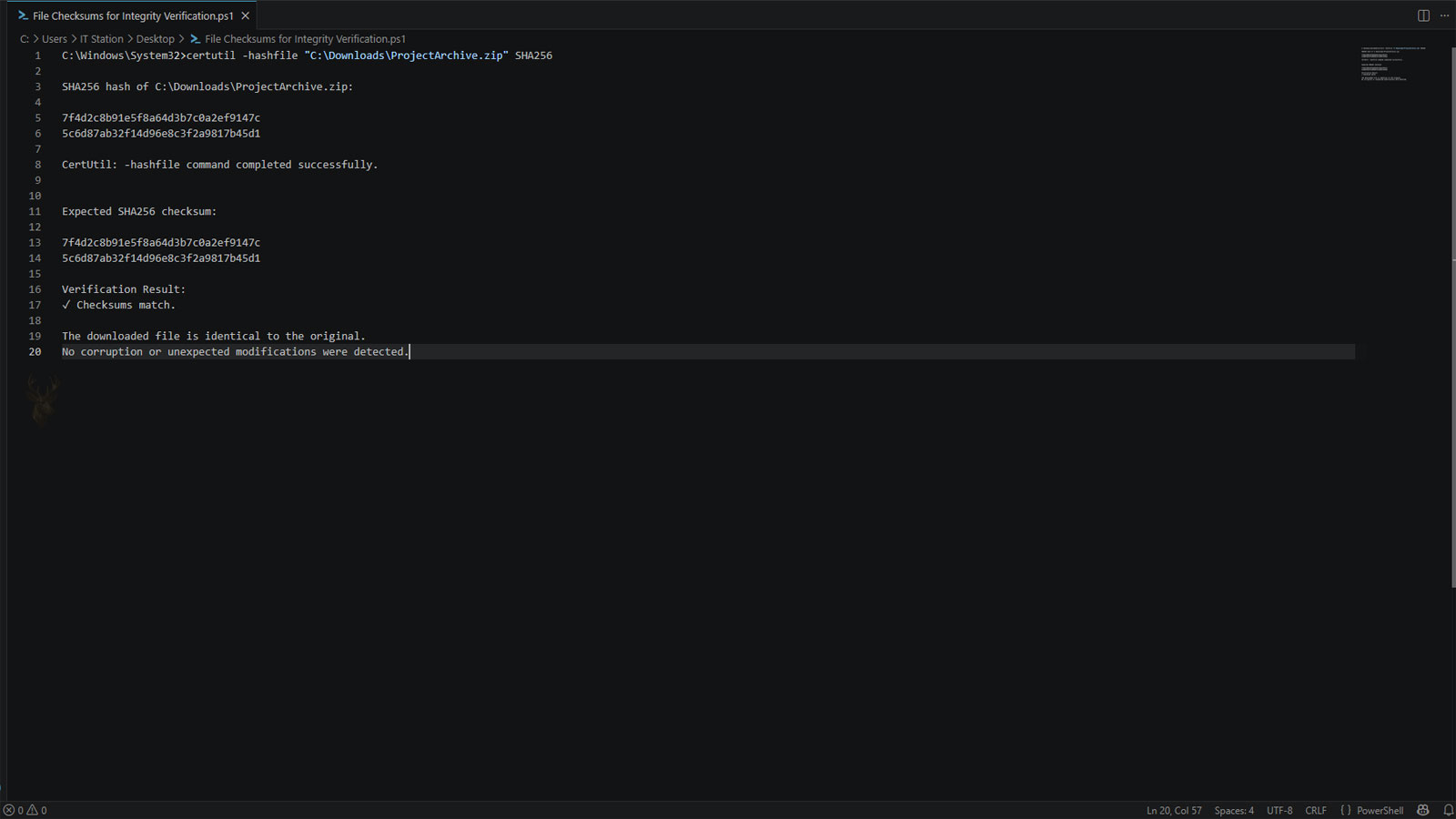
A Checksum Can Reveal Whether a File Has Changed
A computer file may appear normal even when part of its data has changed. The name, extension, size, and visible icon can remain familiar while corruption, an incomplete transfer, or an unexpected modification prevents the file from working correctly.
A checksum provides another way to examine file integrity. Instead of opening the document, installer, archive, or backup and reviewing its contents manually, checksum software processes the file and produces a value that represents the data stored inside it.
When two copies produce the same expected checksum, there is strong evidence that their contents match. A different result indicates that something changed, although the checksum alone does not explain when or why the change occurred.
Checksums Are Calculated From File Data
A checksum is generated by applying a mathematical algorithm to the contents of a file. The result is commonly displayed as a long sequence of letters and numbers known as a hash value.
Even a small change inside the file normally produces a different value. Renaming the file without altering its contents, however, does not usually change the checksum because the calculation is based on the data rather than the visible name.
A checksum identifies the current contents of a file, not the name displayed in File Explorer.
Matching Values Support File Integrity
A checksum becomes most useful when there is a trusted value available for comparison. Software developers may publish a checksum beside a download, backup systems may record values during creation, or a technician may calculate one before transferring important data.
After the file is downloaded, copied, restored, or received, another checksum can be calculated. Matching values indicate that the compared file data remained the same.
| Comparison Result | Typical Meaning |
|---|---|
| Values match exactly | The compared file contents are likely identical. |
| Values are different | The file contents changed or the wrong copy was checked. |
| No trusted value exists | The checksum can be recorded, but originality cannot be confirmed. |
| Different algorithms were used | The resulting values cannot be compared directly. |
Different Algorithms Produce Different Hash Values
Several checksum and cryptographic hash algorithms are used in computing. Each one processes the file differently and produces a value in its own format and length.
The algorithm used for the original value must also be used for the new calculation. An SHA-256 result cannot be compared with an MD5 result, even when both were generated from the same file.
- CRC values are often used to detect accidental data errors.
- MD5 remains available in many older tools and archives.
- SHA-1 appears in some legacy verification systems.
- SHA-256 is widely used for modern file verification.
- SHA-512 produces a longer cryptographic hash value.
Downloaded Software Is a Common Use
Large operating system images, firmware packages, application installers, and driver downloads may include published checksum values. Verifying the downloaded file can reveal whether the transfer completed correctly or whether the file differs from the version provided by the publisher.
This can prevent time from being spent troubleshooting an installation that repeatedly fails because the installer itself is incomplete or damaged.
File Transfers Can Be Verified Before the Originals Are Removed
When important folders are copied to another drive, the visible presence of the files does not always confirm that every byte transferred correctly. Checksums can be used to compare the source files with their destination copies before the originals are deleted or the old storage device is retired.
| Situation | Purpose of Verification |
|---|---|
| Copying files to a new computer | Confirms that destination copies match the originals. |
| Moving data to an external drive | Checks the transfer before old files are removed. |
| Downloading an installation image | Detects incomplete or altered downloads. |
| Restoring a backup | Helps confirm that restored files match recorded values. |
| Sending a large archive | Allows the recipient to verify the received copy. |
A Checksum Does Not Repair Corrupted Data
A different checksum can confirm that the file no longer matches the expected copy, but it does not repair the damage. The affected file may need to be downloaded again, restored from another backup, recopied from the source, or recovered through another method.
The calculation also does not identify which part of the file changed. It only shows that the overall contents produced a different result.
An Untrusted Checksum Provides Limited Assurance
A checksum is only as trustworthy as the source providing the comparison value. If an unsafe website distributes both a modified download and a checksum created from that same file, the two values will still match.
For meaningful verification, the file and its published checksum should come from an official or otherwise trusted source. Secure websites, signed software, and publisher documentation may provide additional evidence that the download is legitimate.
Verification Depends on a Reliable Comparison
File checksums provide a practical way to compare downloads, backups, transferred data, and stored copies without opening every item individually. Matching values support the conclusion that the underlying file contents remained unchanged.
In the next part, we will examine common checksum algorithms, the situations where older methods provide weaker protection, and the difference between detecting accidental corruption and identifying deliberate modification.
Common Checksum Algorithms Serve Different Purposes
Several algorithms can generate checksums or cryptographic hash values, but they were not all designed with the same goals in mind. Some focus primarily on detecting accidental transmission errors, while others are intended to make intentional modification much more difficult to conceal.
Older algorithms remain available because many existing applications and archives still rely on them. Modern software publishers, however, frequently recommend stronger algorithms when verifying downloads and important files.
| Algorithm | Common Purpose |
|---|---|
| CRC32 | Detects accidental transmission or storage errors. |
| MD5 | Legacy file verification and compatibility with older systems. |
| SHA-1 | Still found in some older software but gradually being replaced. |
| SHA-256 | Modern software distribution and integrity verification. |
| SHA-512 | Higher-security environments and large-scale data verification. |
Detecting Damage Is Different From Identifying Its Cause
A checksum can indicate that a file has changed, but it cannot determine why. A mismatched value may result from storage failure, an interrupted download, memory errors during transfer, accidental editing, or intentional modification.
Additional investigation is usually required before deciding whether the file should be restored from backup, downloaded again, or examined for other problems.
A checksum answers whether the contents changed, not what caused the change.
Checksums Help Verify Large Backups
Organizations that maintain large backups often record checksum values while creating the backup set. Later, those values can be recalculated to confirm that archived files remain unchanged after months or even years of storage.
This process is particularly valuable for long-term archives that are rarely opened but must remain reliable when eventually restored.
- Confirms archived files remain unchanged over time.
- Detects corruption before a restore is needed.
- Verifies copied backup sets stored on multiple drives.
- Supports periodic integrity testing.
- Provides confidence before deleting older storage media.
Storage Devices Can Develop Silent Data Errors
Not every storage problem causes obvious symptoms such as unreadable files or drive failures. In some cases, isolated sectors or transmission errors may alter stored information while the file continues to appear accessible.
Checksum verification can reveal these unexpected differences before the files are needed for important work, reducing the chance of discovering corruption during a critical restore or installation.
| Situation | Benefit of Using Checksums |
|---|---|
| Long-term backups | Confirms archived files remain intact. |
| External drive copies | Verifies successful transfers. |
| Cloud storage synchronization | Confirms uploaded and downloaded copies match. |
| Software deployment | Ensures installation files remain complete. |
| Large media archives | Detects unnoticed file corruption. |
Checksums Can Verify Individual Files or Entire Collections
Verification is not limited to a single document or installer. Many backup applications, synchronization tools, and enterprise storage systems generate checksum values for thousands of files automatically.
This allows administrators to compare entire collections after migration, replication, or restoration without opening every individual file.
File Size Alone Cannot Confirm Integrity
Two files may have exactly the same size while containing different information. Likewise, two files with identical names may contain completely different data. A checksum evaluates the contents themselves rather than relying on visible characteristics.
This makes checksum comparison significantly more reliable than checking filenames, timestamps, or file sizes alone.
- Identical filenames do not guarantee identical contents.
- Matching file sizes do not prove a successful transfer.
- Modification dates can change during copying.
- Checksums compare the actual stored data.
- Verification works regardless of file type.
Checksum Verification Is Useful During Data Migration
Moving information between storage devices, replacing servers, or upgrading computers often involves copying thousands of files. Calculating checksum values before and after the migration provides additional confidence that the destination contains complete copies of the original data.
Because migrations frequently occur only once, discovering missing or altered files afterward may be much more difficult than verifying them during the transfer process.
Generating a Checksum Does Not Alter the File
Checksum utilities read the existing file data to perform their calculations. The process itself does not modify the document, installer, photograph, database, or archive being examined.
This allows integrity verification to be performed repeatedly throughout the life of a file without changing its contents.
Reliable Verification Depends on Consistent Comparison
Checksums provide an efficient way to compare files after downloads, backups, migrations, and long-term storage. By generating values from the underlying data, they can detect changes that are not visible through filenames, sizes, or timestamps.
In the final part, we’ll examine practical situations where checksum verification prevents unnecessary troubleshooting, discuss common misconceptions about hash values, and explain why integrity verification is an important step before relying on important files.
Checksum Verification Can Prevent Unnecessary Troubleshooting
When an installer, archive, backup, or transferred file fails to work, the problem may be blamed on the computer, operating system, or application. Verifying the checksum first can reveal that the file itself differs from the expected copy.
This simple comparison can prevent repeated installation attempts, unnecessary software changes, or hardware testing when the real issue is an incomplete or altered file.
Confirming file integrity early can separate a damaged file from a computer problem.
A Matching Checksum Does Not Prove a File Is Safe
A checksum can confirm that a file matches a reference copy, but it does not automatically prove that the reference file is trustworthy. A harmful or improperly modified file can still produce a valid checksum if the published value was calculated from that same copy.
Security depends on obtaining the file and the comparison value from a reliable source. Digital signatures, official download pages, antivirus scanning, and publisher documentation may provide additional evidence that the file is legitimate.
| Verification Method | What It Helps Confirm |
|---|---|
| Checksum comparison | Whether the file contents match a known value. |
| Digital signature | Whether the software was signed by an identified publisher. |
| Antivirus scan | Whether known malicious patterns are detected. |
| Official download source | Whether the file came from the expected provider. |
| File reputation | Whether the file has been commonly recognized or reported. |
Different Tools May Display the Same Value Differently
Checksum utilities may display letters in uppercase or lowercase, add spaces, or include the algorithm name beside the result. These formatting differences do not necessarily mean the values are different.
The comparison should focus on the complete sequence of characters after unnecessary spaces or labels are removed. Every character must still match in the correct order.
- Uppercase and lowercase hexadecimal letters usually represent the same value.
- Spaces added for readability may be ignored.
- The complete sequence must be compared.
- The same algorithm must be used on both files.
- Partial matches do not confirm integrity.
Checksum Files Can Store Values for Many Items
Large software packages and archives sometimes include a separate checksum file containing values for multiple files. A verification program can read this list and compare every included item automatically.
This method is more practical than copying and comparing individual values when a folder contains hundreds or thousands of files.
| Collection Type | Use of a Checksum List |
|---|---|
| Software distribution folder | Confirms that all installation components are present and unchanged. |
| Backup archive | Checks multiple stored files during routine integrity testing. |
| Photograph collection | Detects altered or corrupted image files. |
| Document transfer | Verifies that all destination copies match the source. |
| Server migration | Compares large directory structures after copying. |
Renaming a File Usually Does Not Change Its Checksum
Changing a filename normally affects only the directory information used to identify the file. Because the data inside remains the same, the checksum generally remains unchanged.
Editing the file, adding metadata stored within it, recompressing an archive, or saving it through another application can produce a different value even when the visible content appears similar.
Similar-Looking Files May Have Different Values
Two documents or images can look identical while containing small internal differences. Metadata, embedded previews, formatting details, compression settings, or application-specific information may change the checksum.
A mismatch therefore does not always mean the visible content is damaged. It means the underlying data is not identical to the reference copy.
Visual similarity is not the same as byte-for-byte equality.
Verification Should Occur Before the Source Is Discarded
When data is being moved from an old computer, failing drive, server, or backup device, the destination should be verified while the original source is still available. Once the source is erased or discarded, correcting an incomplete transfer may no longer be possible.
- Complete the copy to the destination storage device.
- Generate or compare checksum values.
- Investigate every mismatch before continuing.
- Open a sample of important files for additional confirmation.
- Retain the source until the destination has been verified.
Repeated Mismatches May Point to a Larger Problem
If the same file produces changing checksum values across repeated reads, the problem may extend beyond an ordinary failed download. Unstable memory, a failing storage device, defective cables, controller problems, or other hardware faults can interfere with reliable data access.
A single mismatch may be corrected by downloading or copying the file again. Repeated inconsistencies across different files or devices should be investigated before more important data is transferred.
| Observed Pattern | Possible Explanation |
|---|---|
| One downloaded file does not match | The transfer may have been incomplete. |
| Many files copied to one drive do not match | The destination drive or connection may be unreliable. |
| The same source file produces changing values | Storage, memory, or hardware instability may be present. |
| Only files from one archive fail | The archive itself may be damaged. |
| Values differ after an application saves the file | The program may have modified internal data or metadata. |
Checksum Records Should Be Stored Separately
When checksums are used for long-term backup verification, the recorded values should be stored somewhere reliable. Keeping the checksum list only on the same storage device as the files can limit its usefulness if that device becomes damaged or inaccessible.
A separate backup, management system, or protected record allows the stored files to be checked later against the original values.
Checksums Are Most Effective as Part of a Larger Process
Checksum verification is valuable, but it should not replace backups, storage monitoring, malware protection, or routine testing. It confirms whether data matches a known reference, while other tools address availability, security, and hardware health.
- Maintain more than one copy of important files.
- Verify transfers before deleting the originals.
- Use modern algorithms when stronger verification is required.
- Obtain comparison values from trusted sources.
- Investigate repeated mismatches instead of ignoring them.
File Integrity Can Be Confirmed Before the Data Is Needed
File checksums provide a practical way to confirm that downloads, backups, archives, and transferred files still match their expected contents. They can expose changes that are invisible in filenames, icons, sizes, and modification dates.
A matching value offers strong evidence that two copies are identical when the same algorithm and a trustworthy reference are used. A mismatch indicates that the file changed, but additional investigation is required to determine whether the cause was corruption, incomplete transfer, software modification, or deliberate alteration.
Calculating checksums before important files are distributed, archived, migrated, or removed from their original storage provides a dependable checkpoint and reduces the risk of relying on damaged or incomplete data later.











