
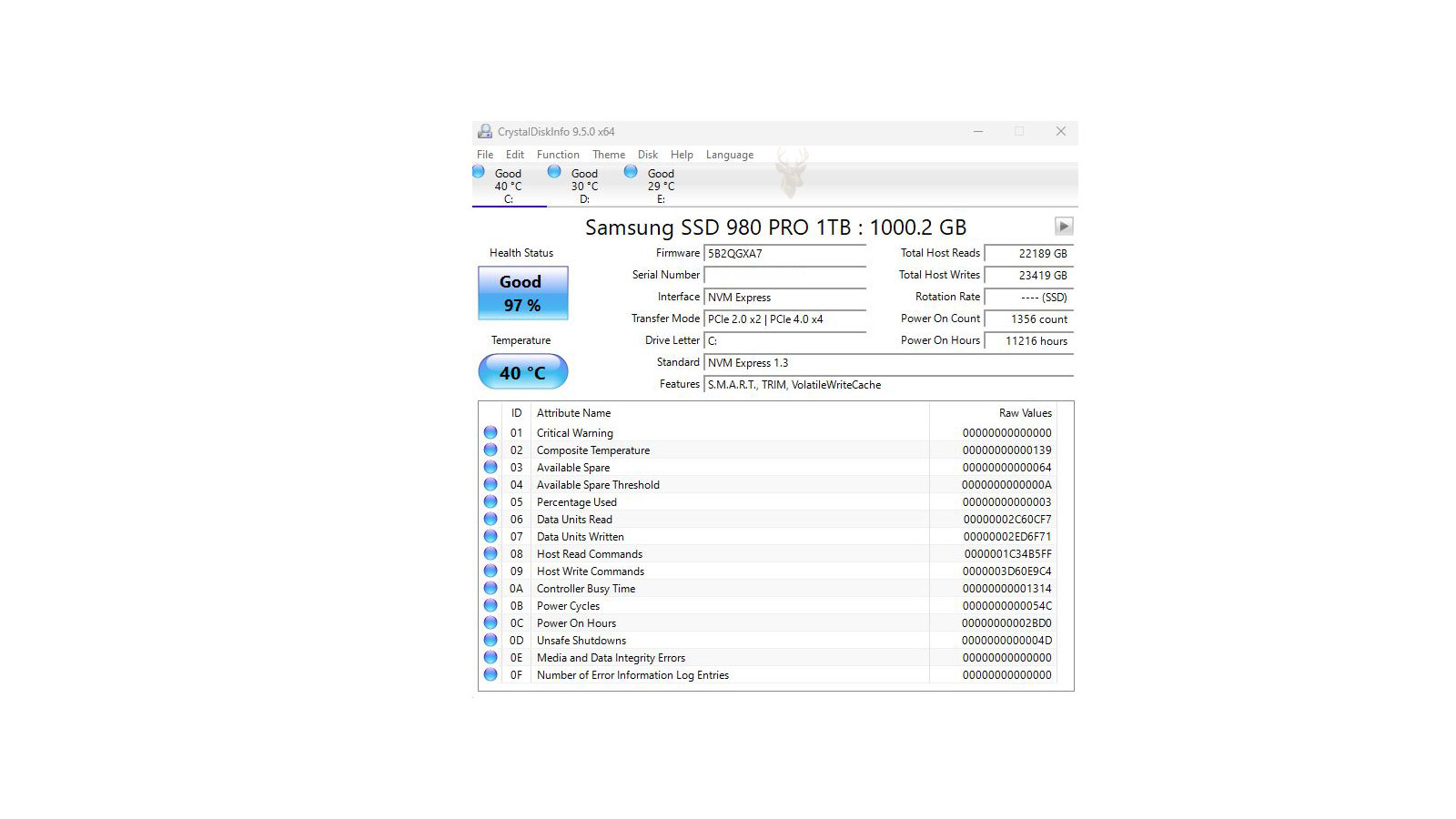
The Health Data Recorded Inside Modern Storage Devices
Modern hard drives and solid-state drives continuously record operating information about their own condition. This internal reporting system, known as SMART (Self-Monitoring, Analysis, and Reporting Technology), tracks numerous measurements that may help identify developing storage problems before complete failure occurs.
Although SMART is an important diagnostic resource, it is often misunderstood. Many users assume that a drive reporting “Healthy” cannot fail, while others believe that every SMART warning means immediate data loss. Neither assumption accurately reflects how the technology is designed to work.
SMART Was Designed to Observe Long-Term Storage Behavior
Rather than performing a single test only when requested, SMART continually records information while the drive operates. The firmware monitors numerous internal conditions and compares them against manufacturer-defined thresholds. If certain values move beyond acceptable limits, the drive can report that its reliability is declining.
Examples of Information SMART May Track
- Read error activity
- Write error activity
- Temperature history
- Power-on hours
- Unexpected power interruptions
Purpose of the Monitoring
- Detect gradual deterioration
- Identify abnormal operating patterns
- Support preventative maintenance
- Assist diagnostic software
- Provide early warning when possible
Instead of focusing on one isolated event, SMART attempts to recognize patterns that suggest storage reliability is changing over time. Those patterns are often more useful than a single measurement taken on one particular day.
Every Drive Maintains Its Own Collection of Health Attributes
SMART information is organized into individual attributes maintained by the drive firmware. Each attribute represents one aspect of drive operation and is continually updated as the storage device is used.
Examples of Common SMART Attributes
- Power-on hours
- Power cycle count
- Operating temperature
- Reported read errors
- Pending sector activity (hard drives)
- Media wear information (solid-state drives)
- Unexpected shutdown events
Not every manufacturer records exactly the same attributes or interprets them identically. Some values are standardized, while others are proprietary and may only have meaning within a specific product family.
A Healthy SMART Status Does Not Guarantee That a Drive Cannot Fail
One of the most common misconceptions is that a healthy SMART report guarantees complete drive reliability. In reality, SMART evaluates only the information the drive is capable of observing. A sudden electronic failure, controller malfunction, firmware corruption, or unexpected physical damage can occur without producing an earlier SMART warning.
SMART is an early warning system when conditions can be measured—not a guarantee that every storage failure can be predicted.
For this reason, regular backups remain essential even when every diagnostic utility reports that a drive is operating normally. Monitoring improves the opportunity to recognize developing problems, but it cannot eliminate every risk associated with electronic storage.
Mechanical Hard Drives and Solid-State Drives Report Different Types of Information
Although both technologies support SMART, the information collected reflects the different ways the devices operate. Mechanical hard drives monitor moving components and magnetic media, while solid-state drives focus more heavily on flash memory usage, controller activity, and remaining media endurance.
Hard Drive Examples
- Spin-up behavior
- Sector stability
- Read retry activity
- Head positioning events
Solid-State Drive Examples
- Flash wear measurements
- Remaining endurance estimates
- Controller health indicators
- Total data written
Because the technologies age differently, interpreting SMART information requires understanding the type of storage device being evaluated rather than assuming every reported value has the same meaning across all drives.
Raw Values and Normalized Scores Are Not the Same Measurement
SMART utilities often display more than one number for the same attribute. A normalized value may appear beside a worst recorded value, a failure threshold, and a raw value. These numbers serve different purposes and should not be interpreted as though they were interchangeable.
The normalized score is usually calculated by the drive manufacturer. In many cases, a higher normalized number represents a better condition, and the score declines as the monitored behavior changes. The threshold marks the point at which the manufacturer considers that attribute to have crossed into a failure condition.
The raw value is the underlying count or measurement recorded by the firmware. It might represent hours, sectors, errors, temperature events, or another internal activity. However, the meaning and formatting of that number can vary between manufacturers, and some utilities may display it in decimal while others use hexadecimal notation.
A large raw number is not automatically bad, and a small number is not automatically safe without knowing what the attribute represents.
This is why comparing one attribute value from two unrelated drive models can be misleading. The drives may use different scales, internal calculations, and reporting methods even when the software places the information under similar labels.
Reallocated Sectors Show That a Hard Drive Has Substituted Damaged Areas
A mechanical hard drive stores data across a large number of physical sectors. When the drive determines that one of those sectors can no longer be used reliably, it may replace the damaged location with a reserved spare sector. SMART records this activity through a reallocation-related attribute.
One reallocated sector does not always mean the drive will stop working immediately. The replacement system exists so the drive can continue operating when a small number of media defects appear. The more important question is whether the count remains stable or continues increasing.
A Stable Count
A drive may record a limited number of reallocations and then operate for a period without additional changes. The event still deserves documentation and closer monitoring, particularly when the device stores important information.
A Rising Count
Continued growth suggests that more areas of the magnetic surface are becoming unreliable. This pattern can indicate progressive media deterioration and a shrinking margin for dependable operation.
Once reallocation activity begins changing regularly, the priority should shift from observing the drive to protecting the data. Repeated surface defects can eventually exceed the drive’s reserve capacity or interfere with files before every weak sector has been replaced successfully.
Pending Sectors Represent Data the Drive Has Not Yet Resolved
A pending sector is different from a sector that has already been reallocated. It identifies a location that produced an unreliable read but has not yet been permanently classified. The drive may be waiting for another attempt before deciding whether the sector can still be used or should be replaced.
The uncertainty matters because the affected sector may contain part of a file, a file-system record, or unused space. If valid data is stored there, Windows may pause, produce a read error, freeze temporarily, or report that a file cannot be accessed.
What May Happen During a Later Write
If the sector accepts new data correctly, the drive may remove it from the pending list. If the write fails, the firmware may redirect that location to a spare sector and increase the reallocated count. A disappearing pending count therefore does not always mean that nothing was wrong; the drive may have completed its decision in one direction or the other.
Running repeated scans against a drive with pending sectors can increase stress and may not be appropriate when the files are irreplaceable. The correct response depends on whether the goal is ordinary maintenance, hardware testing, or data recovery from a device that is already unstable.
Uncorrectable Errors Indicate That Error Correction Could Not Recover the Data
Storage devices use internal error-correction methods to recover data when a read is imperfect. Many small errors are corrected automatically and never become visible to the operating system. An uncorrectable error occurs when the drive cannot reconstruct the requested information through its normal recovery process.
The result can appear as a damaged file, a failed copy operation, a frozen application, or an operating-system error. If the affected location contains startup information, Windows may fail to boot even though much of the remaining drive is still readable.
An uncorrectable count describes failed data recovery at the storage level; it does not identify which files were affected.
SMART can show that the event occurred, but identifying the damaged content may require file-system analysis, controlled imaging, or a review of application and Windows errors. The absence of visible missing files does not prove that every unreadable location was unimportant.
Interface Errors May Point Away From the Storage Media
Not every SMART warning originates inside the drive. Some attributes record communication problems between the storage device and the computer. On a desktop system, these errors may be related to a loose or damaged SATA cable, an unstable connector, a power interruption, or a problem with the storage controller.
A drive can therefore have healthy internal media while the connection repeatedly corrupts or interrupts data transfers. Replacing the drive without checking the cable and controller may leave the original problem unchanged.
- A communication error count that continues increasing
- Temporary drive disappearance inside Windows
- Freezing during large file transfers
- Errors that begin after moving or servicing the computer
- Normal results after replacing the data cable or changing the port
Some communication counters do not reset after the connection is repaired. The historical number may remain visible for the life of the drive. Monitoring whether the count changes after corrective work is more useful than expecting the old value to return to zero.
Temperature Records Need Context Rather Than a Single Snapshot
SMART temperature reporting can help identify a drive that has been operating in poor ventilation or under sustained thermal stress. However, one current reading does not describe the entire operating history. A drive may appear cool during inspection after spending long periods at a much higher temperature inside the computer.
Some drives record the current temperature, the highest observed temperature, and the number of times a thermal limit was crossed. These records can reveal a pattern that would not be visible from a brief diagnostic session.
Environmental Causes
Blocked vents, dust accumulation, poor case airflow, direct sunlight, and operation inside an enclosed cabinet can raise storage temperatures even when the drive itself is not defective.
System Causes
A failed fan, incorrect fan control, nearby graphics-card heat, or continuous heavy disk activity can create a thermal condition that requires attention elsewhere in the computer.
Temperature should be evaluated together with the computer’s design, workload, and ventilation. Correcting the surrounding cooling problem may be more appropriate than replacing a drive whose health indicators remain otherwise stable.
Power-On Hours Describe Usage, Not Remaining Life
Power-on hours are often treated as though they were an expiration timer. The value shows how long the drive has been powered, but it cannot state precisely how many hours remain. Two drives with the same operating time may have experienced very different temperatures, workloads, vibration, power quality, and manufacturing conditions.
A lightly used office drive that remained powered continuously may show more hours than a portable drive that endured frequent drops, unsafe removals, and unstable power. The first device may still be more dependable despite the larger number.
Operating time becomes more meaningful when combined with changing error counts, unusual sounds, declining performance, or other evidence of deterioration. Age and usage deserve consideration, but neither should be used as the only reason to declare a storage device healthy or defective.
SMART Self-Tests Examine the Drive Without Requiring Specialized Equipment
Many storage devices include built-in self-test routines that can be started through diagnostic software capable of communicating with the drive firmware. These tests are performed internally by the drive rather than by Windows itself, allowing the storage device to examine portions of its own operation.
Depending on the manufacturer and the diagnostic utility being used, the available tests may differ in length and scope. Some complete within a few minutes, while more comprehensive examinations may require considerably more time on high-capacity drives.
Short Self-Test
Designed to identify obvious hardware problems quickly by examining selected portions of the drive’s internal operation.
Extended Self-Test
Performs a more thorough examination that may include reading much larger portions of the storage media to identify developing reliability concerns.
Passing either test should be viewed as one piece of diagnostic information rather than a certification that every part of the drive is free from defects.
A Failed SMART Test Does Not Automatically Describe the Severity of Data Loss
A drive that reports a failed SMART self-test may still allow many files to be copied successfully. Likewise, a drive that completes every available test can still contain important files that become unreadable because the damaged area was not encountered during the examination.
The purpose of SMART diagnostics is to evaluate hardware behavior rather than inventory individual documents. The storage device reports its operating condition, while the file system determines where information has been placed across the media.
Hardware health and file integrity are related, but they are not identical measurements.
When valuable information is involved, protecting the files usually becomes the first objective. Hardware testing can continue afterward if necessary, but repeated diagnostic activity should not replace a sound backup or recovery strategy.
Trend Analysis Often Provides More Insight Than a Single Inspection
Looking at SMART information only once provides a snapshot of the drive at that particular moment. Comparing the same attributes over weeks or months often reveals far more about the direction in which the storage device is moving.
A stable collection of SMART values may indicate consistent operation even on an older drive. By contrast, attributes that continue changing from one inspection to the next deserve closer attention because they suggest that the drive’s condition is evolving rather than remaining steady.
Examples of Meaningful Changes
An increasing number of communication errors, growing media defects, additional pending sectors, rising uncorrectable events, or rapidly changing wear indicators can provide more useful diagnostic direction than an isolated reading viewed without historical context.
For computers used in business environments or for storing important records, maintaining periodic health reports can help establish whether a storage device has remained consistent or begun showing gradual deterioration.
Different Diagnostic Programs May Present the Same SMART Data in Different Ways
Users are sometimes concerned when two diagnostic utilities appear to disagree about the health of a storage device. In many cases, the underlying SMART information is identical, but each program organizes, labels, or interprets the attributes differently.
One application may emphasize manufacturer thresholds, another may calculate its own health percentage, and another may simply display the raw SMART information without attempting to summarize the results. The presentation can therefore vary even when the recorded drive data remains unchanged.
Diagnostic software interprets SMART information; it does not create the information recorded by the drive firmware.
For this reason, health percentages should be viewed cautiously unless the software clearly explains how those values were calculated. Manufacturer documentation and the actual SMART attributes generally provide more dependable technical context than simplified scores alone.
SMART Monitoring Should Be Combined With Other Diagnostic Evidence
No single diagnostic method can completely describe the condition of a storage device. SMART becomes far more valuable when considered alongside operating system behavior, file-system integrity, application errors, performance observations, and the user’s description of the problem.
Information From the Drive
- SMART attributes
- Internal self-test results
- Manufacturer diagnostics
- Recorded operating history
Information From the Computer
- Windows event logs
- File-system consistency
- Application error messages
- Observed performance changes
Examining these sources together produces a broader understanding than relying on a single health indicator. Storage problems often reveal themselves through several small clues rather than one dramatic warning.
Routine Monitoring Is Valuable Even When No Problems Are Visible
Many storage failures occur gradually. Reviewing SMART information periodically can identify changes before they become noticeable during everyday computer use. This approach allows maintenance decisions to be made with more time available for backups, hardware replacement, or planned upgrades.
Periodic monitoring does not require constant attention. A consistent schedule that records important SMART values from time to time is often more useful than checking the drive repeatedly without any previous measurements for comparison.
SMART Cannot Replace a Reliable Backup Strategy
Perhaps the most important limitation of SMART is that it cannot protect information by itself. The technology may report developing hardware concerns, but it does not create duplicate copies of documents, photographs, financial records, databases, or other valuable files.
A storage device can experience firmware corruption, electrical failure, accidental deletion, malware activity, physical damage, or other events that occur without sufficient warning for SMART to provide meaningful notice. Backups remain the only dependable method for ensuring that important information exists in more than one location.
Understanding SMART Means Understanding Its Limits
SMART technology represents one of the most useful diagnostic features built into modern storage devices because it allows the drive to report information about its own operating condition. When interpreted correctly, those records can reveal gradual deterioration, communication problems, media wear, and other conditions that deserve attention.
At the same time, SMART should never be viewed as a promise that every future failure will be predicted or prevented. Its greatest value lies in identifying measurable changes early enough to support informed maintenance decisions while reminding users that regular backups remain an essential part of responsible computer ownership.











