
A Computer Can Survive the Spill and Still Fail Later
Liquid damage does not always cause a computer to shut down immediately. A laptop may continue running after a small spill, restart normally later in the day, and appear to have escaped serious damage. Problems may not begin until several days afterward, when keys stop responding, the battery stops charging, or the computer no longer turns on.
This delayed behavior can create the impression that the later failure is unrelated to the original spill. In reality, liquid can remain beneath components, inside connectors, and around tightly spaced circuit paths long after the visible surface has been wiped dry.
The immediate electrical contact is only one part of the risk. Moisture and dissolved residue can begin chemical changes that continue while the computer is unused. A machine that still works after an accident should not automatically be considered undamaged.
The Type of Liquid Changes What Remains Behind
Plain water can create electrical problems while it is present, but beverages often leave a more damaging residue after the moisture evaporates. Coffee, soda, juice, milk, sports drinks, and alcoholic mixtures can contain sugar, acids, minerals, oils, or other ingredients that remain on the circuit board.
These deposits can become sticky, conductive, or corrosive. They may spread across nearby contacts and attract additional moisture from the air. A small amount beneath a connector can interfere with signals even when the surrounding board looks dry.
| Liquid Exposure | Possible Residue or Effect |
|---|---|
| Clean water | May cause temporary shorts and leave minerals depending on its source. |
| Coffee or tea | Can leave oils, sugars, milk residue, or acidic contamination. |
| Soda or juice | Often leaves a sticky deposit that can remain conductive. |
| Saltwater | Can produce rapid corrosion and severe conductive contamination. |
| Cleaning solution | May affect plastics, coatings, adhesives, or electrical contacts. |
The amount of liquid matters, but its location can matter even more. A few drops near a power circuit or fine-pitch connector may create more damage than a larger spill that remains on an unpowered outer surface.
Electricity Can Turn a Wet Area into an Active Fault
When a computer remains powered during a spill, voltage is present across many parts of the motherboard. Liquid can create unintended paths between points that were never meant to connect. These paths may disrupt signals, overload a component, or damage a circuit before the computer has time to shut down.
Pressing keys, moving the laptop, connecting the charger, or attempting repeated restarts can spread the liquid or energize additional areas. A computer that shut off during the spill should not be powered repeatedly to see whether it recovers.
- Disconnect the charger as soon as it can be done safely.
- Shut the computer down instead of continuing to use it.
- Remove a detachable battery when the design allows it.
- Disconnect external devices that may supply additional power.
- Avoid repeated startup attempts while moisture may remain inside.
Many modern laptops contain internal batteries that remain connected even after the screen goes dark. The absence of visible activity does not guarantee that every circuit is unpowered.
Corrosion Begins at Contacts, Solder Joints, and Exposed Metal
Corrosion is a chemical reaction that changes exposed metal. Inside a computer, it can form around component leads, solder joints, connector pins, vias, and damaged areas of the circuit-board coating.
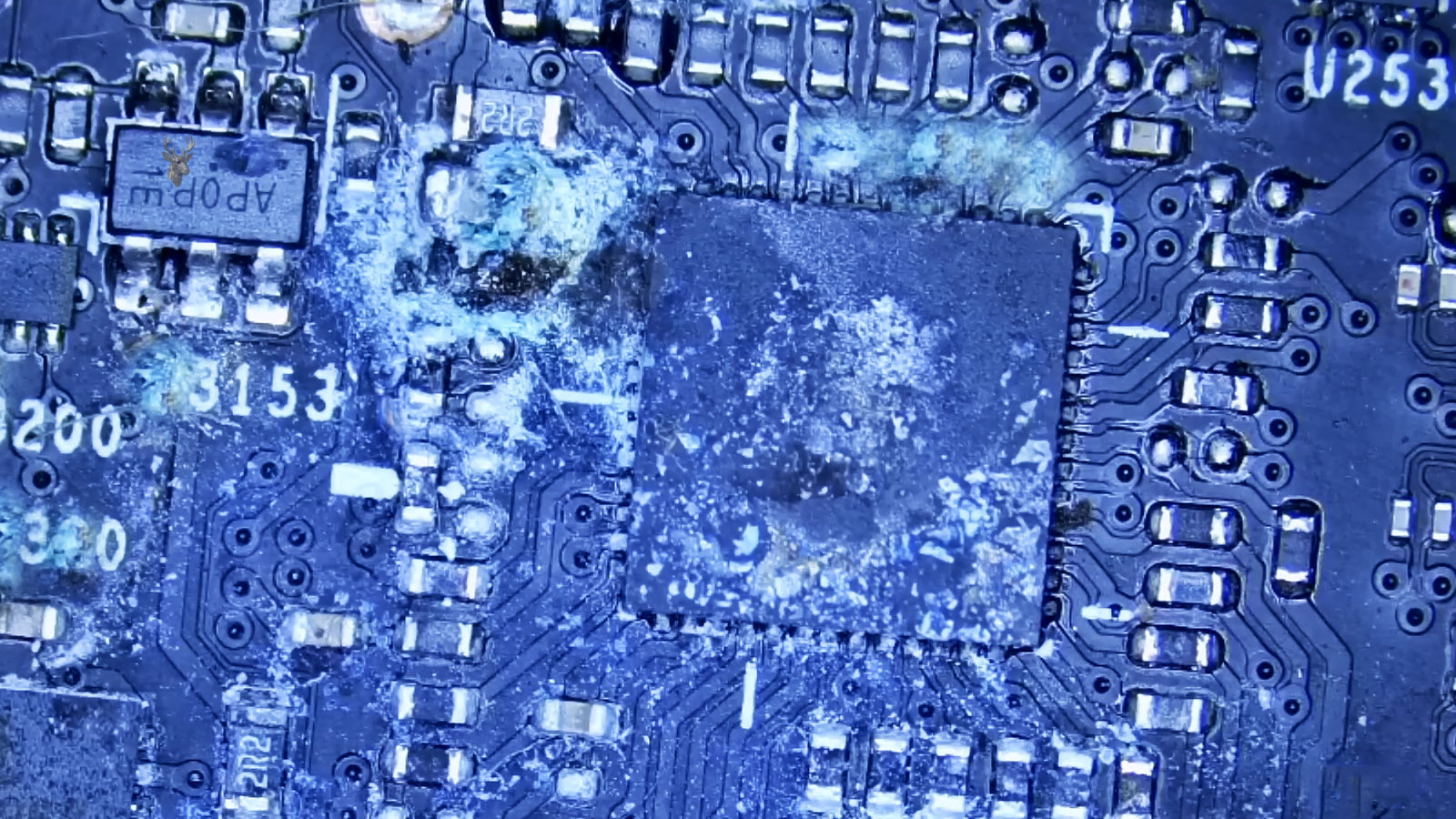
The earliest signs may look like faint discoloration, white residue, darkened metal, or a green-blue deposit near copper. Severe corrosion can weaken a connection until it becomes electrically unreliable or physically separates.
Fine circuit paths are especially vulnerable because only a small amount of material must be lost before the connection changes. A power rail may remain intact while a nearby keyboard, charging, sensor, or communication line becomes intermittent.
The visible stain is not always the damaged area, and the damaged area is not always visible without removing components or protective coverings.
Residue can also collect beneath chips and connectors where ordinary surface cleaning cannot reach it. This is one reason a computer may look clean from above while continuing to develop faults underneath mounted parts.
Delayed Symptoms Depend on Which Circuit Was Contaminated
Liquid damage does not produce one universal symptom. The result depends on where the contamination traveled and which electrical paths were affected. A spill entering through the keyboard may reach several different areas before collecting at the lowest point inside the case.
One computer may develop keyboard problems while another loses charging, sound, USB access, or display output. Symptoms can appear together or emerge gradually as corrosion changes the resistance of individual connections.
- Individual keys may type the wrong character or stop responding.
- The touchpad may click by itself or become intermittent.
- The battery may be detected but refuse to charge.
- The computer may shut down when the charger is connected.
- USB ports may disconnect devices without warning.
- The system may power on only after several attempts.
- Sleep and wake behavior may become unreliable.
A changing symptom pattern is common when contamination affects more than one circuit. Repair should not focus only on the first failed part without inspecting the area that caused it.
Drying Removes Moisture but Does Not Remove Contamination
Leaving a computer unused may allow some trapped moisture to evaporate. That can reduce the chance of an immediate short, but it does not remove sugar, minerals, salts, or corrosion products left behind.
A system may begin working again after several days because the conductive liquid has dried. The apparent recovery can be temporary. Residue remains on the board and may continue reacting with metal or absorbing humidity from the surrounding air.
Heat can also move contamination rather than eliminate it. Warm air may drive liquid deeper beneath a connector or spread dissolved material across a larger area. Excessive heat can damage plastics, adhesives, display layers, and battery cells.
The difference between drying and cleaning is important. Drying addresses moisture. Proper cleaning addresses what the liquid carried and what the reaction has already produced.
Rice Does Not Reach the Parts That Need Attention
Placing a wet device in rice is a common suggestion, but it does not clean a motherboard or remove residue beneath components. Rice may absorb a limited amount of humidity around the device while leaving the actual contamination untouched.
Small particles can also enter vents, ports, and keyboard openings. The time spent waiting may allow corrosion to progress while the computer remains assembled and the internal battery stays connected.
Silica gel and other drying materials may help control moisture in enclosed spaces, but they still do not replace internal inspection and cleaning after a contaminated spill. The central problem is not simply that the computer is wet. It is that liquid reached energized electronics and may have left reactive material behind.
Early Inspection Can Limit the Area That Becomes Permanently Damaged
Prompt inspection provides an opportunity to disconnect internal power, identify where the liquid traveled, and clean contamination before additional metal is lost. Waiting until the computer stops working can turn a localized cleaning problem into a board-level repair involving damaged traces or components.
The inspection should follow the likely path of the spill rather than checking only the visible entry point. Liquid can travel through keyboard openings, along cables, beneath insulating films, and toward lower areas of the case.
A computer that still works may also contain important files that have not yet been backed up. When the storage device is not directly damaged, preserving those files may be possible without relying on the liquid-exposed system to remain stable.
Continued operation after a spill is not proof that the internal circuits are safe. It is a temporary condition that should be evaluated before heat, power, and corrosion create a more difficult failure.
The Spill Route Is Often Wider Than the Visible Wet Area
Liquid rarely stays exactly where it first lands. It can follow the edges of the keyboard, move along ribbon cables, collect beneath insulating sheets, and reach the motherboard through openings that are not visible from above.
A spill near the left side of a laptop may eventually affect a charging circuit located farther inward. Liquid entering near the touchpad can travel toward the battery connector or storage area. Tilting or carrying the computer immediately after the spill may change that route and spread contamination into sections that were initially dry.
The final damage pattern therefore depends on more than the point of entry. Internal case design, component placement, airflow channels, cable openings, and the position of the computer at the time of the spill all influence where the liquid settles.
Keyboard Damage Can Be Separate from Motherboard Damage
A laptop keyboard is often the first component exposed during a spill, but keyboard failure does not automatically mean that the motherboard escaped damage. Liquid may remain inside the keyboard layers, pass through mounting openings, or drip onto circuits below.
Some keyboards begin producing repeated characters, incorrect keystrokes, or keys that activate without being pressed. Others continue working while contamination passes through them and affects a different part of the computer.
| Symptom After a Spill | Area That May Require Inspection |
|---|---|
| Several nearby keys fail together | Keyboard matrix or keyboard ribbon connection |
| Random characters appear without typing | Contaminated keyboard layers or connector contacts |
| Keyboard fails along with charging or USB functions | Motherboard contamination beyond the keyboard |
| External keyboard works normally | Internal keyboard may be damaged, but the board still needs inspection |
| Keyboard works after drying and later fails again | Residue or corrosion may still be developing |
Replacing the keyboard may correct the visible input problem while leaving hidden contamination underneath. The repair decision should be based on the complete spill path, not only on the first component that stops working.
Connector Pins Can Fail Before Larger Components Do
Many internal computer connections depend on tightly spaced metal contacts. Keyboard ribbons, touchpad cables, display cables, battery connectors, speaker leads, and USB daughterboards may all use compact connectors that can trap liquid and residue.
Only one damaged contact may be enough to interrupt an entire function. A connector can look intact from the outside while corrosion underneath changes resistance or weakens the contact pressure between the cable and socket.
- A display may flicker when the lid moves.
- The battery may appear and disappear from the operating system.
- The touchpad may stop responding after the case warms up.
- A USB board may work intermittently depending on cable position.
- The keyboard backlight may fail while the keys still type.
Cleaning the visible motherboard surface without opening affected connectors can leave contamination in place. Each nearby cable and socket should be evaluated according to the spill location and the symptoms that appeared afterward.
Charging Circuits Are Vulnerable Because Power Remains Present
The charging section of a laptop may remain electrically active whenever the charger or internal battery is connected. If liquid reaches that area, it can affect the DC input, charging controller, current-sensing components, battery communication lines, or nearby protection circuits.
A laptop may still run from the battery but refuse to charge. Another may power on only with the charger connected, shut down when the battery is installed, or show an incorrect battery percentage. These symptoms can result from several different failures within the same power path.
Replacing the charger does not correct corrosion inside the laptop. A second adapter may produce the same result because the fault is located after the charging port. Repeatedly connecting power can also energize a contaminated section that has not yet been cleaned.
A charging problem that begins after liquid exposure should be treated as a circuit condition until the internal power path has been inspected.
Battery Exposure Requires More Than Ordinary Drying
Laptop batteries are enclosed assemblies, but their connectors, control boards, and outer wrapping can still be affected by liquid. Moisture around the battery connection may interfere with communication between the battery and motherboard even when the cells themselves remain sealed.
A battery that becomes swollen, unusually warm, physically damaged, or unstable after a spill should not continue to be charged. Internal cell damage is different from surface contamination and can create a safety concern that cleaning alone cannot correct.
- Check for swelling, deformation, punctures, or lifted case sections.
- Inspect the connector and surrounding board for residue.
- Confirm that the battery temperature remains normal.
- Do not reuse a battery that shows physical damage or unstable behavior.
- Test charging only after the contaminated area has been addressed.
A battery may also appear defective when the actual problem is on the motherboard. Proper testing separates a damaged battery pack from a charging circuit that can no longer communicate with it correctly.
Ultrasonic Cleaning Is Useful in Some Repairs but Not Every Situation
Ultrasonic cleaning can help remove contamination from difficult areas of a bare circuit board. The process uses controlled vibration in a suitable cleaning solution to loosen residue around component leads, beneath certain packages, and across densely populated sections.
The board must be prepared correctly before this type of cleaning. Batteries, displays, speakers, microphones, fans, removable shields, and other sensitive parts may need to be disconnected or removed. Improper solution, excessive exposure, or incomplete drying can introduce new problems.
Ultrasonic cleaning also cannot rebuild metal that corrosion has already removed. A damaged trace, dissolved pad, failed component, or weakened connector still requires repair or replacement after the contamination is cleared.
The value of the process depends on the board design, the liquid involved, the amount of corrosion, and whether the affected parts can be cleaned safely. It should be selected because the contamination pattern justifies it, not because every liquid-damaged computer requires the same treatment.
Cleaning Must Be Followed by Electrical Inspection
A clean-looking board is not automatically a working board. Once residue is removed, the affected circuits still need to be checked for missing voltage, shorted lines, damaged components, weakened solder joints, and interrupted traces.
Some failures become easier to see only after the contamination is gone. A darkened resistor, cracked component, lifted pad, or corroded via may have been hidden beneath residue. Other faults require measurement because there may be no visible damage at all.
Testing should match the symptoms and the spill location. A charging complaint may require inspection of input voltage, battery communication, and charging control. A keyboard complaint may require checking the connector, signal lines, and keyboard assembly separately.
Cleaning removes contamination. Diagnosis determines what the contamination damaged.
Testing Too Soon Can Create Misleading Results
A board that has been cleaned must be completely dry before power is restored. Moisture trapped beneath chips, shields, connectors, or insulating material may remain after the visible surface appears dry.
Powering the computer too soon can reproduce the same conditions that caused the original failure. It can also make a repair appear unsuccessful when the remaining problem is incomplete drying rather than permanent damage.
Once the board is ready for testing, power should be introduced in a controlled way. Current draw, heat, startup behavior, charging response, and affected functions can then be observed without immediately reassembling the entire computer.
This staged approach helps separate a board-level fault from a damaged keyboard, battery, display assembly, or peripheral cable. It also reduces repeated disassembly if another affected part is discovered.
Temporary Recovery Does Not Confirm a Successful Repair
A liquid-damaged computer may power on after cleaning and still require additional observation. Intermittent faults may appear only after the board warms, the battery begins charging, the lid is moved, or several ports are used at the same time.
Basic startup is only the first checkpoint. The repaired system should be tested through the functions closest to the affected area and then through ordinary use that places the computer under realistic load.
- Verify that the charger is detected consistently.
- Check battery charging and discharge behavior.
- Test every key, touchpad function, and nearby button.
- Inspect USB, audio, display, and network connections.
- Confirm stable sleep, wake, restart, and shutdown behavior.
- Watch for unusual heat, odor, or changing current draw.
A repair is more dependable when the computer remains stable through repeated testing rather than merely turning on once after the visible residue has been removed.
Data Recovery Should Be Considered Before Repeated Power Testing
A liquid-damaged computer may contain files that are more valuable than the machine itself. When the system still starts intermittently, it can be tempting to keep using it long enough to copy everything normally. That approach can increase the risk if corrosion is already affecting power delivery or the storage connection.
The safest recovery method depends on the storage design. A removable solid-state drive or hard drive may be transferred to suitable equipment and read without continuing to operate the damaged motherboard. Storage soldered directly to the board may require the computer to be stabilized before normal access is possible.
Encryption can also affect the recovery plan. A physically intact drive may still require the original password, recovery key, user account, or functioning security hardware before its contents can be opened.
- Determine whether the storage device is removable or soldered.
- Record any encryption or account credentials before the system becomes less stable.
- Avoid unnecessary startups when the computer shuts down unpredictably.
- Copy irreplaceable files before performing broad repair experiments.
- Verify the copied data instead of assuming that the transfer completed correctly.
Recovering the data first can preserve the most important outcome even when the computer later proves uneconomical to repair.
Liquid Exposure Can Affect Parts That Were Not Directly Wet
Damage is not always limited to the area touched by the spill. A contaminated power circuit can deliver unstable voltage to another section of the board. A shorted keyboard line can interfere with startup. A damaged daughterboard cable can interrupt communication with ports that remained physically dry.
This explains why a failure may appear far from the visible stain. The component showing the symptom may be reacting to a problem earlier in the electrical path rather than failing on its own.
| Visible Symptom | Possible Upstream Cause |
|---|---|
| No image on the screen | Contaminated display connector, damaged backlight power, or unstable board voltage |
| USB devices repeatedly disconnect | Corrosion on a shared controller circuit or damaged daughterboard connection |
| The computer powers off during charging | Fault in the input or battery-management section |
| The fan runs at full speed | Missing sensor communication or contamination near a control circuit |
| The system will not complete startup | Keyboard short, storage interruption, or damage to a required power rail |
Following the circuit relationship is more reliable than replacing the first part associated with the visible symptom.
Intermittent Failures Often Change with Heat and Movement
Corroded contacts and weakened solder joints may behave differently as the computer warms. Metal expands slightly, resistance changes, and a marginal connection may open or reconnect. A system can therefore work when first started and fail after several minutes.
Movement creates another clue. Opening the lid, pressing near the keyboard, connecting a charger, or carrying the laptop may flex the case enough to disturb a damaged connector or trace.
A symptom that changes with temperature or physical position often points toward an unstable connection rather than a simple software fault.
These patterns should be documented during testing. Knowing that a charging failure appears only after the board warms or that the display changes when the lid moves can narrow the inspection to a much smaller area.
Repeatedly flexing the computer to make it work is not a repair. It can worsen an already weakened cable, connector, solder joint, or circuit path.
Contamination Beneath Shielding Can Escape a Surface Inspection
Motherboards often include metal shields, insulating films, adhesive covers, thermal pads, and tightly mounted connectors. These materials can hide the route taken by the liquid and slow evaporation in the enclosed area.
A board may appear clean around its exposed components while residue remains beneath a shield or along the edge of a covered circuit. Removing those coverings requires care because some are soldered, bonded, or positioned near fragile parts.
- Compare the spill location with the board layout.
- Inspect both sides of the motherboard when access is possible.
- Check beneath removable films and protective covers.
- Examine connectors before and after their cables are removed.
- Look for residue at the edge of shields and under nearby components.
The purpose is not to remove every covering without reason. It is to inspect the locations that the liquid could realistically have reached and where the reported symptoms suggest contamination may remain.
Board Repair May Require Rebuilding Damaged Connections
Cleaning is often the first stage, but advanced corrosion can remove enough metal to interrupt a circuit permanently. A solder pad may separate from the board, a fine trace may open, or a component lead may become too weak to carry current reliably.
Repair can involve replacing affected components, restoring solder connections, rebuilding a trace, repairing a via, or replacing a damaged connector. The work must preserve the original electrical route and avoid creating an unintended connection to nearby lines.
Very small circuits may require magnification, precise soldering equipment, board diagrams, and measurements from a working reference point. Visual appearance alone is not enough to confirm that the reconstructed path has the correct continuity and voltage behavior.
The amount of corrosion also affects reliability. A single damaged connection may be repairable, while widespread deterioration across several layers of the board can make a dependable result less likely.
Replacement Parts Can Carry Contamination from the Original Assembly
A replacement keyboard, touchpad, battery, or daughterboard may be installed correctly and still develop problems if the connecting cable or motherboard socket remains contaminated. The new part becomes attached to the same damaged path that affected the original one.
This is especially important when residue is found around ribbon connectors. Installing a clean cable into a corroded socket can transfer material onto the replacement contacts and produce another intermittent connection.
- Inspect both sides of every affected cable connection.
- Clean or replace contaminated ribbons instead of reusing them automatically.
- Check connector locking mechanisms for damage.
- Confirm that replacement parts remain stable after repeated movement.
- Retest neighboring functions that share the same board area.
A part replacement is complete only when the surrounding connection path has also been addressed.
The Cost of Repair Depends on the Depth of the Damage
Two computers exposed to similar amounts of liquid can require very different repairs. One may need a keyboard replacement and localized cleaning. Another may have damage beneath several chips, corrosion across multiple power circuits, and a battery that can no longer be reused.
The computer’s age, replacement value, part availability, storage arrangement, and importance of the data all influence the decision. A technically possible repair is not always the most practical choice, particularly when extensive corrosion makes long-term reliability uncertain.
Inspection is therefore necessary before a meaningful estimate can be made. The visible spill size does not reveal how far the liquid traveled or how much metal has already been affected.
The repair decision should consider both present functionality and the likelihood that hidden corrosion will create additional failures.
Post-Repair Testing Should Recreate Normal Daily Use
A liquid-damage repair should be evaluated under more than one startup attempt. The system needs time to warm, charge, sleep, wake, move data, and operate the parts nearest the contaminated area.
A laptop that remains stable while idle may fail during charging or while several ports are active. A keyboard may pass a brief check while still producing occasional repeated characters during longer typing. Testing should be broad enough to reveal those delayed behaviors.
- Run the computer from both battery and charger power.
- Observe charging percentage and battery temperature over time.
- Test every internal and external input device.
- Use the ports located near the original spill route.
- Complete several restarts and sleep-wake cycles.
- Check audio, camera, wireless, display, and storage operation.
- Inspect the repaired area again after the system has warmed.
Longer testing cannot guarantee that no future problem will occur, but it gives intermittent faults a better chance to appear before the computer returns to regular use.
Preventing Another Spill Requires More Than Moving the Drink
Keeping liquids away from the computer is the most direct precaution, but the surrounding workspace also matters. An open cup beside a charging cable can be pulled over when the cable moves. A drink placed behind the laptop may spill toward ventilation openings where it is difficult to see.
Containers with secure lids reduce the amount released during an accident. Separate tables, raised stands, and deliberate cable routing can keep liquids from being positioned directly beside the keyboard or above connected equipment.
Regular backups remain important because no physical precaution removes every risk. A spill can happen during travel, at work, in a vehicle, or in any place where the normal workspace protections are absent.
Backup planning does not prevent hardware damage, but it can keep the loss of one computer from becoming the loss of years of documents, photographs, business records, or project files.
Delayed Failure Is One of the Defining Risks of Liquid Damage
A computer that remains operational after a spill may still contain moisture, residue, weakened contacts, and developing corrosion. The delay between exposure and failure does not separate the two events. It is often part of the same damage process.
The best response is to remove power, avoid repeated testing, inspect the internal spill route, clean the contamination, and measure the affected circuits before the condition progresses. Drying alone cannot remove dissolved material, and replacing one failed part cannot correct contamination that remains elsewhere.
When important data is involved, recovery should be included in the plan before unstable hardware is subjected to repeated startup attempts. When repair is practical, the work should address both the visible symptom and the electrical path that produced it.
Liquid damage is difficult because the computer can appear normal while internal changes continue. Recognizing that delayed behavior makes it possible to act before a temporary recovery becomes a permanent failure.











