
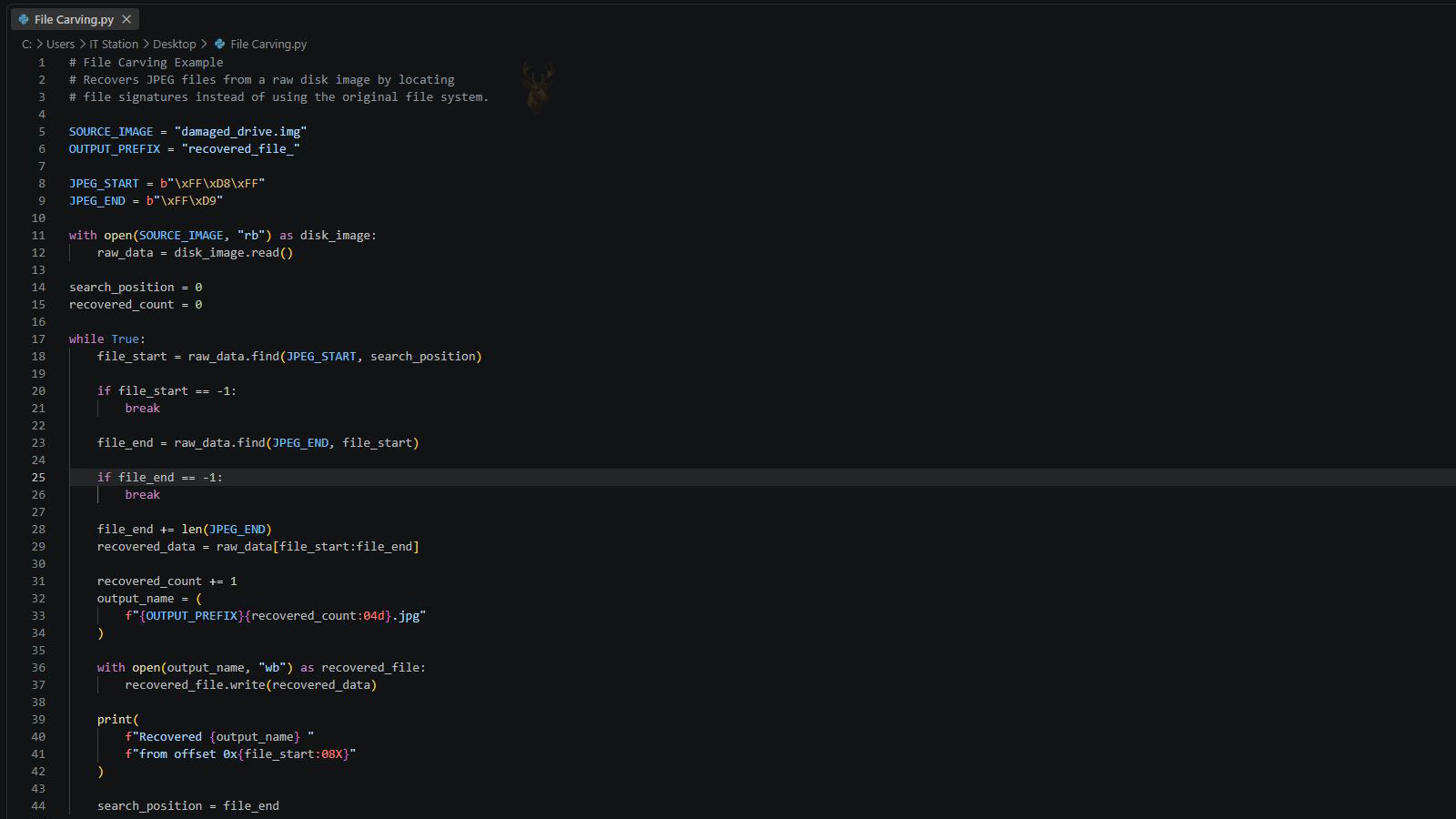
A Recovered File Can Survive Even After Its Name and Folder Are Gone
Files stored on a computer contain more than the visible information inside a document, picture, video, or archive. The storage system also maintains records describing each file’s name, folder location, size, dates, permissions, and the physical areas of the drive where its data is located.
When a file system is damaged or its directory records are missing, the content of some files may still remain on the storage device even though Windows or another operating system can no longer identify them normally. Data-recovery software may then search the raw storage space for recognizable file patterns rather than relying on the original folder structure.
This technique is commonly called file carving. It can recover useful content from storage that has lost important organizational information, but the result may consist of files with generated names, missing dates, and no indication of where they originally belonged.
A File System Acts as the Storage Device’s Directory
A storage device contains large numbers of sectors or blocks that hold file content and file-system information. The file system organizes those blocks so the operating system can locate individual items without searching the entire device every time a file is opened.
Depending on the format, the file system may maintain allocation tables, file records, directory entries, indexes, journals, and maps of used and available space. These structures connect a human-readable file name with the locations containing the file’s actual data.
If those records remain intact, recovery software may be able to restore deleted files with their original names and folders. If the records are corrupted, overwritten, or unavailable, the software may have to recover the content without the information that once described it.
The File Name Is Usually Stored Separately From the File Content
The visible name of a file is generally not stored repeatedly throughout the document, image, or video itself. Instead, the name is recorded in a file-system entry that points toward the blocks containing the data.
This separation explains why a recovery program can find the bytes belonging to a photograph but be unable to determine that the image was originally called family-vacation.jpg. The photograph’s image data may survive while the directory entry containing its name has already been lost.
Some file formats contain internal titles, author information, camera dates, or other metadata that can help identify the content later. That embedded information is different from the original operating-system file name and may not always be present.
File Carving Searches for Recognizable Data Signatures
Many file formats begin with a recognizable sequence of bytes. These patterns can identify the beginning of a JPEG image, PDF document, ZIP archive, executable program, audio file, or another supported format.
A carving program scans raw storage for these signatures. When it finds a possible beginning, it attempts to determine where the file ends by locating an ending marker, reading a size value, or interpreting the internal structure of the format.
The method does not require a working directory entry. It depends on the surviving file content being sufficiently complete and recognizable for the recovery program to separate it from surrounding data.
Generated Names Replace Information the Recovery Program Cannot Reconstruct
When the original file name is unavailable, recovery software commonly assigns a sequential or descriptive name such as file000123.jpg, recovered_0045.pdf, or video_078.mp4. The name identifies the recovered output rather than the file’s former identity.
Files may be grouped into folders based on type, estimated location, or recovery method. These folders are created by the software and do not necessarily match the organization that existed before the loss.
The generated names do not indicate that the content is damaged. A fully viewable photograph can still have a meaningless name because the directory information disappeared before the image data was overwritten.
Deleted Files May Retain Their Directory Records for a Limited Time
Deleting a file often removes or changes the file-system reference before the underlying data is erased. The storage space is marked as available for reuse, allowing new information to overwrite it later.
If the directory entry and allocation information have not been reused, a recovery program may reconstruct the file with its original name, folder, size, and dates. This is generally more informative than carving because the file-system metadata is still available.
As the computer continues operating, new files, updates, temporary data, browser caches, and background activity can overwrite both the deleted content and the records that describe it. The recovery method may then shift from metadata-based restoration to raw carving.
Formatting Can Remove the Map Without Immediately Erasing Every File
A quick format commonly creates new file-system structures without writing over every area of the storage device. Older file content may remain beneath the new organization until the space is reused.
The new file system can overwrite important portions of the previous directory, allocation records, and root structures. As a result, recovery software may find old documents and images but lose the original folder hierarchy and names.
The extent of recovery depends on the type of format, the old and new file systems, the amount of later use, and whether the storage device performs internal operations that remove discarded data.
File-System Corruption Can Separate Content From Its Directory
An unsafe shutdown, failing storage device, damaged cable, defective memory, interrupted write, or software error can corrupt file-system structures. The operating system may then report that a drive needs formatting, display an empty folder, or show a volume without the expected files.
Some files may remain physically intact even though the directory can no longer point to them correctly. Carving can locate recognizable content in the inaccessible space without depending on the damaged file-system map.
Running repair tools directly on a damaged volume can modify the remaining structures. Before attempting repairs that write changes, the condition of the device and the importance of the data should be considered carefully.
A File Header Often Identifies the Format
The beginning of a file can contain a header describing the type, version, dimensions, encoding method, or internal layout of the data. Recovery tools compare these bytes with known patterns to recognize supported formats.
A file extension such as .jpg or .pdf is not required during raw carving because the program assigns the extension after interpreting the header. The original extension may already be missing with the deleted directory entry.
A recognizable header does not guarantee that the rest of the file survived. The content following it may be partially overwritten, fragmented, or mixed with unrelated data.
Some Formats Include Clear End Markers
Certain file types contain a recognizable sequence near the end of the file. A carving program can search for that marker after locating the header and extract the data between the two points.
This approach works best when the file occupies a continuous region and no similar ending pattern appears prematurely inside the content. A false match can cause the recovered output to end too soon or include data belonging to another file.
Formats without a dependable end marker require other methods, such as reading an internal size field or analyzing the file’s structure. Recovery quality therefore varies considerably between different file types.
Internal Size Information Can Help Define the File Boundary
Some formats record their expected length or the size of internal sections within the header. Recovery software can use this information to estimate how much data should be extracted after the starting signature.
If the size value is damaged, incorrect, or refers to data that has been overwritten, the resulting file may be incomplete or contain unrelated bytes beyond its true ending.
A file can also contain several internal objects with separate size values. Reconstructing complex formats may require more than copying a continuous block from the first signature to a calculated endpoint.
Fragmentation Is One of the Main Limits of File Carving
A file is fragmented when its data is stored in separate areas rather than one continuous sequence. The file system normally keeps track of those locations and presents them as one complete item.
When the allocation records are missing, a carving program may find the beginning of the file but not know where the remaining fragments are located. It may extract only the first continuous portion or attach unrelated data found afterward.
Large files are more likely to span multiple areas, especially on storage that has been used heavily or has limited free space. Video files, disk images, large archives, and databases can therefore be more difficult to recover through basic carving.
Small Files Are Not Automatically Easier to Recover
A small file may fit within one continuous area, which can make carving simpler. However, its data can also be overwritten quickly because fewer new writes are needed to replace it completely.
Some small files are stored inside specialized file-system structures rather than in ordinary external blocks. Recovery depends on whether those structures survived and whether the software understands the storage method.
The recoverability of a file depends on its location, format, fragmentation, metadata, and later storage activity rather than size alone.
Overwriting Can Leave a File Present but Unusable
New data may overwrite only part of a deleted file. The beginning can remain recognizable while sections in the middle or end have been replaced.
The recovery program may still produce an output file because it found a valid header and extracted the expected region. Opening the result can reveal missing pages, distorted images, silent audio sections, broken archives, or a document that stops before the end.
A successful recovery count therefore does not equal a successful content recovery. Each important file must be opened, inspected, and compared with the expected material.
Partially Recovered Images May Still Display Useful Areas
Some image formats can display the beginning or upper portion of a picture even when later data is damaged. The result may show correct colors at first and then contain gray blocks, distorted lines, missing sections, or abrupt changes.
Thumbnail information embedded inside the file may also survive when the full-resolution image does not. This can create a small preview of a photograph that cannot be opened normally at its original size.
The presence of a thumbnail does not mean the complete image can be reconstructed. It is a separate, lower-resolution representation stored within some image files.
Recovered Documents May Depend on Several Internal Files
Many modern office documents are containers holding XML files, formatting information, images, relationships, and other components. The visible document depends on those internal parts remaining consistent.
A carved document may have the correct outer signature but fail to open because one internal component was overwritten or the container’s directory is incomplete. Another document may open while losing embedded images, comments, formatting, or later pages.
Application repair functions can sometimes salvage readable text from a damaged container, but they cannot recreate information that no longer exists on the storage device.
Compressed Archives Are Sensitive to Missing Sections
ZIP and other archive formats may contain many files within one larger container. The archive relies on internal records describing each item and where its compressed data is located.
If the ending directory or a middle section is damaged, the archive may refuse to open even though some compressed entries remain intact. Specialized tools may recover individual contents from the surviving sections, but the original folder organization may be incomplete.
A carved archive should be tested without replacing the original recovered copy. Repair attempts can create additional files, and preserving the untouched output allows other methods to be tried later.
Database Files Can Be Difficult to Reconstruct Through Simple Carving
Databases may contain pages, indexes, transaction records, free-space maps, and relationships that must remain internally consistent. Recovering one continuous block does not guarantee that the database engine can interpret the result.
A fragmented or partially overwritten database can contain valid records alongside damaged structural information. Specialized recovery may focus on extracting individual tables, rows, messages, or records rather than restoring the original file as a fully working database.
The value of the content and the availability of application-specific repair tools should be considered before repeated attempts are made on the only copy.
Carved Results Often Contain Duplicate Files
A storage device can contain active files, deleted copies, temporary versions, cached images, thumbnails, backups, and fragments from earlier edits. A raw scan may identify several items that appear identical or nearly identical.
Applications may also save temporary copies while a document is being edited. Cloud software, browsers, photo programs, and messaging applications can leave additional versions in cache or working folders.
Duplicate removal should not be performed solely by comparing file names because carved names are generated. File size, checksums, internal dates, dimensions, and visual inspection may be needed to determine whether two recovered items contain the same data.
Recovered Files Can Include Old Data the User No Longer Expected
Raw carving searches available storage without limiting results to the files that were recently visible. It may find content deleted months earlier, temporary internet files, old application data, or portions of previous installations.
This can create a large collection containing useful files mixed with irrelevant or outdated material. The existence of an old file does not prove that it was active immediately before the failure.
Recovered information should be handled carefully because it may include private documents, account data, cached images, and files belonging to other users of the device.
Different Recovery Methods Preserve Different Amounts of Context
| Recovery Method | Information That May Be Preserved |
|---|---|
| Restoring from an intact file-system record | The original file name, folder, size, dates, and data locations may still be available. |
| Reconstructing a damaged directory | Some names and folders may return, while damaged entries remain incomplete or incorrectly linked. |
| Searching unallocated space by file signature | The file content and probable type may be recovered without the original name or folder. |
| Extracting a continuous block after a recognized header | The beginning may be valid, but fragmentation or overwriting can leave the output incomplete. |
| Recovering embedded previews or thumbnails | A smaller representation may survive even when the full original file is damaged. |
| Using an application-specific repair process | Readable records or internal components may be extracted from a damaged container or database. |
| Restoring from a separate backup | The original organization and metadata may be preserved if the backup was created before the loss. |
The most complete recovery usually comes from intact metadata or a separate backup. File carving becomes valuable when those sources are unavailable, but its ability to recover content does not guarantee that the original names, folders, dates, or relationships can be reconstructed.
The Storage Device Should Be Copied Before Intensive Recovery Work
File carving can require reading the entire storage device from beginning to end. On a healthy drive, this may simply take time. On a failing drive, repeated full scans can increase mechanical stress, trigger more read errors, and reduce the amount of data that remains accessible.
A sector-level image or controlled clone creates a separate working copy of the readable areas. Recovery software can then analyze that copy instead of repeatedly scanning the original device.
The original drive should remain unchanged whenever possible. If one recovery method produces incomplete results, another approach can be attempted against the image without subjecting the source device to the same workload again.
A Disk Image Preserves More Than the Files Windows Can See
Copying visible folders through File Explorer is different from creating a sector-level image. A normal file copy includes only the files the operating system can currently locate and read through the mounted file system.
A disk image can preserve allocated files, deleted space, damaged directory structures, partition information, boot records, and unrecognized regions. These areas may contain the metadata or raw file content needed during later recovery.
The image must be stored on another device with enough available capacity. Saving it onto the damaged or deleted source volume can overwrite the same information being recovered.
Read Errors Should Be Recorded Instead of Retried Without Limit
A damaged sector may respond slowly, return incorrect information, or stop the drive from completing a read request. Basic cloning tools can become trapped retrying the same area while the rest of the device remains unread.
Recovery-oriented imaging tools can skip difficult regions, continue copying more accessible areas, and maintain a map of what was read successfully. The skipped sections can be revisited later with controlled retry settings.
This approach prioritizes the largest possible amount of readable data before the device condition worsens. It also distinguishes sectors that were never read from areas that were copied successfully.
A Clone and an Image File Serve Similar but Different Workflows
A clone copies the source device onto another physical drive. The destination can sometimes be connected and examined as though it were the original storage device.
An image file stores the captured sectors inside one or more files on a separate volume. Recovery programs can open that image directly or mount it through supported software.
A physical clone can be convenient for certain tools, while an image file is easier to duplicate, archive, and preserve as an unchanged master. The chosen method should not alter the original source or the first captured copy.
Partition Loss Does Not Always Mean the Files Were Erased
A partition table describes where volumes begin and end on a storage device. If that information is deleted or corrupted, the operating system may display the entire device as unallocated even though the file-system structures and file content still exist inside it.
Recovery software may first search for old partition boundaries and volume signatures. Reconstructing the correct volume can preserve more names, folders, and metadata than immediately carving the entire disk.
Writing a guessed partition layout directly to the source can make later recovery more difficult. The discovered structure should be verified against an image before permanent changes are considered.
File-System Reconstruction Should Usually Precede Raw Carving
When enough metadata survives, a recovery program may rebuild directories, reconnect file records, and identify the allocation chains belonging to each item. This can restore original names and improve the recovery of fragmented files.
Raw carving ignores much of that organization and searches directly for file signatures. It is valuable when the file system cannot be reconstructed, but it often produces less context and more duplicates.
A staged process commonly begins with partition and file-system analysis, followed by deleted-file recovery, and then carving for content that remains unreferenced. Starting with the least destructive and most informative method usually produces a better-organized result.
A Signature Match Can Be a False Positive
The byte sequence used to identify a file format can sometimes appear naturally inside unrelated data. A carving program may interpret that sequence as the beginning of a file even though it belongs to a database, compressed archive, memory dump, or another container.
This can produce recovered files that have a valid extension but do not open. Others may contain random content that happens to satisfy the first signature check.
More advanced carving verifies internal structure, expected fields, checksums, and consistency before accepting an output. Even then, every result should be treated as a candidate until its content is inspected.
Nested File Formats Can Produce Results From Inside Other Files
A large archive, document, database, disk image, or email container may hold many embedded objects. A raw scan can recognize the internal JPEG, PDF, audio, or compressed-file signatures and recover those objects separately.
The carved items may therefore be copies that were originally embedded inside another file rather than separate files stored in their own folders. This is one reason recovered collections can contain unexpected duplicates.
The relationship to the parent file is usually lost during basic carving. A recovered image may be viewable without revealing which document, message, or archive originally contained it.
Thumbnail Databases Can Be Mistaken for Original Photographs
Operating systems and applications often create smaller preview images to display folders quickly. These thumbnails may remain after the full-resolution original has been deleted or overwritten.
A carving scan can recover the preview because it contains a recognizable image structure. The result may look complete at a small size but contain far fewer pixels than the original photograph.
Dimensions and file size should be checked before a recovered image is treated as the original. A thumbnail can still be useful for identification, but it cannot restore detail that was never stored in the preview.
Camera Cards Can Contain Several Generations of the Same Image
Digital cameras may create a full image, an embedded preview, a smaller thumbnail, and additional processing data for one photograph. Editing or transferring software may also generate more copies.
A raw scan can recover several of these versions and assign unrelated generated names. They may appear to be duplicates until their dimensions, compression, and embedded metadata are compared.
The largest file is not always the best copy. A partially overwritten full-resolution image may be less usable than a complete medium-resolution preview.
Video Recovery Depends on More Than Finding the First Frame
Video files contain encoded streams, timing information, indexes, and container structures that tell a media player how to locate and present the content. Finding the opening signature does not guarantee that those supporting structures survived.
A carved video may refuse to open, play only the beginning, lose audio, skip sections, or report an incorrect duration. Fragmentation is especially significant because large recordings often occupy multiple noncontiguous areas.
Some repair tools can rebuild missing indexes when the encoded stream remains intact. They cannot recreate frames that were overwritten or recover fragments whose locations are no longer known.
Audio Files May Contain Recoverable Sound Without Complete Metadata
Music and voice recordings can include artist names, track titles, album information, artwork, chapter markers, and recording dates inside metadata fields. The audio stream may survive even when those fields are damaged or absent.
A recovered file may therefore play correctly but appear as an unknown track with no useful title. The generated operating-system name adds another layer of missing identification.
Listening to the recording, examining duration, and reading any surviving tags may be necessary before the file can be renamed and organized.
Email Recovery Often Produces Messages Without Their Original Folder Context
Email applications may store many messages inside one database or mailbox file. When that container is damaged, recovery can focus on extracting individual messages or attachments from recognizable internal structures.
The recovered message may retain sender, recipient, subject, and date information because those details are part of the message itself. Its original mailbox folder, read status, flag, category, and conversation placement may be lost.
Attachments can also be recovered separately from the message that contained them. Without the parent relationship, identifying the correct correspondence may require comparing dates, filenames embedded in the attachment, and message content.
Compressed Data Can Hide File Signatures From Basic Scans
When a file is stored inside a compressed archive or compressed file-system region, its original byte pattern may not appear directly on the device. A simple signature scan cannot identify content that exists only in compressed form.
The outer container must first be recovered and decoded successfully. If the container is damaged, some internal files may remain inaccessible even though their compressed data is physically present.
This limitation explains why a carving scan may recover many ordinary images and documents while missing files that were stored inside one damaged archive.
Encrypted Files Cannot Be Identified Like Ordinary Plain Data
Encryption transforms recognizable content into data that appears random without the correct key. The usual headers, text patterns, image structures, and document signatures are not visible in their original form.
Recovering encrypted content therefore depends on preserving the encrypted container, volume metadata, credentials, keys, and any structures required to decrypt it. Carving isolated regions from an encrypted volume does not normally produce usable documents.
If the encryption metadata or key material is missing, the underlying file bytes may remain physically present while still being unreadable. Recovery and decryption are separate requirements.
Full-Disk Encryption Changes the First Recovery Priority
When an entire volume is encrypted, the immediate goal is usually to preserve and unlock the volume rather than scan its raw sectors for ordinary file signatures. Before decryption, the data does not resemble the files stored inside it.
Recovery keys, account credentials, hardware security information, and encryption metadata should be documented before system changes are attempted. Reinstalling an operating system or altering security settings can remove access paths that were still available.
Once the encrypted volume is opened or imaged in a usable form, file-system reconstruction and carving can be performed against the decrypted representation.
Solid-State Drives Handle Deleted Data Differently From Many Hard Drives
Solid-state drives use flash memory and internal controllers rather than magnetic platters. The operating system can notify the drive that certain blocks are no longer needed through a command commonly associated with discarded data management.
The controller may later erase or reorganize those blocks internally. Once that process has occurred, a raw scan may find zeros or unrelated data where the deleted file previously existed.
This behavior can reduce the time during which recently deleted files remain recoverable. Continuing to run the operating system can allow background cleanup to proceed even when the user is not intentionally saving new files.
TRIM Does Not Produce the Same Result in Every Situation
Whether discarded blocks are cleared depends on the operating system, file system, drive firmware, connection type, controller, and the amount of time the device remains powered. An external adapter may handle the command differently from a direct internal connection.
A deleted file on one solid-state drive may become unrecoverable quickly, while another device may retain some content longer. The presence of TRIM support does not establish exactly when every block was erased.
The safest response remains stopping normal use and preserving the device as soon as the loss is discovered. Assumptions about internal cleanup should not replace an actual assessment.
USB Flash Drives and Memory Cards Use Their Own Translation Layers
Flash-based removable storage includes a controller that maps the addresses requested by the computer to physical memory cells. Wear leveling and bad-block management can move data without exposing those locations to ordinary software.
A logical image captures what the controller currently presents, not a direct view of every raw memory cell. If the controller is failing or cannot initialize, standard carving software may be unable to access the stored data at all.
In advanced cases, recovery may require reading memory components separately and reconstructing the controller’s translation scheme. File carving then occurs only after the raw data has been rearranged into its logical order.
A Failing Controller Can Make Good Memory Appear Empty or Corrupted
The controller on a storage device manages communication, addressing, error correction, and access to the underlying media. If that controller fails, the computer may report the wrong capacity, request formatting, disconnect repeatedly, or stop detecting the device.
The file content may still exist on the storage media even though normal software cannot read it through the damaged controller. Repeated connection attempts can worsen electrical or firmware problems without producing a usable image.
Carving is a logical recovery method and requires readable data. Hardware access problems must be stabilized or bypassed before signature-based recovery can begin.
Bad Sectors Can Damage Metadata and File Content Differently
A small unreadable region can have very different consequences depending on what was stored there. Damage to a directory record may remove the name and location of a file while leaving the content readable elsewhere.
Damage inside the file itself can preserve the name and folder but make the document, image, or archive incomplete. Damage to allocation information may cause the recovery program to lose track of later fragments.
The number of unreadable sectors alone does not measure the importance of the loss. Their position within file-system structures and critical files determines the effect.
Recovery Output Should Never Be Written Back to the Source
Recovered files must be saved to another physical storage device. Writing them onto the source can overwrite deleted content, remaining directory records, or fragments that have not yet been recovered.
Creating a new folder on the damaged volume, installing recovery software there, or saving scan results back to it can permanently replace recoverable information.
The destination should have enough free space for the expected output and additional working files. Raw carving can produce a collection larger than the amount of user data because duplicates and false positives may be included.
Scan Results Should Be Preserved Before Sorting Begins
Sorting recovered files often involves renaming, moving, deleting duplicates, converting formats, and opening damaged items with repair tools. These actions can alter timestamps and make the original scan output harder to compare.
An untouched copy of the recovery results should be retained before organization begins. Working duplicates can then be grouped by type, date, dimensions, content, or other available information.
Preserving the original output also protects against accidental deletion. A file that initially appears irrelevant may later provide context for another recovered item.
Hash Values Can Identify Exact Duplicates Without Relying on Names
A cryptographic hash summarizes the content of a file. Two files with different generated names but the same reliable hash value contain the same sequence of bytes.
This is useful when a scan produces thousands of sequentially named files. Exact duplicates can be grouped without opening every item manually.
Files that look similar but have different hashes should not automatically be deleted. They may be different resolutions, edited versions, partial recoveries, or copies containing different metadata.
Embedded Metadata Can Help Rebuild Part of the Lost Organization
Photographs may contain camera dates, device models, coordinates, and image dimensions. Documents can include authors, titles, creation dates, or application information. Audio files may retain track and album tags.
These fields can be used to group and rename recovered files even when the original file-system names are gone. Metadata extraction can reduce the amount of manual review required.
Embedded dates should be treated cautiously. They may represent capture time, editing time, export time, scanning time, or a device clock that was incorrect when the file was created.
Recovery Quality Must Be Evaluated at Several Levels
| Recovery Check | What It Confirms |
|---|---|
| The file has a familiar extension | The recovery program recognized a probable format, but the content may still be incomplete. |
| The file opens in its normal application | The minimum required structure is readable, although hidden damage may remain. |
| The entire document, image, recording, or video can be reviewed | The visible content appears complete rather than only the opening portion. |
| The expected size, duration, dimensions, or page count is present | The recovered item resembles the original scope and is less likely to be truncated. |
| Internal metadata is readable | Some identifying information survived independently of the original file-system record. |
| The file can be copied and reopened from another device | The output is not dependent on a temporary recovery path or unstable destination. |
| A second preserved copy matches the first by hash | The verified recovered content has been duplicated without alteration. |
A file should not be counted as successfully recovered merely because software created an output with the correct extension. Important results must be opened, reviewed from beginning to end, copied to reliable storage, and preserved in more than one location before the recovery process is considered complete.
Recovering the File Content Is Only the Beginning of the Reconstruction Process
A carving scan can produce thousands of files with generated names and limited context. Even when many of those files open correctly, the original folder arrangement, naming system, project relationships, and sequence of events may still be missing.
The next stage is reconstruction. This involves identifying what each file contains, separating useful material from duplicates and fragments, and rebuilding as much organization as the surviving metadata allows.
Reconstruction is not the same as restoring the original file system. It creates a new usable arrangement from the recovered evidence rather than recreating every former folder and filename exactly as they once appeared.
Sorting by File Type Creates a Practical First Structure
Generated names provide little help when browsing a large recovery set. Grouping files by type can separate photographs, documents, videos, audio recordings, archives, databases, and application-specific formats into manageable collections.
This first grouping is based on the detected format rather than the original location. A photograph recovered from a desktop folder may appear beside images that were previously stored in email, browser caches, temporary folders, or application databases.
Type-based sorting reduces the size of each review task, but it should not be mistaken for restored organization. The relationship between the recovered file and its former folder remains unknown unless another source of information survives.
File Dimensions Can Separate Originals From Previews
Image dimensions often reveal whether a recovered file is likely to be a full photograph, a screen-sized copy, an application preview, or a thumbnail. Several files may show the same scene while containing very different amounts of detail.
A 4000-by-3000 image may be closer to the camera original than a 320-by-240 preview. However, the higher-resolution copy should still be opened fully because a larger file can contain more corruption than a smaller, complete preview.
Grouping images by dimensions can quickly identify repeated preview sizes created by the same operating system or application. Those groups can be reviewed separately from likely originals.
Page Count and Document Properties Can Help Identify Related Files
Recovered documents may retain internal information such as page count, title, author, subject, company name, application version, or last saved date. These properties can help separate meaningful documents from temporary or incomplete copies.
Several recovered files may represent different revisions of the same document. One may contain fewer pages, another may include later edits, and a third may be an automatically saved copy created shortly before a failure.
Comparing visible content and internal properties is more reliable than selecting the largest file automatically. A larger file may contain embedded objects or corruption without representing the newest usable version.
Internal Dates Can Provide Clues but Not Complete Certainty
Many file formats contain dates recorded inside the content. A digital photograph may preserve the capture time, a document may store the last saved date, and an email may contain the date it was sent.
These dates can be useful when the original file-system timestamps are missing. They can help place recovered items into years, months, projects, or events.
Internal dates can also be misleading. A camera clock may have been wrong, a document may have been copied from an older template, or an editing program may have replaced the original creation date with an export date.
File-System Dates and Embedded Dates Describe Different Events
A file-system creation date may indicate when a file was copied onto a particular drive rather than when its content was originally created. The modified date may reflect a later edit, while the accessed date may change when software reads the file.
Embedded metadata can describe a different event. A photograph may contain the camera capture time even though the file-system creation date reflects a later transfer to the computer.
When both types of dates survive, they should be compared rather than combined without distinction. The differences can reveal transfers, exports, revisions, or copies created during earlier migrations.
Folder Names May Survive in Separate Metadata Even When the Files Do Not
A damaged file system can preserve some directory names while losing the records that connect files to those directories. Recovery software may display partial folder trees containing empty or incomplete branches.
Those surviving names can still provide context. A folder called Taxes 2015, Customer Photos, or Project Drafts may help identify the purpose of carved files even when direct links no longer exist.
Association must be based on additional evidence such as dates, content, file types, or nearby metadata. A surviving folder name alone does not prove that every recovered file from the same storage region belonged inside it.
Physical Proximity on the Device Can Offer Limited Context
Files written during the same period may occupy nearby storage regions, especially on devices that were relatively empty when the files were created. Some recovery tools preserve the source offset or sector location for each carved item.
Nearby locations can suggest that files were written during a related activity, but modern storage behavior makes this evidence uncertain. Fragmentation, background writes, wear leveling, and file-system allocation can place unrelated items beside one another.
Physical proximity should therefore be treated as a supporting clue rather than a substitute for content review or surviving metadata.
Temporary Files Can Contain More Recent Work Than the Named Document
Applications often create working copies while a file is being edited. These temporary files may contain changes that were not successfully written back to the main document before a crash or power interruption.
A carved temporary file can appear under a generated name and unfamiliar extension. Its content may be more current than the last manually saved version, even though it was never intended to remain as a permanent document.
Opening temporary formats may require the original application or a controlled copy with a changed extension. The untouched recovered file should be preserved before any conversion or renaming is attempted.
Automatic Recovery Copies May Contain Only Part of a Project
Auto-recovery systems can save recent changes at intervals, but they do not always preserve every component of a complex project. Linked images, external media, fonts, plug-ins, or referenced databases may remain outside the recovery copy.
A recovered project may open while reporting missing assets or altered formatting. The core document can still be valuable, but complete restoration may require locating the external files separately.
Recovered assets should be matched by content and project references rather than generated names. An image called file002381.jpg may be the missing picture expected by a project that refers to a former descriptive filename.
Project Files Can Depend on Paths That No Longer Exist
Creative, engineering, publishing, and media applications may store references to files located in specific folders. When the original directory structure is lost, the project can open but fail to locate its linked content.
The application may display the former path or filename in a missing-resource message. That information can help identify the correct carved file through dimensions, duration, content, or internal metadata.
Rebuilding the project can involve placing the recovered assets into a new organized folder and relinking each item manually. The project may become usable without recreating the exact original storage layout.
Sequence Numbers Can Preserve Order Even When Names Are Gone
Some cameras, scanners, audio recorders, and applications store internal sequence numbers or counters. These values may survive inside the file even after the operating-system name is lost.
Sequence information can help arrange photographs, scanned pages, recordings, or exported frames in their original order. This can be especially important when the visible content is similar and dates are identical or missing.
A restarted counter or reused device can produce the same sequence number in different periods. The sequence should be compared with timestamps, device identifiers, and content before files are organized permanently.
Content-Based Searching Can Replace Missing Filenames
Text documents, spreadsheets, messages, and some databases may contain searchable words even when their filenames are meaningless. A phrase, customer name, invoice number, address, or project term can identify relevant recovered files.
Search indexing should be performed on a working copy because some tools create databases, thumbnails, or preview files during analysis. The original output should remain unchanged.
Files that are compressed, encrypted, damaged, or stored in proprietary formats may not be searchable until they are opened or converted successfully.
Optical Character Recognition Can Identify Scanned Documents
Scanned pages and photographed documents may contain useful text without storing it as searchable characters. Optical character recognition can analyze the image and create text that helps identify the document.
The extracted text can be used to group invoices, statements, receipts, contracts, or correspondence even when the recovered image names are sequential.
Recognition errors are common when pages are blurred, rotated, damaged, handwritten, or low resolution. The original image should remain the authoritative recovered content, while the recognized text serves as an aid for searching and organization.
Visual Similarity Does Not Always Mean Two Files Are Identical
Two images can look the same while differing in resolution, compression, color profile, cropping, metadata, or hidden edits. Exact hash comparison will treat those versions as different because their bytes are not identical.
Similarity tools can group visually related images, but the final decision should consider which version is complete and most useful. One file may be an original photograph, another a resized email attachment, and another an edited copy.
Deleting all but one visually similar file can remove an important higher-quality or historically relevant version. Recovered collections should be reduced carefully.
Partial Files Should Be Separated From Verified Complete Files
A recovered file may open even though part of its content is missing. A photograph can display with a damaged lower section, a video may stop early, or a document may omit later pages.
Complete and partial recoveries should be stored in separate groups. This prevents damaged versions from being mistaken for final copies while preserving them for possible future repair.
A partial file can still contain irreplaceable information. It should not be discarded merely because a normal application reports an error or cannot display every section.
Different Applications Can Interpret the Same Damaged File Differently
One application may refuse to open a damaged file while another displays part of the content. Programs vary in how strictly they enforce format rules and how much incomplete information they can tolerate.
A media player may recover playable video from a file rejected by another player. A document viewer may show readable pages even when the original editing application reports that the structure is invalid.
Testing should be performed on copies because some applications attempt automatic repair and then save changes. The first recovered version should remain untouched for comparison.
Repairing a Container Does Not Restore Missing Data
Repair software can rebuild indexes, correct headers, reconstruct directory records, and remove invalid sections from a damaged file. These changes may allow an application to open content that was previously inaccessible.
The repair process cannot recreate sectors that were overwritten or fragments that were never recovered. A repaired file may become readable while still lacking pages, images, messages, frames, or records.
The repaired result should be compared with expected length, duration, dimensions, and content. Opening successfully is one part of verification rather than proof of full restoration.
File Extensions Should Be Confirmed Against the Actual Content
A recovery program assigns extensions based on its interpretation of the file structure. False positives, damaged headers, and nested content can result in an incorrect extension.
Changing an extension does not convert the file. It only changes the name presented to the operating system and may cause a different application to attempt opening it.
The internal signature and structure should be examined before a file is permanently renamed. An item labeled as an image may actually be embedded data, a fragment, or part of a larger container.
Application Caches Can Contain Useful Copies With Reduced Quality
Web browsers, photo managers, messaging applications, and cloud clients often store local cache copies. These may survive after the original file is no longer available.
A cached copy can be smaller, recompressed, incomplete, or stripped of metadata. It may still preserve visible content that would otherwise be lost.
Cached files should be labeled clearly during reconstruction so they are not confused with the original source. Their value may be informational rather than archival.
Cloud Synchronization Can Leave Several Local States of One File
Cloud applications may maintain local working copies, conflict versions, partial downloads, thumbnails, and synchronization databases. A carving scan can recover multiple stages of the same file.
One copy may contain the newest edits, another may be complete but older, and another may be only a placeholder or partial transfer. Generated names make these differences difficult to recognize without opening the files.
Surviving cloud metadata, account history, or online versions can help determine which recovered local copy is most current and complete.
Recovered Executable Files Require Careful Handling
Raw scans may recover programs, installers, scripts, and executable fragments along with user documents. Some may be legitimate application files, while others may be damaged, obsolete, or malicious.
Recovered executable content should not be launched simply to determine what it is. It can contain malware that was present on the original system or code damaged in ways that produce unpredictable behavior.
Identification should rely on signatures, hashes, trusted security analysis, and known software sources. User-created data normally deserves priority over reinstallable program files.
Personal and Business Data Should Be Segregated During Review
A recovery set can combine personal photographs, business records, cached account information, application data, and files belonging to several users of the same computer.
Separating categories during review reduces accidental disclosure and makes it easier to return data to the correct owner. Access should remain limited to the people responsible for evaluating the recovered content.
Temporary working copies and extracted previews should be protected with the same care as the original files because they may contain equally sensitive information.
A Recovery Inventory Prevents Important Results From Being Lost Again
An inventory can record the recovered filename, probable type, size, validation status, replacement name, destination folder, and notes about missing or damaged content.
This record is useful when several copies of the recovery results exist or when organization continues over many sessions. It shows which files were verified, which remain uncertain, and which were identified as exact duplicates.
The inventory should be stored separately from the working recovery folder and included in backups. Without it, a large reconstructed collection can become difficult to audit or reproduce.
Renaming Should Follow a Consistent and Reversible Method
Recovered files can be renamed according to date, project, document type, subject, or another meaningful pattern. Consistent names make the reconstructed collection easier to browse and back up.
The original generated name should remain recorded in the inventory. This creates a link between the renamed file and the untouched recovery output.
Bulk renaming should be tested on copies before it is applied to an entire collection. An incorrect date rule or numbering sequence can create new confusion and make later comparison more difficult.
Recovered Data Should Be Backed Up Before the Source Device Is Retired
Once important files have been identified and verified, they should be copied to more than one reliable destination. A single recovery drive remains vulnerable to hardware failure, accidental deletion, theft, and corruption.
The backup should include the organized collection, the inventory, and any untouched recovery results that may be needed later. The sector image may also be retained when future analysis remains possible or the data has significant value.
The original damaged device should not be erased or discarded until the recovered material has been reviewed and independently backed up. Missing files are often noticed only after normal work resumes.
A Complete Review Separates Data Recovery From Data Organization
| Stage | Primary Objective |
|---|---|
| Preserve the source | Create a controlled image or clone without writing new data to the original device. |
| Recover file-system records | Restore names, folders, dates, and fragmented files when enough metadata survives. |
| Carve unreferenced content | Locate recognizable file data that no longer has usable directory information. |
| Validate the output | Confirm that files open, contain the expected content, and are not truncated or corrupted. |
| Identify duplicates and variants | Separate exact copies, previews, revisions, cached files, and partial recoveries. |
| Reconstruct organization | Use content, metadata, dates, properties, and surviving references to create meaningful folders and names. |
| Protect the reconstructed data | Maintain inventories, untouched copies, and multiple backups before the original source is retired. |
Missing Names Do Not Make Recovered Content Meaningless
File carving is designed to recover recognizable content when the file system can no longer provide a dependable map. It can return photographs, documents, recordings, messages, and other information even after the names and folders that once identified them have disappeared.
The loss of context creates a second challenge. Generated names must be replaced with information drawn from internal metadata, visible content, dates, dimensions, application properties, surviving folder records, and related files.
A successful result is therefore not measured only by the number of files produced by the scan. The more meaningful measure is how much important content can be verified, identified, organized, and preserved without altering the original recovery evidence.











