
Combining Multiple Drives Does Not Automatically Protect Data
Many people associate multiple hard drives with better protection against data loss, but the presence of several drives alone does not guarantee that files are any safer. The way those drives are organized determines whether the storage system emphasizes performance, redundancy, storage capacity, or a balance of these objectives.
RAID, short for Redundant Array of Independent Disks, provides a structured method of combining multiple storage devices into a single logical storage system. Depending on the RAID level selected, the array may improve read performance, provide fault tolerance, increase available capacity, or accomplish several of these goals simultaneously.
Understanding the differences between RAID levels helps explain why two computers with the same number of drives may behave very differently when a storage device eventually fails.
RAID Is an Organizational Method Rather Than a Particular Drive Type
RAID is sometimes misunderstood as a special type of hard drive or solid-state drive. In reality, RAID is a storage architecture that defines how multiple drives work together. The individual drives may be traditional hard drives, solid-state drives, or, depending on the controller, a compatible combination of similar storage devices.
The operating system often recognizes the completed RAID array as one storage volume even though several physical drives participate behind the scenes.
This abstraction simplifies storage management while allowing different RAID levels to provide different operational characteristics.
Each RAID Level Has a Different Purpose
No single RAID level is appropriate for every situation. Some configurations prioritize speed, others emphasize continued operation after a drive failure, while others attempt to balance performance, storage efficiency, and redundancy.
Selecting a RAID level therefore depends upon the intended use of the computer or server rather than assuming that higher RAID numbers automatically represent better protection.
Understanding the objective of each RAID level is more useful than memorizing the numerical designations alone.
RAID 0 Focuses on Performance Rather Than Redundancy
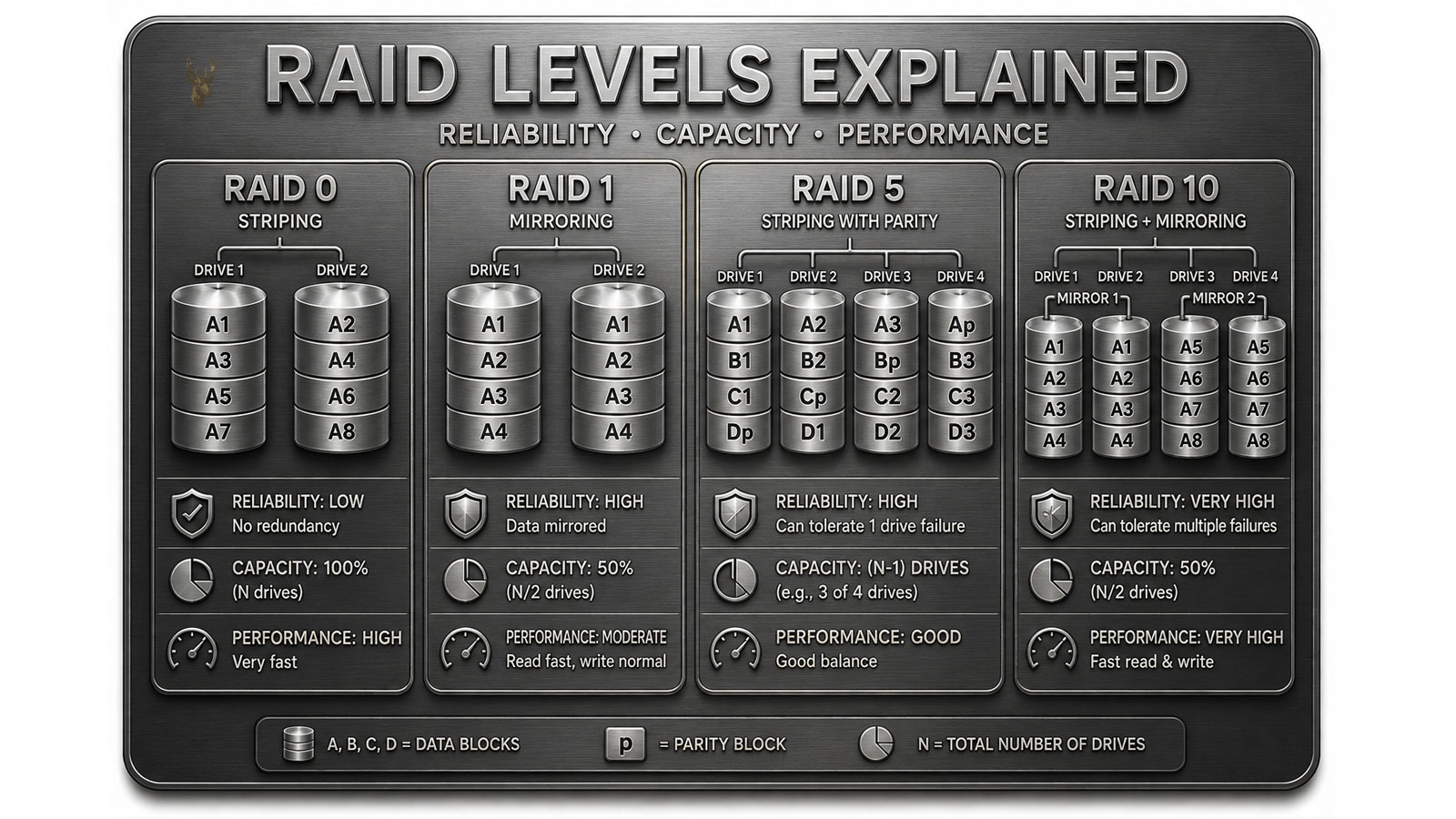
RAID 0 distributes information across multiple drives so that different portions of the same file can be read or written simultaneously. This technique, known as striping, allows storage performance to improve because several drives participate in each operation.
Although RAID 0 increases storage performance and combines the available capacity of all participating drives, it provides no redundancy. If one drive fails, portions of nearly every stored file may become unavailable because the information was divided across the entire array.
For this reason, RAID 0 should never be confused with a backup solution.
RAID 1 Prioritizes Redundancy Through Mirroring
RAID 1 stores identical copies of data on two or more drives. Every time information is written, the same data is duplicated across each mirrored drive so that one drive contains the same files as another.
If one drive develops a hardware failure, the remaining mirrored drive continues holding the same information. This redundancy improves system availability because the array may continue operating while the failed drive is replaced.
Mirroring, however, requires additional storage capacity because duplicate copies of every file must be maintained.
Redundancy Does Not Replace Independent Backups
One of the most common misconceptions about RAID is that redundant storage eliminates the need for backups. Although certain RAID levels continue operating after a drive failure, they do not protect against every cause of data loss.
Accidental file deletion, malware, software corruption, theft, fire, flooding, controller failure, and certain configuration mistakes may still affect every drive within the array simultaneously.
RAID improves storage availability under specific hardware failure conditions, while backups provide separate copies of important information that can be restored after many different types of incidents.
Hardware and Software RAID Reach the Same Goal Differently
RAID functionality may be managed by a dedicated hardware controller or by software integrated into the operating system. Both approaches organize multiple drives into a single storage array, but they differ in how storage management responsibilities are performed.
Hardware RAID controllers include dedicated processing resources for array management, while software RAID relies more heavily on the computer’s primary processor and operating system.
The appropriate approach depends upon the intended workload, hardware platform, and management requirements.
Basic Characteristics of Common RAID Levels
| RAID Level | Primary Characteristic |
|---|---|
| RAID 0 | Improves performance through striping without redundancy. |
| RAID 1 | Creates mirrored copies for hardware fault tolerance. |
| RAID 5 | Balances redundancy, capacity, and distributed parity. |
| RAID 10 | Combines striping with mirrored storage. |
Although RAID configurations vary considerably in design and capability, they all share the same objective of coordinating multiple storage devices into a unified storage system. Understanding the purpose behind each RAID level provides a stronger foundation for evaluating storage performance, planning hardware upgrades, and recognizing the difference between redundancy and comprehensive data protection.
Parity Allows Some RAID Arrays to Preserve More Usable Capacity
Mirroring protects data by maintaining complete duplicate copies, but that approach reduces the amount of storage available for everyday use. Parity-based RAID levels use a different method. Instead of duplicating every file in full, they calculate additional recovery information that can be used to reconstruct missing data after a drive failure.
This design allows an array to provide fault tolerance while preserving more usable capacity than a basic mirror. The tradeoff is greater complexity because the system must calculate, distribute, and maintain parity information alongside the original data.
Parity therefore represents a compromise between storage efficiency and continued operation after hardware failure.
RAID 5 Distributes Data and Parity Across Several Drives
RAID 5 requires at least three drives and distributes both file data and parity information across the entire array. No single drive is reserved exclusively for recovery information. Instead, parity rotates among the participating drives so that the workload is shared more evenly.
If one drive fails, the remaining data and parity information can be used to reconstruct the missing contents. The array may continue operating in a degraded state, although performance can decrease while the failed drive remains absent.
The usable capacity of RAID 5 is approximately equal to the combined capacity of all drives minus the capacity of one drive.
A Degraded Array Is Functional but No Longer Fully Protected
When a redundant RAID array loses one of its drives, it may remain accessible because the surviving drives still contain enough information to continue operating. This condition is commonly described as degraded operation.
Degraded does not mean the array is healthy. It means the system is operating with reduced fault tolerance and may be unable to survive another hardware failure. Read and write activity may also become slower because missing information must be reconstructed during normal access.
A degraded warning should therefore be treated as a time-sensitive hardware condition rather than a routine notification that can be ignored indefinitely.
Rebuilding Restores Redundancy After a Drive Replacement
After a failed drive is replaced, the RAID controller begins reconstructing the missing information onto the new device. This process is known as rebuilding. Depending on the size of the array, the speed of the drives, and the amount of active data, a rebuild may require many hours to complete.
During this period, the remaining drives experience additional activity because they must supply the data needed for reconstruction while continuing to handle normal storage requests.
The array generally does not regain full redundancy until the rebuild finishes successfully.
Large-Capacity Drives Can Make Rebuilds More Demanding
As individual drive capacities increase, reconstructing an entire failed device takes longer and places greater sustained demand on the surviving hardware. A large array may need to read extensive amounts of information before the replacement drive is fully synchronized.
This extended rebuild period increases the amount of time the array remains vulnerable. If another drive develops a serious problem before reconstruction is complete, data availability may be placed at greater risk.
For this reason, array design should consider not only total capacity but also the time and workload involved in recovering from a failed device.
RAID 6 Provides Additional Protection Against Drive Failure
RAID 6 extends the parity concept by maintaining two independent sets of recovery information. This allows the array to continue operating after two drives have failed, provided no additional failure occurs before the damaged devices are replaced and the array is rebuilt.
The additional protection requires more storage overhead and more complex parity calculations than RAID 5. Usable capacity is approximately equal to the total capacity of all participating drives minus the capacity of two drives.
RAID 6 is often selected for larger arrays where the possibility of a second drive problem during a lengthy rebuild deserves additional consideration.
RAID 10 Combines Mirroring With Striping
RAID 10, sometimes written as RAID 1+0, combines mirrored drive pairs with data striping. Information is distributed for performance while each section is also duplicated across another drive for redundancy.
This configuration generally requires at least four drives. Approximately half of the total installed capacity is available for use because the remaining capacity stores mirrored copies.
RAID 10 can provide strong performance and relatively straightforward recovery after certain drive failures, but it requires more physical storage than parity-based alternatives.
Drive Placement Determines Which Failures RAID 10 Can Survive
RAID 10 may survive more than one failed drive, but only when the failed devices do not belong to the same mirrored pair. If both members of one mirror fail, the striped array loses access to that portion of the stored information.
This detail illustrates why stating that an array can tolerate a certain number of failures may be incomplete. The location of each failed drive within the RAID structure can be just as important as the total number of failed devices.
Mixed Drive Sizes Can Reduce Available Capacity
Many RAID controllers base the usable contribution of each drive on the smallest device in the array. If larger and smaller drives are combined, the additional capacity on the larger drives may remain unused.
For example, an array containing several two-terabyte drives and one one-terabyte drive may treat every participating device as though it provides only one terabyte. The exact behavior depends on the controller and RAID implementation, but matched capacities generally simplify planning and reduce wasted space.
Using drives with similar performance characteristics also helps prevent one slower device from limiting the behavior of the entire array.
Capacity and Fault-Tolerance Comparison
| RAID Level | Minimum Drives | Approximate Usable Capacity | Typical Drive Failure Tolerance |
|---|---|---|---|
| RAID 0 | 2 | Total capacity of all drives | None |
| RAID 1 | 2 | Capacity of one mirrored drive | One drive in a two-drive mirror |
| RAID 5 | 3 | Total capacity minus one drive | One drive |
| RAID 6 | 4 | Total capacity minus two drives | Two drives |
| RAID 10 | 4 | Approximately half of total capacity | Depends on which mirrored members fail |
Parity, mirroring, striping, and rebuilding each solve a different part of the storage problem. RAID 5 and RAID 6 preserve more usable space through parity, while RAID 10 uses additional drive capacity to combine mirrored protection with striped performance. Evaluating these differences helps prevent the assumption that every redundant array offers the same level of protection, recovery speed, or usable capacity.
Monitoring a RAID Array Helps Identify Problems Before Data Becomes Unavailable
A RAID array is designed to continue operating under certain hardware failure conditions, but that capability should never encourage the assumption that storage health no longer requires attention. Like every storage system, RAID arrays benefit from regular monitoring so developing hardware problems can be identified before they progress into more serious failures.
Many RAID controllers and operating systems report the condition of individual drives, the overall status of the array, and whether rebuilding or other maintenance activities are currently taking place. Reviewing these indicators allows corrective action to begin while redundancy is still available.
A Failed Drive Should Be Confirmed Before Replacement
When a RAID system reports a drive problem, the first objective is confirming which physical drive has actually failed. Modern RAID controllers often identify the affected drive by its location, serial number, enclosure position, or indicator light, reducing the likelihood of removing the wrong device.
Replacing an operational drive instead of the failed one can unnecessarily reduce the array’s fault tolerance and may complicate recovery procedures. Verifying the failed device before taking action is therefore an important part of proper RAID maintenance.
Drive Health Can Change Before Complete Failure Occurs
Storage devices do not always stop functioning without warning. Some drives begin reporting read errors, communication problems, or increasing numbers of corrected faults before they become completely unavailable. RAID monitoring tools may detect these changes and provide advance warning that maintenance should be scheduled.
Recognizing these early indicators allows a drive to be replaced under controlled conditions instead of waiting for an unexpected interruption during normal operation.
Controller Configuration Is Part of the Storage System
A RAID array depends not only on its storage drives but also on the controller responsible for managing the array. The controller maintains information describing how the drives are organized, how redundancy is calculated, and how the operating system accesses stored information.
Understanding that the controller is an integral part of the storage architecture helps explain why replacing hardware without preserving the correct configuration may complicate recovery efforts.
Hot Spare Drives Can Reduce Recovery Time
Some RAID implementations support the use of a hot spare drive. This additional storage device remains installed but unused during normal operation. If one of the active drives fails, the controller can automatically begin rebuilding the array onto the spare without waiting for manual installation of a replacement drive.
Although a hot spare increases the amount of installed hardware, it can reduce the time an array operates with reduced redundancy after a drive failure.
RAID Is Common in Many Different Computing Environments
RAID technology is used in a variety of environments, including business servers, network-attached storage systems, professional workstations, virtualization platforms, media production systems, and some enthusiast desktop computers. Each environment places different demands on storage performance, fault tolerance, and available capacity.
For this reason, the most appropriate RAID level depends upon the intended workload rather than assuming one configuration is universally superior.
Array Expansion Requires Careful Planning
Eventually, many storage systems require additional capacity. Depending on the RAID controller and the selected RAID level, expanding an existing array may involve adding drives, migrating to a different RAID level, or creating an entirely new storage volume.
Because every controller supports expansion differently, reviewing the manufacturer’s documentation before modifying an established array helps reduce unnecessary risk and unexpected downtime.
Selecting the Appropriate RAID Level Begins With the Intended Purpose
Choosing a RAID configuration involves balancing several objectives rather than focusing on a single specification. Storage performance, usable capacity, fault tolerance, recovery time, hardware cost, and future expansion plans all influence which RAID level best matches a particular computer or server.
Understanding these tradeoffs makes it easier to evaluate storage designs without assuming that larger arrays or higher RAID numbers automatically provide the best overall solution.
Important RAID Concepts
| Concept | Purpose |
|---|---|
| Striping | Distributes data across multiple drives to improve performance. |
| Mirroring | Maintains duplicate copies for redundancy. |
| Parity | Stores recovery information without duplicating every file. |
| Rebuild | Restores redundancy after a failed drive is replaced. |
| Hot spare | Automatically replaces a failed drive when supported. |
| Monitoring | Helps detect storage problems before complete failure. |
RAID remains one of the most widely used storage technologies because it offers flexible ways to balance performance, reliability, and storage capacity across multiple drives. Whether the objective is improving speed through striping, increasing fault tolerance through mirroring, or combining redundancy with efficient storage through parity, each RAID level addresses a different operational need. Understanding these distinctions allows storage systems to be planned more effectively while reinforcing an important principle: RAID improves hardware resilience, but maintaining separate backups remains essential for protecting valuable information from the many causes of data loss that extend beyond the failure of a single storage device.











