
Clean Airflow Depends on More Than Cooling Fans Alone
Cooling fans receive much of the attention when desktop computer temperatures begin to rise, yet they represent only one part of the cooling system. Air must first enter the computer through unobstructed openings, travel across heat-producing components, and then leave the enclosure efficiently. When that airflow is interrupted, cooling performance gradually declines even if every fan continues spinning normally.
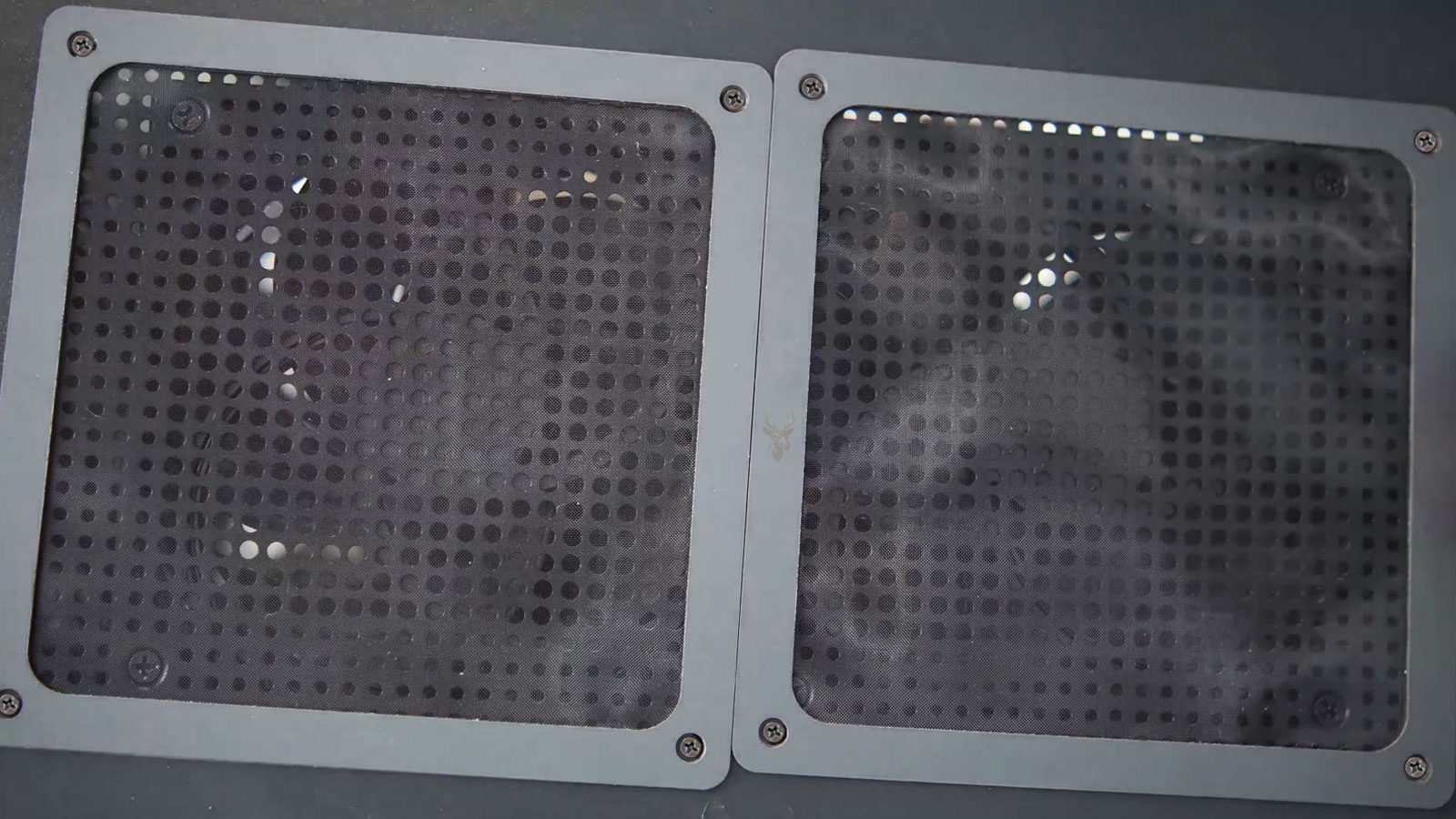
Many modern computer cases include removable dust filters to reduce the amount of airborne debris entering the system. These filters improve cleanliness inside the computer, but they also become maintenance items because every filter gradually restricts airflow as dust accumulates.
Understanding how airflow moves through the enclosure helps explain why cooling efficiency depends upon the complete ventilation path rather than individual components alone.
Dust Filters Are Designed to Reduce Internal Contamination
Desktop cases frequently position dust filters in front of intake fans located along the front panel, bottom panel, or side openings. As outside air enters the computer, the filter captures a significant portion of airborne particles before they reach the motherboard, graphics card, storage devices, and cooling assemblies.
This approach slows the accumulation of dust throughout the system and helps keep heatsinks, circuit boards, and internal connectors cleaner over long periods of operation.
Rather than preventing dust completely, filters concentrate much of the debris into one accessible location that can be cleaned periodically.
Every Filter Creates Some Resistance to Airflow
Even a brand-new dust filter slightly slows incoming airflow because air must pass through a fine mesh before reaching the intake fan. Manufacturers account for this restriction when designing the cooling system, but airflow decreases further as dust begins collecting across the filter surface.
As the openings become partially blocked, intake fans must work harder to pull the same amount of air into the enclosure. If the restriction becomes severe, the total volume of cooling air moving through the computer gradually decreases.
This reduction usually develops slowly enough that users do not immediately notice a change in cooling performance.
Air Must Travel Through the Entire Computer Case
Effective cooling depends upon continuous airflow rather than simply bringing fresh air into the computer. Once air enters through the intake filters, it must move across major heat sources before exiting through exhaust openings.
The processor, graphics hardware, voltage regulation components, storage devices, and memory all release heat into the moving air. If airflow slows significantly before reaching these components, temperatures may rise throughout the enclosure instead of around only one device.
The complete airflow path is therefore just as important as the number of installed cooling fans.
Different Filter Materials Capture Dust Differently
Computer manufacturers use several types of filter materials depending on the intended balance between airflow and particle capture. Fine woven mesh, synthetic fiber, perforated plastic, and magnetic filter assemblies each provide different airflow characteristics while reducing contamination inside the enclosure.
Filters with smaller openings generally capture finer particles but may require more frequent cleaning because debris accumulates more quickly across the available surface.
Selecting a filter involves balancing cleanliness with unrestricted ventilation rather than maximizing only one characteristic.
The Computer’s Environment Influences Maintenance Frequency
Desktop computers operating in different environments accumulate dust at very different rates. Homes with pets, workshops, offices near construction activity, carpeted rooms, and areas with higher airborne particles may require filter cleaning more frequently than systems located in cleaner environments.
Placement also affects dust accumulation. A computer positioned directly on the floor often encounters more airborne debris than one located on a desk or elevated platform.
These environmental differences explain why maintenance schedules cannot be based solely on the age of the computer.
Airflow Restrictions Can Affect Multiple Components Simultaneously
Reduced airflow rarely influences only a single component. Because all major hardware shares the same ventilation path, restrictions near the intake can gradually affect processor cooling, graphics card temperatures, storage devices, motherboard components, and power delivery circuits.
Although each device manages heat differently, all depend upon a steady supply of cooler air moving through the enclosure. Maintaining unrestricted airflow benefits the entire system instead of only one individual component.
Common Sources of Airflow Restriction
| Restriction | Possible Effect |
|---|---|
| Dust-covered intake filters | Reduced incoming airflow. |
| Blocked front ventilation openings | Less fresh air reaches internal components. |
| Computer placed against a wall | Restricted exhaust airflow. |
| Cable bundles across ventilation paths | Interrupted internal air movement. |
| Objects covering ventilation panels | Reduced overall cooling efficiency. |
Airflow management is an important part of routine computer maintenance because cooling depends upon the entire ventilation path remaining open. Dust filters provide valuable protection against internal contamination, but like every maintenance component, they perform best when inspected and cleaned before accumulated debris significantly restricts the movement of air through the computer.
Air Pressure Inside the Case Influences Where Dust Accumulates
Desktop cooling involves more than simply moving air through the enclosure. The relationship between intake airflow and exhaust airflow creates internal air pressure that influences how outside air enters the computer and where dust is likely to collect over time.
When intake and exhaust airflow remain reasonably balanced, fresh air follows predictable paths across major components before leaving the case. If the balance changes significantly, outside air may begin entering through unfiltered openings instead of passing through the intended intake filters.
Although every computer case is designed differently, understanding airflow balance helps explain why some systems remain relatively clean while others accumulate dust in unexpected locations.
Positive Air Pressure Encourages Air to Enter Through Filtered Openings
Positive air pressure exists when intake airflow slightly exceeds the amount of air being exhausted. The additional incoming air creates a small increase in internal pressure, encouraging excess air to leave the enclosure through small gaps, ventilation openings, and expansion slot covers.
Because most of the incoming air passes through the intended intake filters, a larger percentage of airborne dust is captured before reaching internal hardware. This design philosophy is commonly used in cases that emphasize long-term cleanliness.
Positive pressure does not eliminate dust completely, but it can reduce the amount entering through unfiltered openings.
Negative Air Pressure Can Draw Dust Through Small Openings
Negative air pressure develops when exhaust fans remove air faster than intake fans replace it. The resulting pressure difference encourages outside air to enter wherever an opening exists, including gaps around expansion slots, unused drive bays, side panels, and cable openings.
Many of these entry points do not contain dust filters. As a result, airborne particles may bypass the primary intake filters entirely before settling throughout the interior of the computer.
This does not necessarily indicate poor case design, but it does influence where dust is likely to accumulate between maintenance intervals.
Balanced Airflow Supports Consistent Cooling
Many desktop systems operate effectively with airflow that remains close to balanced between intake and exhaust. In these configurations, air follows a predictable route across the processor, graphics card, memory, storage devices, and motherboard before exiting the enclosure.
Maintaining this controlled airflow allows heat generated by one component to move away before affecting neighboring hardware. The objective is not simply moving large amounts of air but directing it efficiently through the system.
Case layout, fan placement, and internal component arrangement all contribute to how effectively this airflow pattern develops.
Large Graphics Cards Can Influence Internal Air Movement
Modern graphics cards often occupy significant space inside the computer enclosure. Their cooling assemblies may redirect airflow, partially obstruct nearby ventilation paths, or create separate airflow zones around the graphics processor.
Although these cooling systems are engineered for high-performance hardware, they also affect how fresh air reaches other nearby components. Careful case design helps maintain adequate airflow despite the increasing size of modern expansion cards.
This interaction illustrates why cooling performance depends upon the complete internal layout rather than any single fan.
Cable Routing Can Improve Ventilation Paths
Power cables, data cables, and accessory wiring occupy space inside every desktop computer. When these cables cross major airflow paths unnecessarily, they can create small areas of turbulence that reduce the efficiency of moving air.
Modern computer cases often include dedicated cable-routing channels behind the motherboard tray, allowing much of the wiring to remain outside the primary airflow path. This organization improves accessibility while supporting more consistent ventilation.
Although cable routing alone cannot solve cooling problems, it contributes to a cleaner and more efficient airflow pattern.
Filter Maintenance Is Different From Internal Cleaning
Dust filters are designed to be serviced regularly without requiring complete disassembly of the computer. Most modern cases allow filters to slide out or detach so accumulated debris can be removed before airflow becomes significantly restricted.
Internal cleaning, however, involves removing dust that has already passed through the filters or accumulated on heatsinks, cooling fans, circuit boards, and other components. These two maintenance procedures complement one another but serve different purposes.
Keeping filters clean reduces how quickly dust reaches the hardware, while periodic internal cleaning addresses contamination that still develops during normal operation.
Environmental Changes Can Alter Cooling Performance
A computer that operated efficiently in one location may experience different cooling conditions after being moved. Seasonal changes, room temperature, nearby furniture, flooring, humidity, and airborne dust levels all influence the operating environment surrounding the enclosure.
Even placing the computer inside a confined cabinet can reduce the amount of cool air available to the intake fans while allowing warm exhaust air to circulate repeatedly around the case.
Considering the surrounding environment is therefore an important part of maintaining stable operating temperatures.
Airflow Management Involves the Entire Cooling System
| Cooling Factor | Contribution to Airflow |
|---|---|
| Dust filters | Reduce airborne contamination entering the enclosure. |
| Intake fans | Supply fresh air to internal components. |
| Exhaust fans | Remove heated air from the enclosure. |
| Cable routing | Helps maintain unobstructed airflow paths. |
| Case ventilation layout | Guides air across heat-producing hardware. |
| Regular maintenance | Preserves cooling efficiency over time. |
Effective cooling results from the combined operation of intake airflow, exhaust airflow, unobstructed ventilation paths, clean filters, and proper case design. Looking at the entire airflow system instead of focusing on a single cooling fan provides a better understanding of why desktop computers maintain stable operating temperatures during everyday use.
Maintaining Airflow Is a Preventive Practice Rather Than a One-Time Repair
Desktop computer cooling gradually changes as the system continues operating month after month. Airborne particles settle on filters, fan blades collect fine dust, room conditions vary with the seasons, and the airflow moving through the enclosure slowly becomes less efficient than when the computer was first assembled. These changes occur gradually enough that they often go unnoticed until temperatures begin rising or cooling fans become noticeably louder.
Because airflow naturally changes over time, maintaining proper ventilation is best approached as routine preventive maintenance instead of waiting until heat-related symptoms develop.
Inspection Begins With the Exterior of the Computer
Before opening the computer case, technicians typically examine the condition of the exterior ventilation areas. Intake openings, exhaust vents, removable filters, and surrounding panels often provide valuable information about how the cooling system has been operating.
Heavy dust accumulation around one section of the enclosure may indicate where airflow is entering or leaving the system most aggressively. At the same time, blocked ventilation openings or filters covered with debris can explain why cooling efficiency has gradually declined.
Observing these conditions first helps establish how air has been moving through the computer before internal components are examined.
Internal Airflow Is Evaluated as a Complete Path
Once the enclosure is opened, attention shifts to the entire airflow path instead of individual cooling fans. Intake locations, cable routing, heatsinks, graphics hardware, storage devices, and exhaust areas are evaluated together to determine whether fresh air can travel efficiently from one end of the case to the other.
A single obstruction rarely causes every cooling problem. More often, several small airflow restrictions combine to reduce the overall effectiveness of the ventilation system.
Cooling Components Are Examined for Normal Wear
Cooling fans, mounting hardware, heatsinks, and removable filters are designed for extended operation, but they are still subject to normal wear. Fan bearings age, mounting clips loosen, vibration can develop, and dust gradually changes how efficiently air passes across cooling surfaces.
Examining these components together provides a clearer understanding of the cooling system than evaluating any single part independently. Proper airflow depends upon the combined performance of every component involved in moving heat away from the hardware.
Computer Placement Continues to Affect Cooling After Installation
Even a properly maintained computer depends upon its surroundings for a steady supply of cooler air. Placing the enclosure inside a confined cabinet, directly against a wall, beneath heavy fabric, or in an area with limited air circulation can reduce the effectiveness of the cooling system regardless of the number of installed fans.
Allowing adequate space around ventilation openings helps warm air leave the enclosure instead of circulating back toward the intake vents.
Routine Maintenance Helps Preserve Long-Term Cooling Performance
Regular inspection of removable filters, exterior ventilation openings, and internal airflow paths helps maintain the cooling conditions originally intended by the system manufacturer or custom builder. Preventive maintenance is generally easier than correcting heat-related problems after prolonged airflow restriction has already affected overall operating temperatures.
Maintaining clean airflow also supports more stable operation for processors, graphics hardware, storage devices, memory, and motherboard components that all depend upon the same supply of moving air.
Cooling Problems Should Be Diagnosed Systematically
If a desktop computer begins running hotter than expected, the solution should be based on observation rather than assumption. Airflow restrictions, environmental conditions, fan operation, dust accumulation, cable placement, and heatsink condition all contribute to overall cooling performance.
Evaluating the complete cooling system helps distinguish between normal maintenance requirements and conditions that require hardware repair or replacement.
Good Airflow Supports Every Major Hardware Component
| Area of the Computer | Benefit of Unrestricted Airflow |
|---|---|
| Processor cooling | Helps transfer heat away from the CPU heatsink. |
| Graphics hardware | Provides cooler intake air for GPU cooling systems. |
| Motherboard components | Improves heat dissipation around power circuitry. |
| Storage devices | Helps moderate operating temperatures during extended activity. |
| Power supply | Allows continuous movement of cooling air through the unit. |
| Entire enclosure | Supports balanced temperatures throughout the system. |
Dust filters are an effective part of modern desktop computer design because they reduce the amount of airborne contamination reaching sensitive hardware while concentrating routine maintenance into accessible locations. Their effectiveness, however, depends on regular inspection, unobstructed airflow, and a properly ventilated enclosure. Understanding how filtered intake air, unrestricted ventilation paths, balanced airflow, and routine maintenance work together provides a more complete view of desktop cooling and helps preserve reliable computer operation over the long term.











