
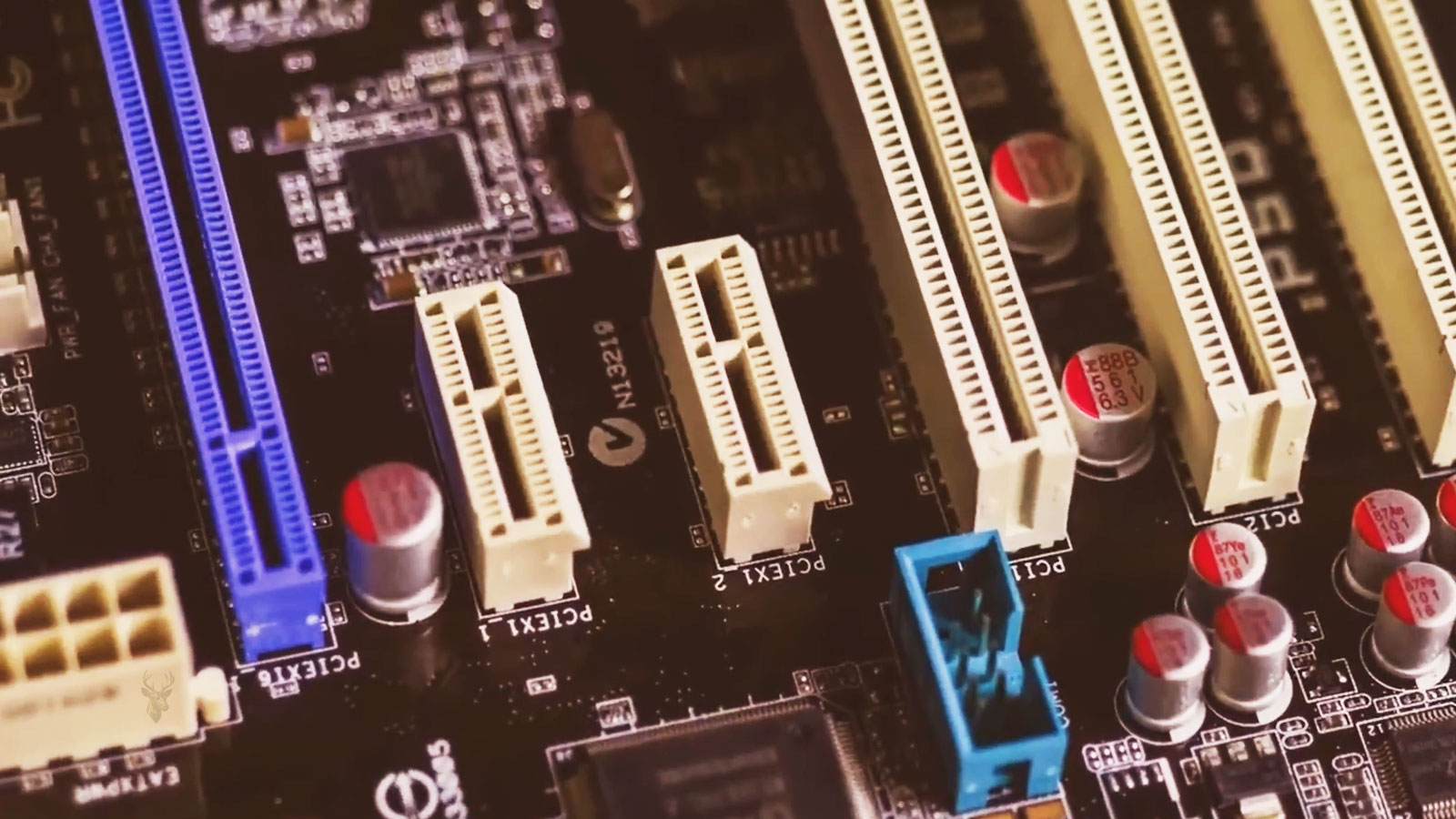
Not Every Expansion Slot Has the Same Connection to the System
Many computer owners assume that every expansion slot on a motherboard operates at the same speed because the connectors often appear similar. In reality, each slot may have a different number of communication lanes, a different electrical connection, or a different path through the motherboard chipset. These differences determine how much information can move between installed hardware and the rest of the computer.
The physical size of a slot does not always indicate its maximum performance. A long connector may not necessarily provide the same bandwidth as another connector of identical length, and some motherboards intentionally share resources between multiple devices.
Understanding how PCI Express lanes are assigned helps explain why hardware compatibility involves more than simply finding an available slot.
PCI Express Transfers Information Through Individual Lanes
PCI Express, commonly shortened to PCIe, communicates by using individual data pathways known as lanes. A device may operate with one lane, four lanes, eight lanes, sixteen lanes, or another supported configuration depending on its design and the motherboard that hosts it.
Each additional lane increases the amount of information that can travel simultaneously. Instead of relying on one large communication channel, PCI Express combines multiple high-speed lanes into a wider connection capable of carrying greater amounts of data.
This scalable approach allows very different devices to share the same communication standard while using only the bandwidth they require.
Lane Count and Slot Length Are Related but Not Identical
Expansion slots are often described as x1, x4, x8, or x16. These designations identify the maximum number of PCI Express lanes that the connection is designed to support. Although slot length usually corresponds to these values, appearances can sometimes be misleading.
Some motherboards include full-length connectors that are electrically wired for fewer lanes. This design provides physical flexibility for larger expansion cards while operating within the available hardware resources.
Reading the motherboard specifications is therefore more reliable than judging capability by connector size alone.
The Processor and the Chipset May Supply Different Lanes
Modern desktop platforms commonly receive PCI Express lanes from more than one source. Some lanes originate directly from the processor, while others are provided by the motherboard chipset. Although both follow the PCI Express standard, they may serve different purposes depending on the system architecture.
High-performance devices frequently benefit from direct processor connections, while many secondary devices communicate through the chipset. This organization allows numerous components to operate together without every device requiring its own dedicated processor connection.
The exact arrangement varies between processor families, motherboard models, and platform generations.
Several Devices May Share Available Resources
Motherboard designers often balance available PCI Express lanes across multiple connectors and storage interfaces. Installing one expansion card or storage device may therefore reduce the resources available to another connector.
This behavior does not indicate a hardware defect. It reflects design decisions that allow a motherboard to support many different combinations of components while remaining within the limitations of the processor and chipset.
For this reason, installing additional hardware can sometimes change the operating characteristics of other expansion slots without any component actually failing.
Expansion Cards Do Not Automatically Use Maximum Bandwidth
Every expansion device is designed with its own bandwidth requirements. Some network adapters, sound cards, and USB controllers operate efficiently with relatively few lanes, while storage controllers and graphics hardware may benefit from wider connections.
Using a larger connector does not necessarily improve performance if the hardware itself was engineered to utilize fewer communication lanes. The effective bandwidth depends upon both the expansion card and the motherboard connection supporting it.
Matching hardware capabilities with the available PCI Express resources helps maintain efficient system operation without unnecessary expectations regarding performance.
Motherboard Documentation Explains Resource Allocation
Manufacturers document how PCI Express resources are distributed throughout the motherboard. These diagrams often describe which slots share bandwidth, which storage connectors disable others under certain configurations, and how different combinations of installed hardware affect available connections.
Although these tables may appear technical at first, they provide valuable information whenever additional hardware is installed or system upgrades are planned.
Consulting this information before purchasing new components helps avoid unexpected compatibility limitations later.
Common PCI Express Lane Configurations
| Lane Configuration | Typical Purpose |
|---|---|
| x1 | Sound cards, USB expansion cards, network adapters, and other lower-bandwidth devices. |
| x4 | Storage controllers, some high-speed adapters, and selected expansion devices. |
| x8 | Professional expansion hardware and certain graphics configurations. |
| x16 | Graphics cards and other devices requiring the widest available connection. |
Understanding PCI Express lane allocation provides a stronger foundation for evaluating upgrades, diagnosing compatibility questions, and interpreting motherboard specifications. Rather than viewing expansion slots as identical connectors, recognizing how lanes are assigned reveals how the computer distributes its available communication bandwidth among installed hardware.
PCI Express Generations Increase Speed Without Changing the Basic Design
One advantage of the PCI Express standard is that it has continued evolving without abandoning its original architecture. New generations increase the amount of data that each communication lane can carry while preserving the same fundamental method of transferring information between the processor, chipset, and installed hardware.
This means that newer motherboards and expansion cards often maintain a high degree of compatibility with earlier hardware. Although devices usually operate together successfully, the available performance is limited by the fastest PCI Express generation supported by both the motherboard and the installed component.
Compatibility therefore depends on more than simply fitting into the connector. The electrical capabilities of both devices determine the communication speed that will actually be used.
Backward Compatibility Does Not Guarantee Maximum Performance
A PCI Express card designed for a newer generation will generally function in an older compatible slot, provided the motherboard supports the device electrically. Likewise, an older expansion card can usually be installed into a newer motherboard without difficulty.
When different generations are combined, both devices communicate using the highest standard that they have in common. As a result, the hardware continues operating reliably while accepting the bandwidth limitations imposed by the older technology.
This automatic negotiation allows computer upgrades to occur gradually instead of requiring every expansion device to be replaced at the same time.
Graphics Cards Often Receive the Most Attention, but They Are Not Alone
Graphics adapters are commonly associated with PCI Express because they frequently use full-length x16 connectors. However, they represent only one category of hardware that depends upon PCI Express communication.
High-speed storage adapters, network interface cards, RAID controllers, video capture hardware, professional audio equipment, and specialized accelerator cards also communicate through PCI Express lanes. Each device is designed according to its own bandwidth requirements rather than following a single configuration.
This flexibility has allowed PCI Express to become the standard expansion interface across a wide variety of computing environments.
NVMe Storage Shares the Same PCI Express Technology
Many modern solid-state drives communicate through PCI Express rather than traditional SATA connections. Although they are often installed into compact M.2 connectors instead of expansion slots, the underlying communication technology still relies upon PCI Express lanes.
Because these storage devices frequently use multiple lanes simultaneously, motherboard manufacturers sometimes assign lane resources between M.2 storage connectors and selected PCI Express expansion slots.
This explains why installing an additional NVMe drive can occasionally change the availability or operating mode of another connector elsewhere on the motherboard.
Lane Sharing Is a Planned Design Choice
Users sometimes assume that losing access to a particular connector after installing new hardware indicates a defective motherboard. In many situations, the behavior is completely intentional. Manufacturers design systems to distribute a finite number of PCI Express lanes among multiple expansion options.
When additional devices are installed, the motherboard automatically reallocates available resources according to its design. Certain slots may operate with fewer lanes, while others may become unavailable until hardware is removed or relocated.
Consulting the motherboard manual before making hardware changes helps avoid unexpected surprises during installation.
Expansion Cards Negotiate Their Operating Link Automatically
When a computer starts, PCI Express devices establish communication by negotiating both the number of active lanes and the generation that will be used. This process occurs automatically and normally requires no manual configuration.
If either device cannot support a wider or faster connection, communication simply continues using compatible settings. This automatic negotiation contributes to the reliability of PCI Express by allowing different generations of hardware to operate together without extensive user intervention.
Only when negotiation fails because of hardware defects, firmware problems, or compatibility limitations does communication become unreliable.
Physical Installation Remains Important
Even when an expansion card is fully compatible with the motherboard, proper installation remains essential. The card should be completely seated within the connector, secured to the chassis, and free from unnecessary mechanical stress.
Dust accumulation, accidental movement during transport, or incomplete insertion can interrupt electrical contact and create symptoms that resemble software or hardware failures.
Simple physical inspection is therefore an important part of diagnosing newly installed expansion devices.
Firmware Updates Can Improve PCI Express Compatibility
Motherboard firmware occasionally receives updates that improve compatibility with newer processors, storage devices, graphics hardware, or expansion cards. These updates may refine PCI Express initialization, improve device recognition, or address communication problems identified after the motherboard was originally released.
Although firmware updates should never be performed casually, manufacturers sometimes recommend them when installing newer hardware that was introduced after the motherboard entered production.
Reading the manufacturer’s release notes helps determine whether a firmware update addresses a specific compatibility concern.
Understanding PCI Express Helps When Planning Upgrades
| Planning Question | Why It Matters |
|---|---|
| How many PCIe lanes are available? | Determines how system resources are distributed. |
| Which PCIe generation is supported? | Establishes the maximum communication speed. |
| Do expansion slots share bandwidth? | Explains changes after installing additional hardware. |
| Will an M.2 device affect expansion slots? | Some motherboards share PCIe resources. |
| Does the motherboard documentation describe lane allocation? | Provides the intended hardware configuration. |
Understanding PCI Express lane allocation makes hardware upgrades easier to plan and helps explain why some expansion devices perform differently depending on the motherboard they are installed into. Recognizing how bandwidth is assigned provides a clearer understanding of overall system architecture instead of viewing each connector as an independent component.
Effective PCI Express Troubleshooting Begins With Understanding the Platform
When an expansion card, storage device, or other PCI Express hardware does not behave as expected, replacing components immediately is rarely the most efficient approach. Because PCI Express devices depend on motherboard design, firmware support, processor resources, and proper physical installation, a systematic diagnosis provides more reliable results than assuming the newest component is defective.
Successful troubleshooting focuses on identifying where communication stops, whether the limitation is caused by hardware allocation, compatibility, firmware, or the expansion device itself. Understanding the complete platform prevents unnecessary replacement of components that continue operating correctly.
Motherboard Specifications Provide the Starting Point
Before investigating individual hardware, technicians review the motherboard documentation to understand how PCI Express resources are distributed. This information identifies which connectors share bandwidth, how storage devices interact with expansion slots, and whether certain combinations of hardware automatically change lane assignments.
Without this reference, normal motherboard behavior may be mistaken for a malfunction. What appears to be a disabled slot or reduced bandwidth is often an expected result of the platform’s resource allocation design.
Physical Inspection Remains an Essential Step
Even modern PCI Express hardware depends upon clean electrical contact between the expansion card and the motherboard connector. During inspection, technicians verify that the card is fully seated, properly secured to the chassis, and free from excessive movement or mechanical stress.
Dust accumulation, incomplete insertion, bent retaining brackets, or accidental movement during transportation can interrupt communication without producing visible damage to either component.
Correcting these conditions is often considerably simpler than replacing otherwise functional hardware.
Firmware Compatibility Is Verified Before Hardware Is Condemned
Motherboard firmware controls the initialization of PCI Express devices during startup. As processors, graphics adapters, storage controllers, and other expansion hardware evolve, manufacturers sometimes release firmware updates that improve compatibility with newer components.
Reviewing firmware support helps determine whether the motherboard fully recognizes recently introduced hardware or whether additional compatibility improvements have been published by the manufacturer.
This verification reduces the likelihood of replacing hardware when the platform itself requires updated firmware support.
Expansion Devices Are Evaluated Individually
When several PCI Express devices are installed simultaneously, diagnosing one component at a time helps isolate the source of unexpected behavior. Testing individual devices under controlled conditions avoids confusing shared resource allocation with multiple unrelated hardware failures.
Returning the system to a simpler hardware configuration also makes it easier to determine whether a particular expansion card, storage device, or motherboard connector is responsible for the observed symptom.
Resource Allocation Should Always Be Confirmed After Hardware Changes
Adding an NVMe drive, installing another expansion card, or replacing an existing device can change how motherboard resources are assigned. Confirming lane allocation after each modification ensures that every installed component continues operating within the intended hardware configuration.
Understanding these planned design changes prevents unnecessary concern when an expansion slot begins operating differently after another device has been added elsewhere on the motherboard.
Processor Capabilities Also Influence Expansion Performance
The processor contributes directly to PCI Express operation by supplying a portion of the available communication lanes. Different processor families, product tiers, and platform generations support different lane counts, making processor selection an important consideration for systems expected to operate multiple high-bandwidth devices simultaneously.
Evaluating only the motherboard without considering processor capabilities provides an incomplete picture of the system’s expansion capacity.
Planning Hardware Upgrades Becomes More Predictable
Understanding PCI Express architecture allows future upgrades to be planned with greater confidence. Rather than selecting hardware solely according to connector size, users can consider lane availability, platform limitations, firmware support, and resource sharing before purchasing additional components.
This approach reduces compatibility surprises and helps maintain balanced system performance as new storage devices, expansion cards, and graphics hardware are introduced over time.
Key Concepts to Remember
| Concept | Practical Significance |
|---|---|
| Lane allocation | Determines how communication bandwidth is distributed. |
| PCI Express generation | Influences maximum data transfer capability. |
| Processor resources | Help define the platform’s expansion capacity. |
| Motherboard documentation | Explains shared resources and connector behavior. |
| Firmware compatibility | Supports recognition of newer expansion hardware. |
| Proper installation | Ensures stable electrical communication between devices. |
PCI Express has become the foundation for modern computer expansion because it combines scalability, backward compatibility, and high-speed communication within a standardized architecture. Understanding how lanes, bandwidth, motherboard resources, firmware, and processor capabilities work together makes it easier to interpret hardware specifications, diagnose compatibility concerns, and plan future upgrades with realistic expectations. Rather than viewing expansion slots as simple connectors, recognizing the underlying PCI Express architecture provides a more complete understanding of how modern computers exchange information between their most demanding hardware components.











