
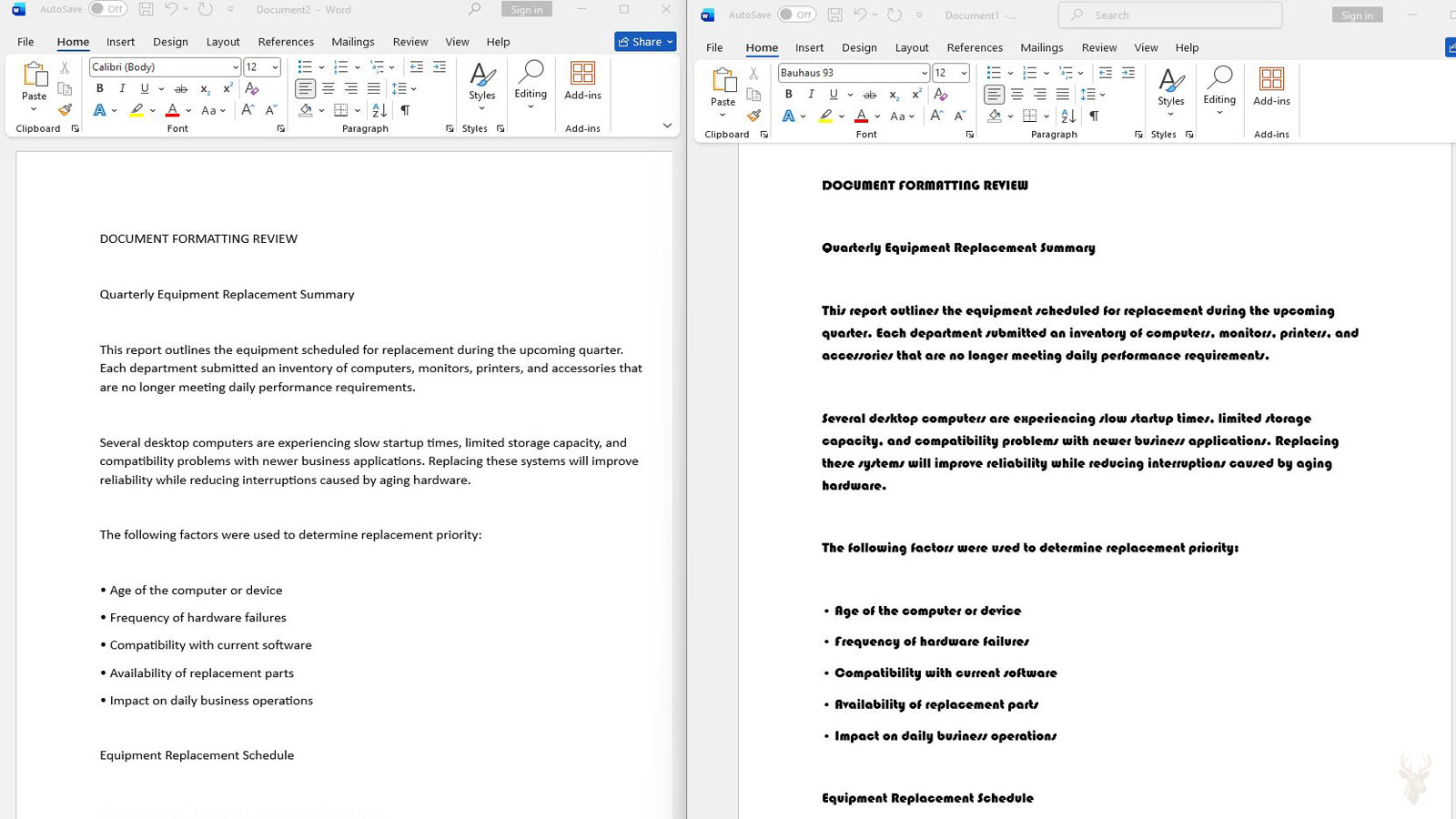
A Document Can Change Shape Without Losing Any of Its Text
A document may open with every word still present while headings move, paragraphs wrap differently, tables expand, and the page count changes. These symptoms can make the file appear damaged even though its written content remains intact.
The layout often changes because the computer is not displaying the same typeface that was used when the document was created. The application substitutes another font and rebuilds each line according to the replacement font’s measurements.
The replacement may look generally similar, but small differences in character width, line height, punctuation spacing, and bold styling can affect the entire document. The problem is therefore not limited to appearance. It can alter the physical position of text throughout the file.
Typeface Measurements Control More Than the Appearance of Letters
Each typeface defines how much horizontal and vertical space its characters occupy. The letter shapes, side spacing, punctuation width, baseline position, and distance between lines all influence how text fits within a page.
A replacement font with slightly wider lowercase letters may force one additional word onto the next line. That new line can push the following paragraph downward, move a table to another page, or separate a heading from the text beneath it.
Once the first line changes, the effect can continue through the rest of the document. A small substitution near the beginning may eventually produce several extra pages by the end.
Font Substitution Is Usually an Automatic Recovery Behavior
When an application cannot access the requested typeface, it often chooses another font instead of refusing to open the file. This keeps the text readable and allows the user to continue working.
The replacement decision may be based on general characteristics such as serif or sans serif design, language support, weight, or availability. The substitute does not have to match the original spacing exactly.
Because the change happens automatically, the user may not receive a clear warning. The first visible clue may be a document that looks unfamiliar or no longer fits its original page structure.
The Font Name Shown in the Toolbar May Not Tell the Complete Story
Some applications continue displaying the requested font name in the formatting controls even when the computer is rendering the text with a substitute. The document still contains the original formatting instruction, but the required font resource is unavailable.
This can create the impression that the correct typeface is already active. Changing the selected text to another font and then returning to the original name may not help if the underlying font file is still absent.
The installed font collection must be checked separately from the formatting name stored inside the document.
A Font Family Name Can Represent Several Separate Resources
A document may rely on regular, bold, italic, semibold, condensed, or other members of the same font family. These variations can be contained in separate files or provided through different internal styles.
The regular typeface may display correctly while bold headings appear too wide or italic text changes shape. In that situation, the family is not completely absent. Only one required member may be unavailable or incompatible.
This distinction matters because reinstalling only the regular font does not restore a missing bold or italic resource used elsewhere in the document.
| Document Symptom | Possible Font Condition |
|---|---|
| Normal paragraphs look correct, but headings expand. | The bold or semibold style may be missing. |
| Italic passages use a different design. | The application may be simulating italics or substituting another style. |
| Only narrow labels overflow their boxes. | A condensed font variation may be unavailable. |
| All text changes width and page count. | The complete typeface family may be missing. |
| Symbols fail while ordinary letters remain visible. | The installed font may lack the required character coverage. |
Documents Created on Another Computer Carry Formatting Instructions, Not Always the Font Files
Many editable documents record the name of the typeface that should be used without including the actual font resource. The receiving computer must already have a compatible copy available.
A file can therefore travel successfully through email, external storage, or cloud synchronization while its supporting typeface does not travel with it. The document is complete, but the environment needed to reproduce its original appearance is different.
This is common when files move between home computers, office workstations, school systems, and design applications that use separately licensed fonts.
Embedded Fonts Can Preserve Layout, but Embedding May Be Partial
Some document formats can include font information inside the file. This allows the document to reproduce its original appearance without depending entirely on fonts installed on the receiving computer.
Embedding is not always complete. A file may contain only the characters used when it was saved, or it may include enough information for viewing and printing but not for unrestricted editing.
New text added later may therefore use a substitute even though the original paragraphs continue displaying correctly. This can produce two visibly different typefaces inside the same document.
Licensing Rules Can Prevent a Typeface from Being Embedded or Shared
Commercial fonts can include permissions that restrict copying, installation, editing, or document embedding. An application may obey those permissions by excluding the typeface from the saved file.
The document can then display correctly on the creator’s computer but change when opened elsewhere. The missing resource is not necessarily the result of file corruption or an unsuccessful transfer.
Replacing the font with an unauthorized copy is not a reliable repair. The correct licensed resource or an approved alternative should be used when the original typeface cannot legally be transferred.
Different Revisions of the Same Typeface Can Produce Different Layouts
Two computers may both list the same font family while using different revisions of its files. A publisher can update spacing, add characters, correct outlines, or change internal measurements without changing the visible family name.
The document may therefore shift even though the expected font appears to be installed on both systems. One computer is not substituting another family; it is using a different version of the intended one.
Version differences become especially noticeable in forms, labels, tightly fitted tables, presentation slides, and documents designed around exact line lengths.
Applications Can Interpret the Same Typeface Differently
The operating system supplies font resources, but the application determines how those resources are used inside the document. Two programs can calculate spacing, line height, kerning, and style behavior differently.
A file opened in a compatible alternative program may therefore show small layout changes even when the correct fonts are installed. Converting between document formats can increase those differences.
The comparison should include the application and version used to create the file. Matching only the operating system and font family may not reproduce the original layout.
Printer Output Can Reveal a Different Substitution Than the Screen
A document may appear acceptable on the monitor but print with changed line breaks, missing symbols, or altered spacing. Printing introduces another rendering path involving the application, operating system, printer driver, and output format.
The screen and printer do not always use font information in exactly the same way. A driver may substitute a device font, process the typeface incorrectly, or fail to reproduce a feature used by the document.
Comparing the editable file, a PDF export, and the printed page can help identify whether the layout change occurs during document display or during print processing.
PDF Export Can Preserve Appearance Without Repairing the Editable File
Exporting a correctly displayed document to PDF can preserve its visual arrangement for distribution and printing. This can be useful when recipients do not need to edit the original content.
The PDF does not necessarily correct the font environment inside the editable source. Opening the original document on another computer may still trigger the same substitution and layout changes.
A PDF should therefore be treated as a stable output copy rather than proof that the missing or incompatible typeface has been repaired.
Text Boxes and Tables Often Expose Font Differences First
Ordinary paragraphs can absorb small changes by wrapping onto another line. Text boxes, form fields, labels, and table cells have fixed boundaries that leave less room for variation.
A replacement typeface may cause text to touch a border, disappear below the visible area, or push a table column wider than intended. These confined sections can reveal a substitution before the rest of the document looks noticeably different.
Checking the most tightly fitted areas provides a useful early comparison when two versions of a document are being evaluated.
Missing Symbols Can Be a Character-Coverage Problem Instead of Full Font Substitution
A typeface does not necessarily contain every language character, mathematical mark, currency sign, or technical symbol. Most of the document may display correctly while a small number of characters appear as boxes or unrelated marks.
The application may borrow the missing character from another font while leaving the surrounding text unchanged. This can produce a single symbol with a different weight, height, or alignment.
The distinction is important because replacing the entire family may be unnecessary. A version with broader character coverage or a carefully selected companion font may resolve the limited problem.
The Layout Pattern Provides the First Diagnostic Direction
| Observed Change | Most Likely Area to Examine |
|---|---|
| The entire file gains or loses pages. | Complete typeface substitution or a different font revision. |
| Only headings become wider. | Missing bold, semibold, or display style. |
| Original text looks correct, but newly typed text does not. | Partial font embedding or restricted editing permissions. |
| The file changes only in another application. | Application rendering or document-format conversion. |
| The screen is correct, but printed pages shift. | Printer driver or output-stage font processing. |
| Only symbols or another language are affected. | Incomplete character coverage rather than a missing family. |
| Tables and labels overflow before normal paragraphs change. | Small measurement differences inside fixed-width areas. |
The location and scale of the layout change help distinguish a missing family from an absent style, incomplete embedding, limited character support, application conversion, or print-specific substitution. That distinction should be established before fonts or document formatting are replaced.
Font Replacement Can Be Triggered by a Broken Link Between the Document and the Installed Typeface
A document can request a font by using internal naming information that does not match the way another computer recognizes the installed file. The visible family name may look identical while the application treats the available typeface as a different resource.
This can happen after a font is updated, reinstalled, converted, or supplied by another publisher. The replacement may carry different internal family, style, or identification records even though its displayed name appears familiar.
The application may then substitute another font because it cannot connect the document’s original reference with the replacement file. Confirming only the visible family name may overlook this internal mismatch.
Copied Formatting Can Introduce a Typeface That Is Not Obvious on the Page
Text copied from another document, website, email, or business system can bring hidden formatting with it. A paragraph may look similar to the surrounding content while still referring to a different font family or style.
The difference may remain unnoticed on the original computer because both typefaces are available. After the document is transferred elsewhere, only the pasted section may expand, contract, or display with substituted characters.
Inspecting the formatting of the affected passage separately can reveal that the document contains several font references rather than one consistent typeface throughout.
Templates Can Reapply Font Choices After a Document Opens
Documents created from templates may inherit heading, paragraph, table, and list styles from an external or attached template. Those styles can include specific typeface assignments.
If the template is missing, replaced, or updated on another computer, the document may adopt different style definitions when it opens. The user may see layout movement even though no text was manually reformatted.
The affected sections often follow structural patterns such as all headings, captions, quotations, or table labels changing together. That pattern points toward style or template behavior rather than random font damage.
Document Themes Can Alter Font Assignments Across Multiple Styles
Some office documents use theme fonts instead of assigning one fixed typeface directly to every paragraph. A theme can define separate fonts for headings and body text.
Changing the document theme can therefore alter many sections at once. A heading may continue reporting that it uses the theme heading font even though the actual typeface behind that theme has changed.
This can create broad layout changes without producing a missing-font warning. The document still has a valid font assignment, but the theme now resolves that assignment to a different typeface.
Direct Formatting and Style Formatting Can Produce Conflicting Results
A paragraph can receive formatting from its assigned style and also contain direct changes applied manually. These two layers can become difficult to distinguish when the document moves between systems.
A style may request one font while selected words or lines contain another font applied directly. If only one of those typefaces is available, the passage can display with mixed spacing and inconsistent character shapes.
Removing direct formatting without examining the style can also change more than intended. The effective font should be identified at both the style level and the selected-text level before the document is normalized.
Automatic Font Activation Can Make the Problem Appear Intermittent
Some design and publishing environments can activate fonts temporarily when a document is opened. The font becomes available for the current application or project without being installed permanently for every program.
The document may display correctly during one session and substitute another typeface later if the activation service is unavailable, the project is moved, or the temporary font resource is no longer accessible.
This behavior can make the layout problem appear inconsistent. The controlling factor may be whether the font-management utility successfully activated the required resource before the document loaded.
Network-Based Font Resources Can Fail Outside the Original Workplace
Organizations sometimes maintain licensed fonts on managed systems, shared resources, or controlled application environments. A document created there may depend on typefaces that are not present on a personal or off-site computer.
The document can open normally at the office and change layout when viewed elsewhere. The difference may follow the network connection, company account, software license, or managed workstation rather than the document file.
Testing whether the typeface is available before and after connecting to the organization’s environment can help identify whether access to a managed resource controls the document’s appearance.
Remote Desktop Sessions Can Present a Different Font Environment
A document opened through Remote Desktop is being processed by the remote computer, not by the device displaying the session. The available fonts and application versions belong to that remote system.
The same file may therefore look different when opened locally and remotely. One environment may contain the intended typeface while the other substitutes a replacement.
Comparing the two views should include the computer actually running the application. The monitor or laptop used to view the remote session does not determine which font files are being used.
Browser-Based Editors May Not Match Their Desktop Versions
Web-based document editors often support a more limited font collection than full desktop applications. A file can retain its original formatting instructions while the browser editor displays an available substitute.
Advanced spacing, embedded fonts, specialized styles, and uncommon typefaces may not be reproduced exactly in the online environment. Saving the file from the browser can sometimes preserve the original assignment, but conversion or reformatting may also occur.
A layout change visible only in the browser should be compared with the same file opened in the original desktop application before the document is treated as damaged.
Mobile Document Viewers Commonly Simplify Typography
Phones and tablets may not contain the same typefaces or layout engine used on the computer that created the document. Mobile applications can substitute fonts, simplify page structure, or reflow content for a smaller display.
A document that appears rearranged on a mobile device may still remain correct on the original computer. The mobile view may prioritize readability over exact page reproduction.
For files that depend on precise page positioning, a fixed-layout export is generally a more reliable viewing copy than an editable document opened in a mobile application.
Compatibility Modes Can Change the Way Text Is Measured
Applications may open older documents in a compatibility mode intended to preserve behavior from an earlier file format or software version. This can affect line spacing, text boxes, tables, and font measurement.
The document may use the correct typeface but still produce different page breaks because the newer application is reproducing older layout rules. Converting the file to the current format may change those calculations again.
The file mode should therefore be recorded before changing fonts. A measurement difference caused by compatibility processing will not necessarily be corrected by reinstalling the typeface.
Line Spacing Settings Can Magnify Small Font Differences
Paragraphs can use fixed, minimum, proportional, or automatic line spacing. The chosen setting determines how strongly a replacement font affects vertical layout.
A typeface with taller characters may be clipped when exact line spacing is used. Under automatic spacing, the same replacement may increase the distance between lines and push content onto later pages.
The relationship between the typeface and paragraph spacing should be examined together. Adjusting only the font can overlook a restrictive line-height setting that made the substitution more visible.
Character Spacing Overrides Can Hide or Intensify Substitution
Documents can apply expanded, condensed, or manually adjusted character spacing. These settings modify the natural width supplied by the selected typeface.
A replacement font may appear unusually compressed because the document is also applying a condensed spacing value intended for the original typeface. Another replacement may overflow because its wider design is being combined with expanded character spacing.
Reviewing the font name alone can therefore miss a second formatting layer that contributes to the altered layout.
Kerning and Advanced Typography Can Change Word Width
Kerning adjusts the space between particular character pairs so letters fit together more naturally. Some applications also use ligatures and other advanced typography that combine or reshape characters.
If the substitute font lacks the same features, or the receiving application processes them differently, individual words can occupy slightly more or less space. The difference may be small on one line but significant across a long document.
This type of change is common in polished reports, marketing materials, books, and presentation designs where text has been fitted closely to a specific layout.
Language-Specific Font Selection Can Affect Only Part of a Document
Applications can assign different fonts according to the language or writing system used in a passage. English text may use one family while Arabic, Hebrew, East Asian, or other characters use another.
A document can therefore appear correct in one language while another section changes spacing or displays substituted characters. The second typeface may be missing even though the primary body font is installed.
The language assignment and font used for that character range should be inspected separately. Treating the entire document as though it uses one font can hide the actual dependency.
Right-to-Left Text Can Shift When the Replacement Font Uses Different Metrics
Documents containing right-to-left writing depend on both appropriate character support and correct text direction. A substitute typeface can alter the width and positioning of connected characters, punctuation, and numbers.
The visible result may include uneven alignment, misplaced punctuation, or lines that wrap differently from the original. These symptoms can be mistaken for paragraph-direction errors even when the direction setting remains correct.
The font’s support for the writing system must be considered together with the document’s language and direction settings.
Fields and Automatically Generated Text Can Use Different Formatting
Page numbers, dates, references, tables of contents, captions, and other generated elements may use formatting controlled by fields or specialized styles. Their typeface can differ from the visible text around them.
A document may look correct until its fields are updated. The regenerated content can then use a substitute font, change width, and alter the alignment of headers, indexes, or page-number sections.
When layout changes occur immediately after updating fields, the formatting of those generated elements should be examined before the entire document is reformatted.
Equation and Symbol Components May Depend on Specialized Typefaces
Mathematical expressions, scientific notation, musical characters, and technical diagrams can rely on fonts designed specifically for those symbols. Ordinary body fonts may not provide equivalent character shapes or spacing.
If the specialized typeface is unavailable, equations can show empty boxes, misplaced operators, or incorrect vertical alignment. The surrounding paragraphs may remain completely normal.
The narrow scope of the problem helps identify that the document depends on a specialized symbol resource rather than suffering from broad formatting damage.
Document Protection Can Limit Attempts to Correct the Typeface
Protected forms, templates, and business documents may restrict changes to styles or selected sections. The user can see the substituted font but may be unable to replace it through ordinary editing controls.
This can create the impression that the application is ignoring the new font selection. In reality, document protection or controlled content may be preventing the formatting change.
The protection status should be identified before repeated formatting attempts are made. Removing restrictions without authorization can also affect the document’s intended workflow or validation behavior.
The Location of the Change Helps Separate Font Problems from General Formatting Damage
| Location of the Layout Change | Likely Direction |
|---|---|
| Only pasted paragraphs change. | Hidden formatting or an additional imported typeface. |
| All headings change together. | Theme, template, or heading-style font assignment. |
| The document changes only in a browser editor. | Limited online font support or different layout processing. |
| The file changes only in a remote session. | The remote computer has a different font environment. |
| Page numbers and the table of contents shift after updating. | Generated fields or specialized styles use another font. |
| Only equations and technical symbols fail. | A specialized symbol typeface is unavailable. |
| One language changes while the rest remains correct. | A language-specific font assignment or missing character support. |
| Changes appear after conversion from an older file format. | Compatibility rules, format conversion, or altered style definitions. |
Identifying whether the movement follows a template, theme, language, field, application, session, or imported section provides a more precise direction than replacing every typeface referenced by the document.
Troubleshooting Should Begin with a Protected Copy of the Original Document
Before fonts, styles, templates, or file formats are changed, the original document should be duplicated. The copy provides a safe place to test corrections without permanently altering the source.
This is especially important when the document contains carefully arranged tables, forms, page breaks, headers, equations, or sections that depend on exact spacing. A repair attempt that appears successful in one area can create movement elsewhere.
The untouched original also provides a visual and structural reference. Without it, later changes can make it difficult to determine whether a page shifted because of the original problem or because of the attempted repair.
The First Comparison Should Identify What Changed and What Remained Stable
A useful comparison records the page count, line breaks, heading positions, table dimensions, text-box boundaries, page numbers, and any characters that display incorrectly. The goal is to define the pattern before changing the document.
If every page changes, the issue may involve the main body typeface or application-wide rendering. If only captions, headings, or equations move, the dependency is probably more limited.
Separating stable sections from affected sections reduces the number of fonts and styles that must be investigated.
The Document Should Be Tested in the Application That Originally Created It
Opening the file in a different program may introduce its own interpretation of styles, spacing, themes, and embedded font information. That makes it harder to determine whether the original document is already damaged.
When possible, the file should first be tested in the same application family and a similar software version. If the layout returns to normal there, the problem is more likely related to compatibility than to lost document content.
A comparison in another application can still be useful, but it should be treated as a secondary test rather than the primary repair environment.
The Requested Typeface Must Be Confirmed Rather Than Assumed
The font shown in a toolbar may represent the requested formatting rather than the typeface currently drawing the text. The actual font resource should be confirmed through the application’s font information, document properties, substitution notice, or packaging report where available.
Documents containing several styles should be checked section by section. A title, body paragraph, table, and footer can each depend on a different family or variation.
This step prevents the wrong font from being installed merely because it resembles the text visible on the page.
A Font Inventory Can Reveal Missing Styles and Conflicting Revisions
The installed collection should be compared with the typefaces referenced by the document. The review should include the family name, style, version, publisher, and whether duplicate copies are present.
A computer can contain the regular style while lacking the bold or condensed variation. It can also contain two revisions of the same family installed by different applications.
These conditions can produce mixed results that are easily missed when the inspection stops after confirming that one matching family name appears in the font list.
The Source of the Correct Typeface Should Be Established Before Installation
The safest replacement normally comes from the original software package, document creator, organization, or licensed font publisher. A file downloaded from an unrelated source may carry different measurements or internal identifiers.
A visually similar revision can still alter line wrapping and page structure. Installing an unverified copy may therefore replace one substitution problem with a more subtle compatibility problem.
When the original typeface cannot be obtained, the document may need to be intentionally redesigned around an approved substitute rather than treated as though the original layout can be preserved automatically.
Substitution Reports Can Provide a Direct Map of Replaced Typefaces
Some applications can display which document fonts are unavailable and which replacements are being used. This information is more reliable than judging the typeface only by appearance.
A substitution report may reveal that several original fonts are being replaced by the same available family. It may also show that only one specialized style is missing.
Recording the original and replacement pair helps predict which sections will change when the correct resource is restored.
A Small Controlled Section Should Be Corrected Before the Entire File
One affected heading, paragraph, table cell, or text box should be selected as a test area. Correcting a limited section makes it easier to observe whether the expected spacing and character shapes return.
If the test produces the correct result, the same repair can be expanded carefully. If it does not, the document may be using a different style, theme assignment, font revision, or application rule than expected.
This method is safer than selecting the entire document and applying a new font without understanding the different formatting layers already present.
Replacing a Typeface Across the Entire Document Can Remove Intended Design Differences
A document may intentionally use separate fonts for titles, body text, captions, page numbers, equations, and branding elements. Applying one replacement everywhere can flatten those distinctions.
The result may appear more consistent while no longer matching the original design. It can also damage symbol sections that depend on specialized character sets.
Global replacement should be used only after the full list of font assignments has been reviewed and the scope of the substitution is understood.
Styles Should Be Repaired Before Individual Paragraphs Are Manually Reformatted
When many affected sections share the same style, correcting the style definition is usually more reliable than editing each paragraph separately. A repaired style can restore consistent formatting throughout the document.
Manual changes may hide the problem temporarily while leaving the underlying style unchanged. Newly added headings or refreshed content can then return to the substituted font.
Direct formatting should be reserved for passages that intentionally differ from the surrounding style structure.
Theme-Based Documents Require the Theme Font Mapping to Be Checked
If the document uses theme fonts, changing the visible paragraph font may not correct every section. Headings, charts, tables, and generated content may continue drawing their typeface from the theme.
The heading and body mappings should be compared with the original theme or with a known correct copy of the document. A changed theme can affect numerous styles at once.
Restoring the intended theme mapping can correct multiple layout changes without replacing each style individually.
Templates Should Be Evaluated Before They Are Detached or Replaced
An attached template may contain the style definitions needed to reproduce the document correctly. Detaching it can prevent future unwanted changes, but it can also remove access to the intended formatting structure.
The current template, its location, and its update behavior should be identified first. A replacement template should be tested on a duplicate document before being applied to the working file.
When the original template is unavailable, the necessary styles may need to be rebuilt inside the document rather than linked to an unrelated template.
Line and Character Spacing Should Not Be Adjusted Until the Correct Typeface Is Active
It can be tempting to reduce line spacing, narrow character spacing, or change margins until the substituted text fits. These adjustments modify the document around the wrong typeface.
If the intended font is later restored, the additional spacing changes can make the document too compressed or create new page movement.
Spacing should be evaluated only after the typeface and style assignments have been corrected or after a permanent replacement font has been selected deliberately.
Manual Page Breaks Can Hide Layout Movement Without Correcting Its Cause
Adding page breaks can force sections back to familiar positions, but it does not restore the original text measurements. The document may still contain wider or taller text throughout.
Further editing can expose the problem again as paragraphs grow or shrink. The inserted breaks may also create empty space when the correct typeface becomes available later.
Page breaks should be reviewed after the font repair rather than used as the first response to unexpected pagination.
Tables and Text Boxes Must Be Checked for Hidden Overflow
A replacement font can push text beyond the visible boundary of a fixed object without moving the surrounding page. The document may look complete while part of the content is clipped or concealed.
Each constrained area should be inspected for hidden lines, shortened labels, changed row heights, and text that extends outside its container.
Restoring the correct typeface may return the content to its intended size, but object dimensions should still be confirmed before the document is printed or distributed.
Fields and Generated Sections Should Be Updated Only After Their Formatting Is Correct
A table of contents, index, cross-reference, or page-number field can regenerate large amounts of text. If its controlling style still uses a substitute, updating the field can spread the incorrect formatting through the document.
The associated style and typeface should be corrected first. The generated section can then be refreshed and compared with the original layout.
This order reduces the risk of repeatedly rebuilding sections while the underlying formatting remains unresolved.
A Permanent Substitute Requires a Full Layout Review
Sometimes the original typeface is unavailable, restricted, obsolete, or incompatible with the current workflow. In that case, another font may need to become the permanent replacement.
The substitute should be selected by comparing character width, line height, available styles, language support, symbol coverage, and licensing terms. Similar visual appearance alone is not enough.
After replacement, the document must be treated as a revised design. Page breaks, object sizes, tables, headers, footers, and generated sections may all require deliberate adjustment.
Converting Text to Outlines or Images Preserves Appearance but Removes Normal Editability
Design applications can sometimes convert text into graphic shapes or images. This preserves the visible letter forms without requiring the recipient to have the original font installed.
The converted text can no longer be edited, searched, copied, or read by accessibility tools in the same way as ordinary text. File size and print behavior may also change.
This approach is more suitable for finalized logos, signs, or limited design elements than for long documents that still require editing or accessible text.
A Fixed-Layout Export Should Be Created After the Editable Source Is Correct
Once the document displays properly, a PDF or another fixed-layout output can provide a stable version for printing and distribution. The exported copy should be compared page by page with the corrected source.
The review should include fonts, spacing, page count, images, tables, hyperlinks, form fields, and special characters. A successful editable-file repair does not guarantee that every export setting will preserve the same result.
The source file should still be retained because the fixed-layout version is intended mainly for consistent viewing rather than continued editing.
The Correct Repair Depends on the Confirmed Cause
| Confirmed Cause | Appropriate Repair Direction |
|---|---|
| The original typeface is not installed. | Obtain the correct licensed family and all required styles. |
| The correct family is present, but one style is absent. | Install or restore the missing style rather than replacing the entire family. |
| The installed revision does not match the creator’s version. | Use the matching revision where licensing and compatibility allow. |
| A theme or template redirects styles to another font. | Repair the theme mapping or style source before changing individual paragraphs. |
| Only another application changes the layout. | Use the original application or correct the compatibility and conversion workflow. |
| The original typeface cannot be used. | Select a permanent substitute and redesign the affected layout carefully. |
| Only technical characters or equations fail. | Restore the specialized symbol resource or replace only those affected elements. |
| The editable file is correct but recipients need consistent viewing. | Create and verify a fixed-layout distribution copy. |
A Complete Verification Must Include More Than the First Page
Typeface changes can accumulate gradually through a long document. The first few pages may appear correct while later sections still contain altered wrapping, shifted tables, or substituted symbols.
The full file should be reviewed from beginning to end. Headers, footers, footnotes, appendices, indexes, captions, and generated sections deserve the same attention as the main body text.
Documents intended for printing should also be checked through print preview and a representative printed sample before final approval.
The Repair Should Be Retested After Closing and Reopening the File
An application can retain temporary font information during the current session. A document may look repaired until the program is closed and the file is opened again.
Reopening confirms that the correct typeface, style, template, and theme settings were actually saved. Testing after a computer restart can also reveal whether the repair depended on temporary font activation.
The file should then be tested on another intended workstation or viewing environment when the document will be shared.
Future Layout Changes Can Be Reduced Through Better Document Preparation
- Use licensed typefaces that are available to everyone responsible for editing the file.
- Install complete font families when the document uses several weights or styles.
- Keep the original application and file format available for important documents.
- Avoid pasting externally formatted text without reviewing the imported styles.
- Use document styles consistently instead of applying repeated manual formatting.
- Preserve the original template and theme when they control the document design.
- Confirm embedding permissions before relying on embedded fonts for distribution.
- Create a fixed-layout copy when recipients only need to read or print the document.
- Retain a verified source copy before converting formats or replacing fonts.
- Record specialized typefaces required for equations, symbols, branding, or multilingual text.
These practices do not eliminate every compatibility difference, but they reduce the likelihood that a document will arrive on another computer without the resources needed to reproduce its intended layout.
Font Substitution Is a Layout Problem as Well as a Visual Difference
A substituted typeface can change line length, paragraph height, page count, table dimensions, text-box capacity, and the alignment of generated content. The document can remain readable while no longer preserving its original structure.
The correct repair begins by identifying the requested typeface, the actual replacement, the affected styles, and the environment in which the change occurs. That evidence determines whether the solution involves restoring a font, correcting a theme or template, returning to the original application, or redesigning the document around an approved substitute.
After correction, the file should be reviewed in full, reopened, printed or exported, and tested in the environments where it will be used. A stable page count, consistent character display, correct object boundaries, and unchanged layout after reopening provide stronger confirmation than simply seeing the expected font name in a formatting menu.











