
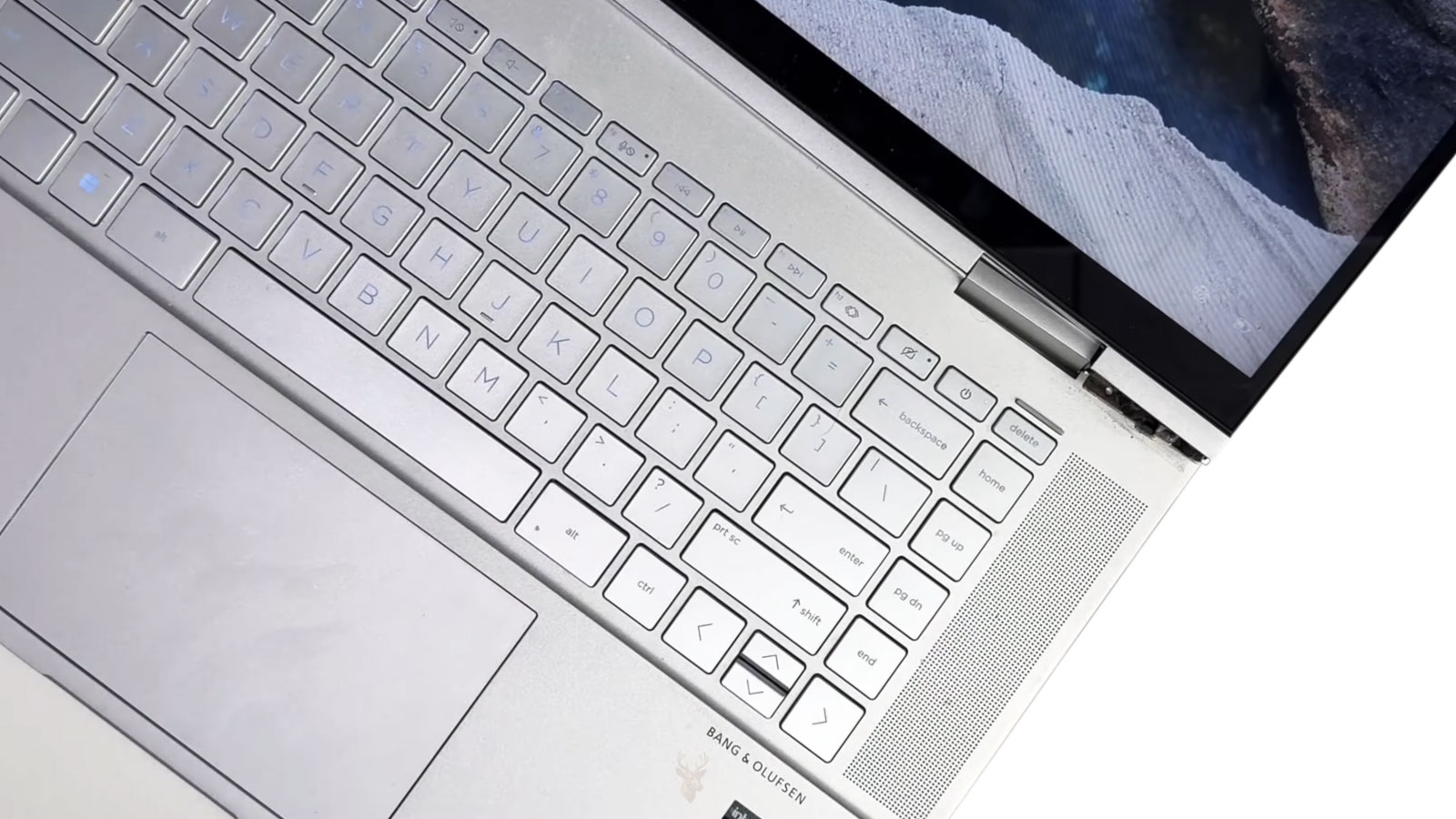
A Small Change in Screen Movement Can Reveal Damage Developing Beneath the Laptop’s Outer Case
A laptop screen should open with steady resistance while the base remains flat and the surrounding case stays securely joined. When one corner begins lifting, a snapping sound appears near the hinge, or the display suddenly feels unusually stiff, the problem may extend beyond the visible metal hinge.
The hinge assembly transfers force between the display and the lower chassis every time the computer is opened or closed. That force is distributed through screws, brackets, threaded inserts, and molded mounting points hidden inside the case. If one of those attachment areas begins to fail, ordinary movement can gradually separate plastic panels or damage nearby components.
A laptop may continue working normally during the early stages. The screen can remain bright, Windows can load correctly, and the keyboard may still function. The warning is often mechanical rather than electronic, which makes the problem easy to ignore until the case opens farther or the display assembly becomes difficult to move.
The Hinge Is Only One Part of the Support System
The visible hinge is usually a compact metal mechanism designed to hold the display at different viewing angles. It connects to internal brackets extending into the screen assembly and the lower portion of the laptop.
Those brackets must be anchored securely to the surrounding structure. Depending on the computer, they may attach to metal reinforcement plates, threaded brass inserts embedded in plastic, or molded screw posts built into the display cover and palm-rest assembly.
This distinction matters because a hinge can remain physically intact while the material holding it breaks away. In that situation, replacing only the metal hinge may not restore proper support. The failed mounting area must also be evaluated.
Case Separation Often Begins Near One Corner
One of the earliest visible signs is a gap forming between the upper and lower sections of the laptop base. The opening may appear only while the screen is moving and then partially close when the display stops.
This movement usually indicates that the hinge bracket is lifting against the case instead of remaining firmly attached to it. Each opening cycle can enlarge the gap, loosen additional screws, or break neighboring mounting points.
The separation may occur near the rear corner of the keyboard area, along the bottom cover, or around the display bezel. Its exact location depends on which side of the hinge assembly has lost support.
- The palm-rest corner rises while the screen is opened.
- The bottom cover separates near the rear edge.
- The display bezel pulls away from the screen.
- A hinge cover shifts or no longer sits flush.
- Screws near the affected corner repeatedly loosen.
- The screen twists instead of moving evenly.
Any of these changes suggests that force is no longer traveling through the structure as intended.
A Stiff Hinge Can Damage an Otherwise Healthy Chassis
Laptop hinges are designed to create enough resistance to hold the display upright. Over time, corrosion, wear, internal binding, or changes in the hinge mechanism can make that resistance excessive.
When the hinge becomes too stiff, the user must apply more force to move the screen. The metal mechanism may tolerate that force, but the plastic or lightweight mounting structure around it may not. Eventually, screw posts can crack or threaded inserts can pull free from the surrounding material.
This is why tightening loose screws without checking hinge resistance may provide only temporary improvement. If the hinge remains abnormally tight, the repaired attachment points continue receiving the same excessive load.
Loose Hinges Create a Different Kind of Stress
A hinge that has become too loose produces a different set of symptoms. The screen may fall backward, drift forward, shake while typing, or fail to remain at the selected angle.
Loose movement can result from wear inside the hinge, missing fasteners, a fractured bracket, or damaged mounting points. The display assembly may also flex more than intended, placing repeated strain on the screen frame and internal wiring.
Although a loose screen may seem less dangerous than a stiff one, uncontrolled movement can still enlarge cracks and pull against cables routed through the hinge area.
Opening the Screen From One Side Increases Uneven Loading
Many users open a laptop by lifting one corner of the display. The computer may tolerate this habit for a long time, but the movement applies more force to one hinge before the other begins moving.
Opening from the center distributes the load more evenly across both sides of the display assembly. This is especially important on thin laptops with narrow screen frames and lightweight case materials.
Uneven loading does not guarantee hinge failure, but it can accelerate wear when screws are already loose, mounting points are weakened, or one hinge has become stiffer than the other.
Internal Cables Pass Through the Same High-Stress Area
The hinge area often carries more than mechanical load. Display cables, webcam wiring, wireless antenna leads, and sometimes touchscreen connections travel between the base and the screen through narrow channels near the hinges.
When the case separates or the hinge bracket shifts, those cables can become pinched, stretched, or rubbed against exposed edges. The laptop may then develop display flickering, camera interruptions, wireless problems, or touchscreen failure in addition to the original mechanical damage.
These electrical symptoms do not necessarily mean the screen panel or wireless card has failed. The underlying problem may be movement in the hinge area affecting the cable path.
| Visible or Audible Symptom | Possible Mechanical Source |
|---|---|
| A corner of the base lifts while opening the screen | A lower hinge mount may be pulling away from the chassis. |
| The display bezel separates near one hinge | An upper bracket or screen-cover mounting point may be damaged. |
| The screen requires unusual force to move | The hinge mechanism may be binding or excessively tight. |
| The display will not remain upright | The hinge may be worn, loose, or detached from its mounting structure. |
| Cracking or snapping sounds occur during movement | Plastic mounts, screw posts, or case clips may be shifting under load. |
| The image changes when the screen angle moves | A display cable may be strained or pinched near the hinge. |
The pattern of movement often provides more useful information than the appearance of the hinge from the outside. A laptop can look nearly normal while internal supports are already separating.
Cracking Sounds Should Not Be Treated as Normal Wear
A faint hinge sound can occasionally come from ordinary friction between trim pieces, but repeated cracking, popping, or snapping deserves attention. Those sounds often occur when damaged plastic shifts around a screw or when a bracket moves against the case.
Continuing to open and close the computer may turn a limited mounting failure into damage involving the complete display cover, palm rest, bottom case, or internal cables. The screen may eventually become impossible to move safely.
Reducing unnecessary movement until the structure can be inspected is generally safer than repeatedly testing whether the sound is becoming worse.
Different Materials Respond Differently to Repeated Stress
Laptop manufacturers use a variety of materials when building the display assembly and lower chassis. Aluminum, magnesium alloys, reinforced plastics, and composite materials each distribute force differently around the hinge area.
A metal chassis may flex slightly before permanent damage occurs, while certain plastic mounting points can fracture once repeated stress exceeds their design limits. The visible crack is often the final stage of a problem that has been developing gradually through hundreds or thousands of opening cycles.
Because every model uses its own structural design, two laptops with similar external damage may require very different repair approaches.
Loose Screws Can Allow Small Movements to Become Larger Problems
Fasteners holding the hinge assembly are intended to keep the surrounding structure rigid while the display moves. If one screw gradually loosens, the remaining attachment points must absorb additional movement each time the screen is opened.
The extra motion may be almost impossible to notice at first. Over time, however, repeated movement can enlarge screw holes, deform brackets, or weaken the surrounding material until the hinge no longer remains firmly supported.
Finding a loose screw should therefore prompt a broader inspection of the hinge assembly rather than assuming the screw alone caused every symptom.
Visible Cracks May Extend Beyond What Can Be Seen
A fracture appearing near the hinge does not always represent the complete extent of the damage. Internal screw posts, reinforcing ribs, and mounting brackets can separate beneath the outer surface while leaving only a small external crack visible.
As the display continues moving, those hidden fractures may spread farther into the surrounding structure. What begins as a cosmetic-looking defect can gradually become a mechanical failure affecting the entire corner of the chassis.
This is one reason hinge damage should not be judged solely by the size of the visible crack.
Pressure on the Display Panel Can Increase During Hinge Failure
As hinge mounts begin separating, the display assembly may twist instead of moving evenly. Uneven movement can place localized pressure on the LCD panel, particularly near the lower corners where the hinges are attached.
The panel itself is designed for viewing rather than structural support. Excessive flexing can increase the risk of pressure marks, cracked glass, or internal display damage if the movement becomes severe.
Maintaining proper hinge support helps distribute movement through the frame instead of through the display panel.
Protective Cases Do Not Eliminate Internal Hinge Stress
Some laptops are carried inside padded sleeves or rigid transport cases that reduce the likelihood of impact damage during travel. While these accessories help protect the exterior, they do not change the forces generated when the display is opened and closed.
If a hinge has already become excessively stiff or its mounting points have weakened, careful transportation alone will not prevent additional wear during everyday use. Mechanical stress continues to occur each time the display moves.
Protective accessories are valuable for reducing accidental damage, but they cannot compensate for structural problems developing inside the hinge assembly.
Drops Are Only One Possible Cause
Hinge-related damage is often associated with accidental drops, yet many failures occur without a single major impact. Years of normal opening and closing, combined with gradual material fatigue, can eventually weaken mounting points that experience repeated stress.
Environmental conditions, manufacturing tolerances, previous repairs, overtightened hinges, and aging plastics may all influence how long the surrounding structure remains reliable. The absence of a recent accident does not necessarily rule out mechanical failure.
Evaluating the complete condition of the display assembly provides a more accurate picture than focusing only on whether the laptop has been dropped.
| Observed Condition | What It May Suggest |
|---|---|
| The screen opens unevenly. | One hinge or its mounting points may be under greater stress. |
| The rear corner of the case spreads apart. | An internal attachment point may have separated. |
| Movement becomes progressively stiffer. | The hinge mechanism may be binding. |
| The display shifts while typing. | The hinge assembly may no longer hold its intended position. |
| Display problems appear only while moving the screen. | Internal cables may be affected by hinge movement. |
Considering the mechanical movement, visible condition, and behavior of the display together often provides better diagnostic information than looking at any one symptom by itself.
Careful Inspection Helps Define the Extent of the Damage
A hinge problem may involve only the metal hinge, only the surrounding structure, or several connected components at the same time. Determining which parts remain intact helps establish whether the repair centers on hardware replacement, structural restoration, or both.
Inspection also helps identify secondary issues such as strained display cables, damaged wireless antenna routing, loose fasteners, or deformation of the display frame that may not be immediately obvious during normal operation.
Looking beyond the visible crack allows the mechanical condition of the complete display assembly to be evaluated before additional movement creates more extensive damage.
Repeated Movement Can Turn a Repairable Crack Into Complete Separation
A damaged mounting point may continue holding temporarily even after the surrounding material has fractured. During this stage, the laptop can still open and close, but each movement places additional stress on the remaining attachment points.
Once those supports begin sharing more force than they were designed to carry, the damage can spread rapidly. A small gap near one hinge may become a detached palm rest, broken bottom cover, separated display bezel, or twisted screen frame.
Limiting screen movement after the first signs of separation can reduce the chance that a localized repair becomes a larger case replacement.
Adhesive Alone Rarely Restores the Original Structure
Surface adhesive may appear to close a visible crack, but hinge damage usually involves forces acting beneath the outer shell. The repair must resist repeated leverage every time the display moves.
If the original screw posts, threaded inserts, or reinforcement points have separated, simply bonding the exterior panels together may not recreate the internal support. The case can look improved while the hinge continues moving independently underneath.
Any structural repair must account for hinge resistance, bracket alignment, fastener placement, and the condition of the surrounding material. Cosmetic closure and mechanical restoration are not always the same result.
Replacement Parts May Include More Than the Hinge
The damaged component is not always sold as a small individual piece. Depending on the laptop design, the hinge mounting points may be built into a larger assembly such as the palm rest, bottom case, rear display cover, or complete display frame.
A repair that appears to involve one hinge can therefore require replacement of several connected parts. The opposite is also possible: the external case may remain usable while only the hinge and mounting hardware require attention.
- Left or right metal hinge.
- Display rear cover.
- Front display bezel.
- Palm-rest or keyboard housing.
- Bottom chassis cover.
- Internal reinforcement bracket.
- Screws, inserts, and hinge covers.
Exact model identification is essential because parts that look nearly identical may use different screw locations, cable channels, or bracket lengths.
Display Cables Should Be Examined During Structural Repair
When the hinge area has shifted, nearby wiring may have been rubbing, stretching, or folding outside its intended path. Returning the case to its original position without checking those cables can leave hidden damage unresolved.
A cable may still work while partially worn or sharply bent, only to develop intermittent symptoms later. The display can flicker when moved, the webcam may disconnect, or wireless reception may change depending on screen position.
Inspecting the cable route while the laptop is already disassembled helps identify secondary damage before the repaired structure is closed again.
Screen Alignment Matters After the Structure Is Restored
A repaired hinge assembly must allow the display to move evenly without twisting the frame. If one side sits higher, closes earlier, or requires more force than the other, the remaining imbalance can continue stressing the case.
Alignment involves more than making the laptop look straight. The hinges should share the load, the bezel should sit without pressure against the panel, and the lid should close without scraping the keyboard deck or lifting one corner of the base.
Testing the complete range of motion before final assembly helps reveal binding, uneven resistance, or cable interference that might otherwise remain hidden.
Hinge Lubrication Is Not a Universal Solution
A stiff hinge may seem like a simple lubrication problem, but many laptop hinges are enclosed friction mechanisms not intended for casual oiling. Applying general-purpose lubricant can spread into the display, attract debris, weaken surrounding materials, or reduce resistance too far.
Excessive stiffness may come from corrosion, internal deformation, damage to the hinge barrel, or incorrect tension within the mechanism. Lubrication cannot restore broken mounting points or a hinge that has become mechanically distorted.
The source of the resistance should be identified before any substance is applied near the display assembly.
Temporary Handling Can Reduce Further Damage
When immediate repair is not possible, the laptop should be moved as little as practical. Repeatedly opening and closing the display to check the damaged area can accelerate separation.
If the screen is already open at a usable angle, leaving it in that position may place less stress on the structure than closing it for transport. The computer should be supported from the base rather than carried by the display or one corner.
- Avoid opening the display from one side.
- Do not force a stiff or misaligned hinge.
- Keep pressure away from separated case panels.
- Carry the laptop with both hands under the base.
- Disconnect power before moving exposed or damaged parts.
- Back up important files while the computer remains usable.
These precautions do not repair the structure, but they may help prevent additional damage before the laptop can be inspected.
A Working Screen Does Not Mean the Damage Is Minor
Because hinge failure begins mechanically, the laptop may remain fully functional from a software perspective. The operating system loads, the battery charges, and the display continues producing a normal image.
This can create a false sense that the problem is only cosmetic. In reality, the structure holding the display may be weakening each time the screen moves, even though no electronic symptom has appeared yet.
Mechanical condition should therefore be evaluated independently from whether the laptop still turns on and operates normally.
Repair Decisions Depend on the Complete Condition of the Laptop
The value of a hinge repair depends on more than the cost of one replacement part. The age of the computer, availability of matching case assemblies, condition of the screen, battery health, and overall reliability should all be considered.
A relatively new laptop with isolated structural damage may justify a complete restoration. An older system with extensive case cracking, a worn battery, and other hardware problems may require a broader decision about whether repair or replacement is more practical.
| Condition | Repair Consideration | Additional Concern |
|---|---|---|
| The hinge is stiff but the mounts remain intact. | The hinge mechanism may require replacement before structural damage begins. | Continued use can pull the mounts away from the case. |
| One mounting area has separated. | The surrounding case or bracket may need restoration or replacement. | Other attachment points may already be carrying extra load. |
| The display frame is twisted. | Alignment and multiple display components may require attention. | The LCD panel and internal cables may be under pressure. |
| The case is cracked in several locations. | Several chassis assemblies may be needed. | Parts availability can affect whether repair is practical. |
| The laptop remains functional with limited movement. | Files should be backed up before the condition worsens. | Normal operation does not confirm structural safety. |
Looking at the laptop as a complete system produces a more realistic repair decision than focusing only on the visible hinge.
Good Opening Habits Help Protect the Repaired Structure
After a hinge or case repair, the way the laptop is handled can influence how well the restored structure lasts. Opening the screen slowly from the center reduces uneven loading and allows both hinges to move together.
The laptop should rest on a stable surface rather than being opened while held by one corner. Objects left on the keyboard should be removed before closing the lid, and the screen should never be used as a handle.
These habits cannot prevent every future failure, but they reduce unnecessary stress on some of the most heavily loaded mounting points in the computer.
Mechanical Warning Signs Deserve Early Attention
Laptop hinge damage usually provides warning before complete separation occurs. A lifting corner, new cracking sound, changing resistance, loose display, or widening gap indicates that movement is no longer being supported normally.
Addressing the problem while the damage remains limited can protect the display panel, internal cables, and surrounding case assemblies. Waiting until the screen can no longer move may turn a focused structural repair into replacement of several interconnected parts.
The most useful response is to reduce movement, preserve important files, and evaluate the complete hinge support system rather than assuming the visible metal hinge is the only component involved.











