
Recognizing the Difference Between an Ordinary Power Interruption and Electrical Stress That Reaches Computer Hardware
A computer can lose power and restart without suffering permanent damage. A brief outage, an accidentally disconnected cord, or a depleted battery may interrupt work while leaving the hardware unchanged. An electrical surge is different because the incoming voltage rises beyond the level the equipment is designed to receive.
The effects are not always dramatic. A severe event may produce a spark, burned odor, or computer that never turns on again. A smaller surge may leave the system apparently functional while weakening the power supply, damaging a network port, corrupting stored information, or creating instability that becomes noticeable later.
Computers are connected to electricity through more paths than the wall outlet alone. Ethernet cables, telephone lines, cable-modem connections, external drives, monitors, printers, and powered USB devices can also carry electrical disturbances between equipment. Evaluating surge damage therefore requires looking at the entire connected system rather than only the computer’s power cord.
A Power Outage and a Voltage Surge Are Not the Same Event
A power outage is a loss of electrical supply. The voltage falls away, causing desktop computers without battery backup to shut down immediately. The greatest immediate concern is interrupted work, unfinished file operations, and possible corruption if information was being written to storage at that moment.
A surge moves in the opposite direction. Voltage rises above its expected level for a short period. The event may last only a fraction of a second, yet that brief exposure can place electrical stress on power supplies, adapters, circuit boards, and connected devices.
The two conditions can occur together. A storm or utility problem may produce fluctuations before the electricity disappears, then create another disturbance when power returns. The fact that the lights went out does not reveal everything that happened electrically before and after the outage.
Surges Can Begin Outside or Inside the Building
Lightning is the most familiar source of electrical surges, but it is not the only one. Utility switching, damaged power lines, transformer problems, large motors, air-conditioning systems, and equipment cycling on or off can all create voltage changes.
Some disturbances originate within the same building. Refrigerators, pumps, compressors, elevators, and other high-demand equipment can affect nearby circuits, particularly where wiring is outdated, overloaded, or poorly grounded.
- Lightning strikes near utility or communication lines.
- Power returning after a neighborhood outage.
- Utility equipment switching between circuits.
- Large appliances starting or stopping.
- Loose or damaged electrical connections.
- Improperly wired outlets or overloaded branch circuits.
The source may be impossible to identify afterward, but the timing of the failure can still show whether several devices were affected by the same electrical event.
The Computer Power Supply Receives the First Electrical Impact
A desktop power supply converts household electricity into the lower direct-current voltages required by the motherboard, processor, storage devices, fans, and expansion cards. It also contains filtering and protection components intended to reduce the effect of ordinary electrical irregularities.
Those protections have limits. A sufficiently strong surge can damage the input section, blow an internal fuse, weaken capacitors, or allow excessive voltage to reach circuits farther inside the computer.
Sometimes the power supply sacrifices itself and the remaining hardware survives. In other cases, both the power supply and connected components are damaged. Replacing the power supply without checking the rest of the computer can therefore leave hidden problems undiscovered.
Laptop Adapters Provide a Similar Layer of Protection
A laptop receives household power through its AC adapter. The adapter converts that electricity before sending lower-voltage power through the charging connector and into the laptop’s internal power circuitry.
A surge may damage the adapter without reaching the laptop, leaving the computer able to operate temporarily from its battery. The user may first notice that charging has stopped, the adapter light remains off, or the laptop no longer recognizes the charger.
Protection is not guaranteed. Electrical stress can pass through a damaged adapter and affect the charging port, motherboard power section, battery-management circuit, or connected peripherals. A replacement charger should not be connected repeatedly until the laptop has been checked for signs of a short or damaged power input.
Visible Damage Represents Only the Most Severe Cases
Major electrical damage may leave darkened circuit areas, cracked components, melted connectors, or a strong burned-electronics odor. These signs make the event easier to recognize, but many surge-related failures leave no visible evidence.
A semiconductor can fail internally without changing its appearance. A network controller may stop communicating, a USB port may lose power, or a storage device may begin producing errors even though every circuit board looks normal.
Visual inspection remains useful, but normal appearance should not be treated as proof that all electrical pathways survived the event.
A Computer That Still Starts May Have Partial Damage
Electrical failures are not always complete. The computer may turn on and load Windows while one section of the motherboard no longer functions correctly. Audio, networking, charging, USB communication, or storage detection may be affected independently.
Partial damage can also create intermittent behavior. The machine may restart during heavy use, lose connected devices, freeze without a clear pattern, or fail only after warming up. These symptoms are difficult to associate with a surge unless the electrical event and the beginning of the instability are considered together.
| Behavior After an Electrical Event | Possible Area Affected |
|---|---|
| The computer shows no response to the power button | Power supply, adapter, charging circuit, motherboard, or power input. |
| The system starts but restarts under load | Power delivery may have become unstable. |
| USB devices no longer work on certain ports | A motherboard controller or protective circuit may be damaged. |
| Ethernet stops working while Wi-Fi remains available | The wired network port or controller may have received the surge. |
| Storage errors begin after the outage | The drive, controller, or unfinished file operations may be involved. |
The surviving functions help narrow the damaged area, but a complete test is still needed because more than one component may have been affected.
Network Cables Can Carry Electrical Disturbances Into the Computer
A computer connected by Ethernet has a conductive path to a router, switch, modem, or other network equipment. If one of those devices receives an electrical surge, the disturbance can travel through the network cable and damage ports on both ends.
This explains why a computer may continue turning on normally while its wired network connection stops working after a storm. The surge did not need to enter through the computer’s own power cord; it may have reached the motherboard through communication equipment located elsewhere in the building.
Several damaged network devices after the same event strongly suggest a shared electrical path. Replacing only one Ethernet cable will not restore ports whose internal circuitry has already failed.
Telephone and Coaxial Lines Present Additional Paths
Internet equipment may connect to the outside world through telephone wiring, coaxial cable, fiber equipment with powered electronics, or fixed wireless hardware. A disturbance entering through one of those systems can damage the modem or gateway before spreading to connected computers and network devices.
A power strip protecting only electrical outlets does not automatically protect communication lines. Modems, routers, televisions, and computers can remain linked through cables that bypass the protected power connection.
After storm-related damage, each connected path should be considered. A failed modem, burned Ethernet port, and damaged computer network controller may all be parts of the same event rather than unrelated equipment failures.
Storage Damage Can Affect Hardware and Data Differently
A sudden power loss can interrupt a file being written without physically damaging the storage device. The drive may remain healthy while the unfinished document, file-system record, or Windows update becomes corrupted.
A surge introduces another possibility by damaging the drive’s controller board or the motherboard interface communicating with it. The drive may disappear completely, be detected intermittently, or begin producing read and write errors.
Important files should not be subjected to repeated startup attempts when the storage device behaves differently after an electrical event. Preserving readable information may become more important than completing every diagnostic test.
Connected Accessories Can Be Damaged at the Same Time
Monitors, printers, powered speakers, external drives, USB hubs, and docking stations may share both electrical and data connections with the computer. A surge affecting one device can damage several parts of the setup simultaneously.
An external drive may stop being recognized, a monitor may remain dark, or a printer may no longer communicate even though the computer itself appears to start normally. Testing each accessory separately helps determine whether the failure belongs to the computer, the peripheral, or both.
- Disconnect visibly damaged equipment from power.
- Avoid repeatedly reconnecting accessories that smell burned.
- Test cables only after the connected devices are considered safe.
- Check whether the same port works with a known functional device.
- Do not assume every failure belongs to the computer alone.
A shared electrical event can produce several symptoms that require separate diagnosis even though they began at the same moment.
Surge Protectors Have Limits
A surge protector is designed to divert or absorb part of a voltage spike before it reaches connected equipment. This provides an important layer of protection, but it does not make a computer immune to every electrical event.
Protection capacity varies between products, and the internal components wear as they absorb repeated disturbances. A power strip that still delivers electricity may no longer provide the same level of surge protection it offered when new.
Severe lightning-related energy can also exceed the rating of ordinary plug-in protection. The device may reduce damage without preventing it completely, especially when the surge enters through network, telephone, or coaxial connections that are not protected through the same system.
A Power Strip Is Not Automatically a Surge Protector
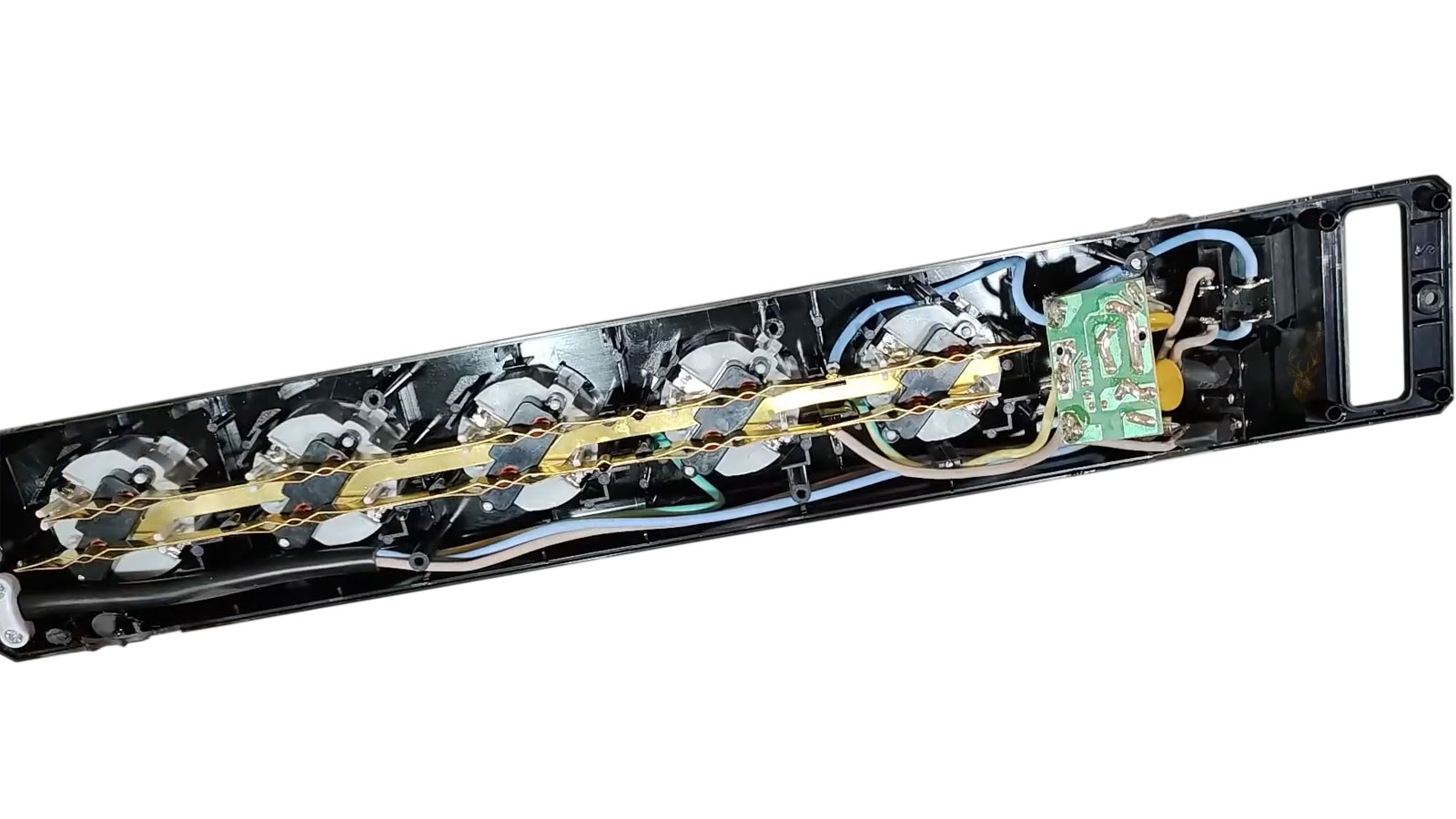
Many power strips provide several outlets without including meaningful surge-suppression components. Their appearance can be nearly identical to protected models, leading users to assume that connected equipment has electrical protection when the strip only distributes power.
Product labeling should identify whether surge protection is present and provide electrical ratings related to that protection. A basic extension strip may include an illuminated switch or circuit breaker while offering no defense against voltage spikes.
- Look for clear surge-protection labeling.
- Do not rely on the presence of multiple outlets or a lighted switch.
- Check whether the protection indicator is still illuminated.
- Review the manufacturer’s replacement guidance.
- Replace units that show heat damage, cracking, or burned contacts.
The distinction matters because outlet expansion and surge suppression are two different functions.
Protection Components Can Wear Without Obvious Failure
Many surge protectors use components that absorb excess energy by changing their electrical behavior. Repeated exposure gradually reduces their ability to respond effectively.
The protector may continue supplying normal power after its protective capacity has weakened. Unless the unit includes a reliable status indicator, the loss of protection may not be apparent during everyday use.
Age alone does not reveal the exact remaining capacity because two protectors installed on the same day may experience very different electrical conditions. A unit exposed to frequent fluctuations may wear much faster than one connected to a stable circuit.
Grounding Affects the Way Protection Operates
Surge protection depends partly on the building’s electrical grounding system. The protector needs an appropriate path for diverted energy, and an improperly grounded outlet can reduce its effectiveness.
Older buildings may contain two-prong outlets, damaged grounding conductors, reversed wiring, or previous modifications that no longer meet modern electrical expectations. Plug adapters do not create a true ground where none exists.
Electrical outlet problems should be evaluated separately from computer repair. Repeated equipment failures, tingling sensations from metal cases, visible arcing, or signs of overheated wiring deserve attention from someone qualified to inspect the building circuit.
Uninterruptible Power Supplies Address More Than Surges
An uninterruptible power supply, commonly called a UPS, contains a battery that can keep connected equipment operating briefly after utility power is lost. This gives the computer time to save work and shut down normally instead of stopping in the middle of an active operation.
Many UPS units also include surge suppression and voltage regulation, although the available features vary by model. Their main advantage over an ordinary surge protector is the ability to provide temporary power during an outage.
A UPS is particularly useful for desktop computers, network equipment, storage systems, and business workstations where sudden shutdowns could interrupt transactions or damage open files.
Battery Backup Capacity Must Match the Equipment
A UPS has a maximum electrical load and a limited amount of stored battery energy. Connecting more equipment than the unit is designed to support can shorten runtime, trigger overload alarms, or prevent the backup from operating correctly when power fails.
The computer, monitor, external storage, router, and other necessary devices should be considered together. High-performance desktops and large monitors may require substantially more capacity than a basic office computer.
- Identify which equipment truly needs battery backup.
- Compare the expected load with the UPS rating.
- Leave room for normal power variation.
- Do not connect high-demand appliances to computer backup outlets.
- Test the available runtime before relying on it during an outage.
A UPS selected only by physical size or outlet count may not provide enough power for the connected system.
UPS Batteries Also Require Maintenance
The rechargeable battery inside a UPS gradually loses capacity. A unit that once supported a computer for fifteen minutes may eventually provide only a few seconds before shutting down.
Some systems perform automatic self-tests and warn when the battery needs replacement. Others continue operating normally from wall power until an outage reveals that the battery can no longer carry the load.
Periodic testing helps confirm that the backup remains useful. Replacement batteries should match the electrical and physical requirements of the UPS and should be recycled through an appropriate battery collection program.
Power Returning After an Outage Can Create Additional Stress
Electrical service does not always return smoothly after a failure. Voltage may fluctuate while utility equipment reconnects, and power may cycle on and off several times before becoming stable.
Repeatedly attempting to start the computer during that period exposes it to each interruption. A desktop may begin loading Windows, lose power again, and restart several times before the electrical supply settles.
Waiting until the building power appears stable before reconnecting sensitive equipment can reduce unnecessary stress. Network devices and external storage should also be considered because they may experience the same unstable recovery.
Storm Damage May Extend Beyond the Computer Room
A nearby electrical event can affect equipment in several rooms at once. A television may lose an HDMI input, a router may stop recognizing Ethernet connections, or a printer may power on without communicating.
These related failures help establish that the computer problem did not develop in isolation. Equipment connected through shared circuits or communication lines may have received different portions of the same disturbance.
Creating a list of every device that changed behavior after the event can reveal the likely entry path and prevent damaged accessories from being reconnected repeatedly to working equipment.
A Burned Odor Requires More Caution Than an Ordinary Restart
A computer that shuts down during a storm and later starts normally may still deserve observation. A system producing a burned smell, visible smoke, crackling, or unusual electrical noise should be treated differently.
Those signs can indicate damaged insulation, overheated connectors, failed power components, or active arcing. Reconnecting power repeatedly to identify the smell can worsen damage and create a safety concern.
- Disconnect the equipment when it is safe to do so.
- Do not continue testing through a burned or melted connector.
- Keep damaged adapters and power strips out of service.
- Avoid opening power-supply enclosures.
- Inspect connected accessories before reconnecting them.
Electrical symptoms should be stabilized before attention turns to software or file recovery.
A Tripped Breaker Does Not Confirm That the Computer Is Safe
Circuit breakers are designed primarily to protect building wiring from excessive current. A breaker that trips may prevent a larger electrical problem, but it does not guarantee that connected electronics avoided damage.
The computer power supply, surge protector, adapter, or peripheral may have experienced stress before the breaker opened. If the breaker trips again when the equipment is reconnected, testing should stop until the faulty device or electrical circuit is identified.
Repeatedly resetting a breaker without determining why it opened can conceal a short circuit, overloaded branch, or damaged appliance.
Power Supply Testing Requires More Than Checking Whether the Fan Spins
A desktop power supply may turn on its fan and still provide unstable or incomplete voltage. Basic activity confirms only that some portion of the unit is operating.
After a surge, the power supply may work under light conditions and fail when the processor or graphics card demands more current. Random shutdowns, restarts, startup hesitation, and instability under load can all appear even though the computer powers on.
Proper evaluation considers output stability, connector condition, system behavior, and whether a known suitable replacement changes the symptoms. A damaged power supply should not be used as a long-term test device for other hardware.
Testing Should Begin With the Simplest Configuration
After an electrical surge, it is often helpful to reduce the computer to its essential hardware before drawing conclusions about which component failed. A desktop may be tested with only the motherboard, processor, one memory module, and display connection, while unnecessary external devices remain disconnected.
This approach helps separate primary hardware failures from secondary problems introduced by damaged accessories. If the computer becomes stable in a simplified configuration, additional devices can be reconnected one at a time while their behavior is observed.
Restoring every cable and peripheral immediately after the event makes it more difficult to identify which device changed as a result of the surge.
Internal Protection Cannot Stop Every Electrical Event
Modern computers include protective circuits that help regulate incoming power and reduce the effect of ordinary electrical fluctuations. These circuits improve reliability during normal operating conditions, but they are not designed to withstand every possible surge.
Protection components have electrical limits. Once those limits are exceeded, the protective device itself may fail, or the remaining energy may continue into other sections of the computer.
For that reason, the presence of built-in protection should never be interpreted as complete immunity from storm damage or severe electrical disturbances.
Several Components May Fail Independently
Electrical surges do not always follow a single path. Depending on how the energy entered the system, more than one component may be damaged at the same time without showing identical symptoms.
A computer might lose its wired network connection, continue operating from a damaged power supply for several days, and later begin reporting storage errors. Treating only the first visible symptom may leave additional problems undiscovered.
This possibility explains why a complete inspection is often more productive than replacing whichever component appears to have failed first.
Repeated Power Cycling Can Increase Existing Damage
A computer that refuses to start after an electrical event often tempts the user to press the power button repeatedly or disconnect and reconnect the power cable several times. If an internal component has already failed electrically, repeated startup attempts may place additional stress on weakened circuits.
Likewise, reconnecting a damaged power adapter or repeatedly plugging in an external drive that no longer responds is unlikely to restore operation. A controlled inspection is generally more informative than dozens of identical startup attempts.
Recording exactly how the computer responds during the first few attempts usually provides more useful diagnostic information than continuing the same test indefinitely.
Firmware Settings Are Rarely Changed by a Surge Alone
Power interruptions can occasionally reset the system clock or clear firmware settings if the motherboard backup battery is already weak. However, an electrical surge does not normally rewrite firmware configuration by itself.
If boot settings suddenly appear different after an outage, the computer may have returned to default values because stored configuration information was lost rather than because the firmware itself became corrupted.
Checking the system date, storage detection, and boot order can therefore be worthwhile before assuming that a more serious firmware failure has occurred.
Battery-Powered Devices Are Not Completely Isolated
Laptops running only from their batteries are generally less exposed to disturbances arriving through the electrical outlet at that moment. Even so, they may still be connected to monitors, docking stations, wired networks, printers, external drives, or other powered equipment.
Those connections can provide additional electrical pathways depending on the nature of the event. Evaluating only the charging adapter may overlook other routes by which connected equipment experienced the same disturbance.
Considering every cable attached during the incident helps create a more complete picture of how the surge may have traveled through the system.
Documentation Can Be Valuable After Major Electrical Events
When several computers or electronic devices are affected at once, keeping notes about what happened can simplify later troubleshooting. The approximate time of the outage, weather conditions, equipment connected at the time, and the first symptoms observed may all become useful reference points.
This information is also helpful if additional devices begin showing problems later or if replacement decisions must be made. Small details that seem unimportant immediately after the event are often forgotten a few days later.
- Record the approximate time of the electrical event.
- List every affected computer and accessory.
- Note which devices still operate normally.
- Identify any burned smells, sounds, or warning lights.
- Keep damaged power adapters and accessories with the equipment they belong to.
Organized observations reduce confusion when several pieces of equipment require attention.
Backing Up Data Remains Important Even With Electrical Protection
No surge-protection strategy can guarantee that every electrical event will leave computer hardware and stored information untouched. A backup created before the incident may therefore become more valuable than any individual hardware component.
Regular backups reduce the consequences of storage failure, motherboard damage, or power-supply replacement. They also allow hardware troubleshooting to proceed without placing the only copy of important files at additional risk.
Electrical protection helps reduce the likelihood of damage, while dependable backups reduce the impact if protection is no longer sufficient.
Replacement Parts Should Not Be Connected Carelessly
After surge damage, installing a replacement power supply, charging adapter, or peripheral without checking the rest of the system can create unnecessary risk. A damaged motherboard or shorted accessory may immediately affect the replacement component.
Testing should proceed methodically so that new hardware is introduced only after obvious electrical faults have been considered. This reduces the possibility of turning one damaged component into two.
Careful sequencing during diagnosis protects both existing equipment and newly installed replacement parts.
Reducing the Risk Before the Next Storm
Electrical surges cannot always be predicted or prevented, but their effects can often be reduced through thoughtful preparation. Appropriate surge protection, properly maintained backup power, sound building wiring, regular data backups, and careful handling of connected equipment all contribute to improving system resilience.
When a computer begins behaving differently immediately after a storm or electrical disturbance, the timing itself becomes an important diagnostic clue. Looking beyond the obvious symptoms and considering every connected device, communication cable, and power path provides a much clearer understanding of how electrical stress may have affected the system.











